X
Select W > Add to Favourites.
X
Dial a phone number.
Connecting and operating external
data storage media
Useful information
The following external data storage media
can be connected:
R
USB memory stick (USB 2.0 or 3.0 with
max. 64 GB) or iPod
®
R
SD or SDHC card (max. 64 GB)
R
External audio equipment (AUX connec-
tion)
R
Bluetooth
®
devices such as mobile phones
The following formats are supported:
R
MP3 files
R
WMA files
R
ACC formats
(.AAC, .M4A, .M4B, .M4P, .M4V, .M4R
and .MP4)
R
OGG Vorbis (.OGG, .OGA)
R
PCM 16 bit (.WAV, .PCM)
A data storage medium may contain no
more than eight directory levels.
The smart Media-System only recognises
the first partition of a data storage medium.
The partition must be formatted as FAT or
FAT32.
Connecting external data storage
media
Connecting a USB memory stick
X
Insert a USB memory stick in the port on
the centre console.
Playback starts automatically.
Connecting an SD card
X
Insert an SD card into the SD card slot in
the centre console.
Playback starts automatically.
Connecting a Bluetooth
®
device
X
Authorise and connect a Bluetooth
®
device, such as a Bluetooth
®
-capable
mobile phone.
Operating external data storage media
Selecting connected external data stor-
age media
X
Select Menu > Multimedia > Media .
X
Select connected medium.
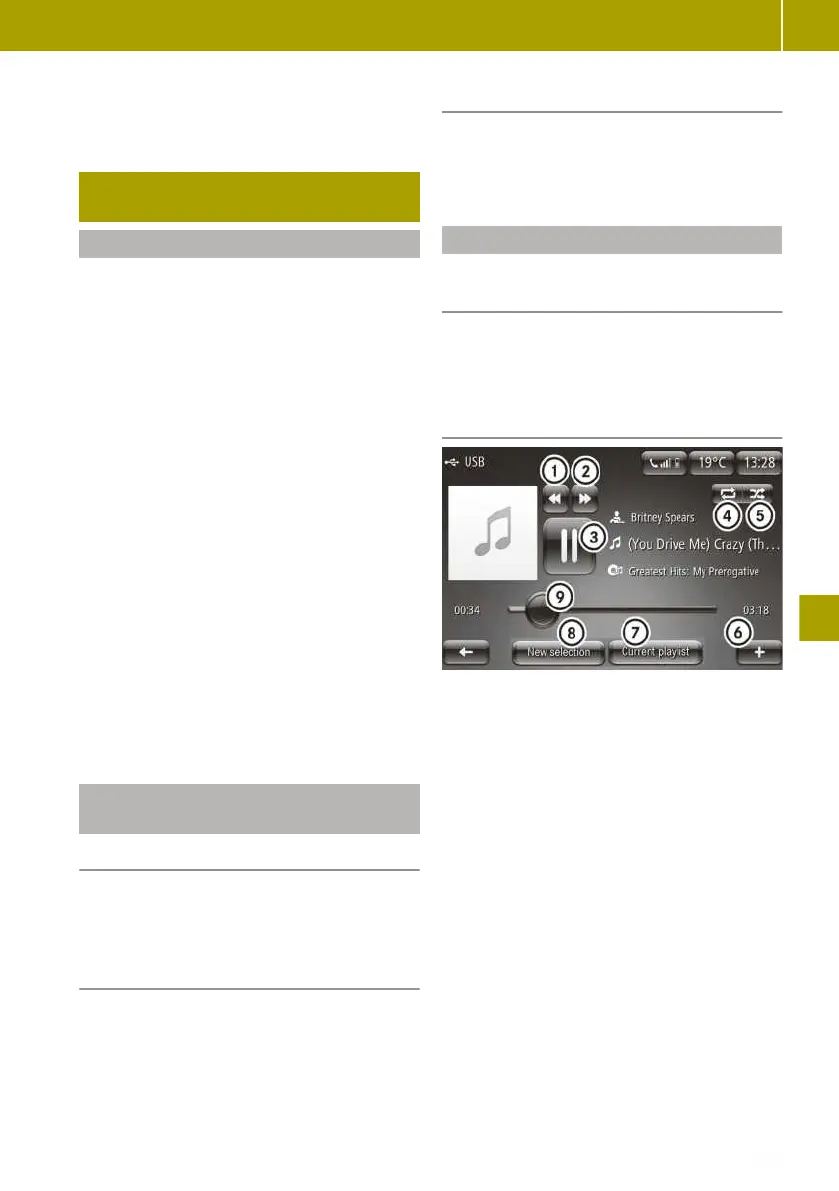
Controlling playback from a USB mem-
ory stick or SD card
:
Selects the previous track
;
Selects the next track
=
Stops and continues playback
?
Switches track repeat on
A
Switches random playback on
B
Calls up the context menu
C
Displays the playlist
D
Selects a new track based on categories,
e.g. album, genre, folder
E
Resumes playback at any point in the
track
Connecting and operating external data storage media
135
>> Using the smart Media-System.
Z















 To Next Page