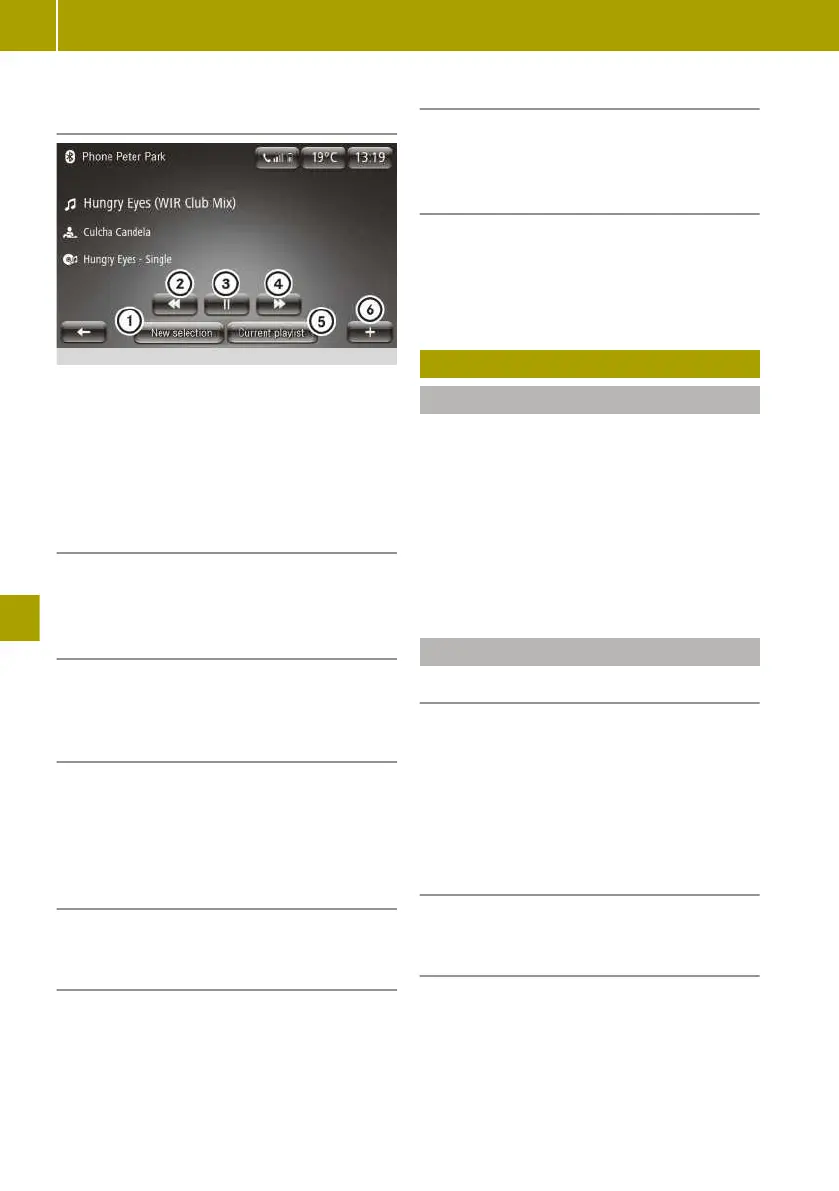
Controlling playback from a Bluetooth
®
device
:
Selects a new track
;
Selects the previous track
=
Stops playback
?
Selects the next track
A
Displays the playlist
B
Calls up the context menu
Selecting a different device
X
Select W > Change source.
Connecting another authorised Blue-
tooth
®
device
X
Select W > Find new device.
Enabling and disabling random play-
back
X
To enable: select W > Enable shuffle.
X
To disable: select W > Disable shuf‐
fle.
Displaying details of tracks on a USB
memory stick or SD card
X
Select W > Song details.
Selecting a track from current playlist
X
Select New selection > Folders.
The current playlist is displayed.
X
Select Find.
A keyboard is shown.
X
Enter the name or part of the name of the
track you are looking for.
Selecting a track from categories
X
Select New selection.
X
Select a category for playback.
Switching album cover display on/off
The album cover must be saved in the audio
file.
X
Select Multimedia > Settings > Media >
Display album cover.
Viewing images
Useful information
Images that have been saved to an SD card
or USB memory stick can be viewed in the
smart Media-System.
The following file formats can be displayed:
R
.JPG
R
.GIF
R
.PNG
R
.BMP
Image playback
Starting image playback
X
Insert an SD card or USB memory stick
into the corresponding port.
X
Select Multimedia > Pictures.
X
Select USB or SD as the media source.
X
Select a folder.
X
Select an image.
Switching between images
X
Swipe left or right.
Specifying a new selection of images
X
Select New selection.
136
Viewing images
>> Using the smart Media-System.















 To Next Page