Adjusting the bass and treble
X
Select Multimedia > Settings > Sound >
Bass/Treble > Manual.
X
Use the control to adjust the bass and
treble separately.
Setting a neutral sound for the bass and
treble
X
Select Multimedia > Settings > Sound >
Bass/Treble > Neutral.
Audio is played without increasing the
bass or treble.
Activating/deactivating arkamys
®
bass
boost (vehicles without JBL sound sys-
tem)
The arkamys
®
bass boost setting emphasi-
ses the bass during playback.
X
Select Multimedia > Settings > Bass
boost Arkamys.
Manual activation of arkamys
®
bass boost
on models with a JBL sound system is not
possible. Activation functions automati-
cally.
Setting the volume for warning tones
X
Select System > Sound > Alerts.
X
Move the control to the left or right.
Enabling warning tones when the dis-
play is switched off
X
Select System > Sound > Alerts > Keep
audio alerts when screen turned off.
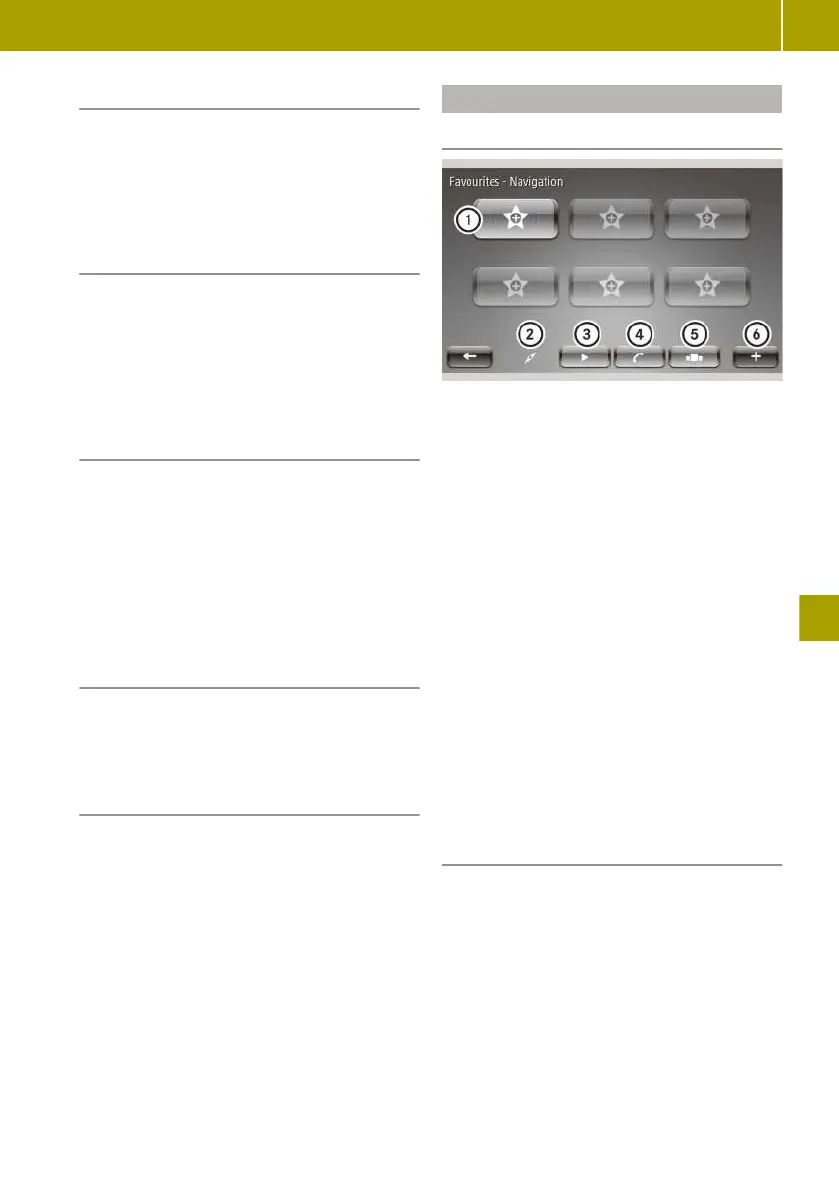
Creating and deleting favourites
Creating favourites
:
Preset
;
Navigation
=
Radio
?
Telephone
A
Services
B
Context menu
Frequently used settings such as phone
contacts and radio stations can be stored as
favourites. Six favourites can be stored for
each of the following categories:
R
Navigation
R
Radio
R
Telephone
R
Services
X
Select Favourites on the home screen.
X
Select a category.
X
Select the next empty memory position.
A list of possible favourites appears.
X
Select favourites.
Deleting favourites
X
Select Favourites on the home screen.
X
Select W > Remove a Favourite.
X
Delete a favourite.
The following options can be selected:
R
Select the favourite you wish to delete
and confirm with Delete.
R
To delete all favourites, select Remove
all Favourites.
Operating and setting up the smart Media-System
127
>> Using the smart Media-System.















 To Next Page