To avoid such risks, observe the follow-
ing:
R
Only connect the charging cable to a
wallbox:
-
which has been properly installed
and
-
has been inspected by a qualified
electrician
R
For safety reasons, only use charging
cables which have been tested and
approved for charging the high-volt-
age battery of an electric vehicle.
R
Never use damaged charging cables.
R
Do not connect the charging cable to an
amplifier.
R
Do not extend the charging cable.
R
Never use an adapter.
R
Observe the safety notes in the operat-
ing instructions for the wallbox.
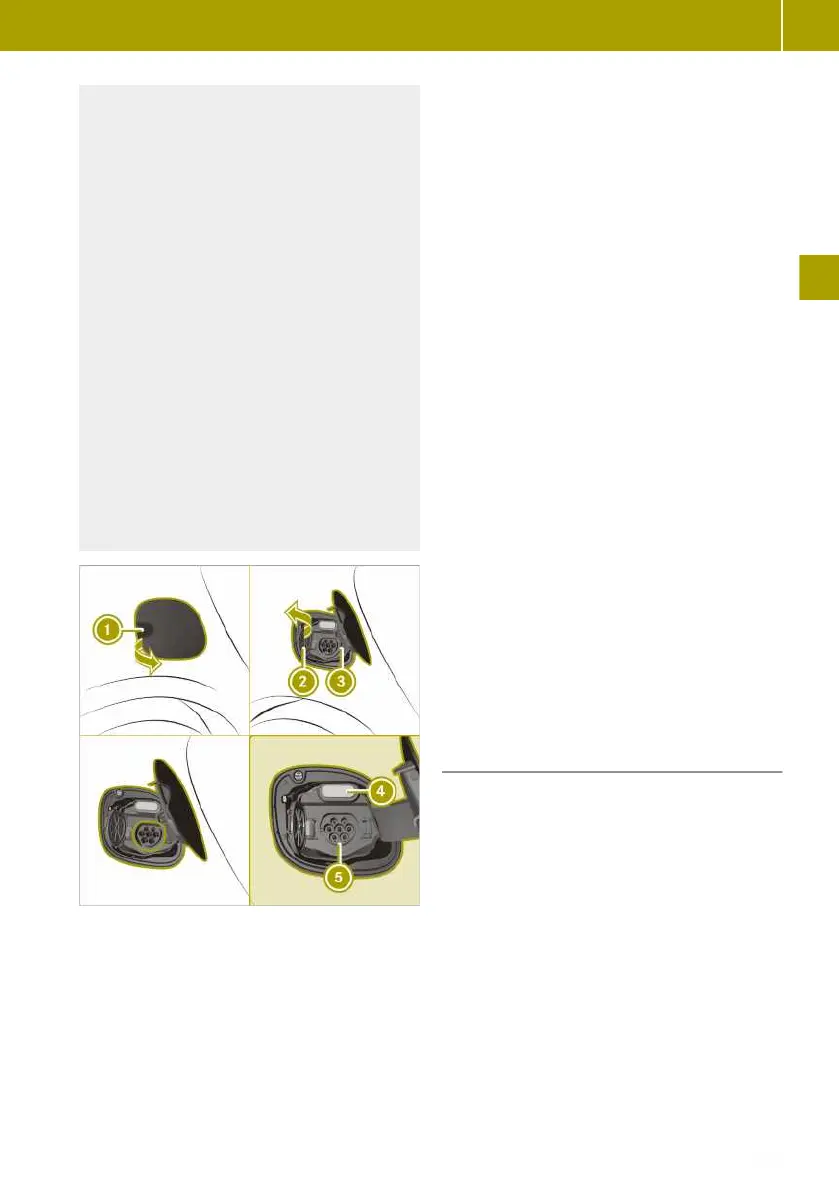
:
Charge socket flap
;
Socket cap
=
Locking mechanism
?
Indicator lamp
A
Vehicle socket
X
Wallbox without a pre-installed cable or
charging station: before using the charg-
ing cable for the first time, remove the
adhesive tape which holds the cable
together.
X
Fully unwind the charging cable before
charging.
X
Engage transmission position j.
X
Turn the key to position u in the igni-
tion lock and remove it.
X
Open socket flap : (Y page 83).
X
Release locking mechanism = on socket
cap ;.
Socket cap ; opens.
X
Wallbox without a preinstalled cable:
insert the charging cable connector into
the wallbox socket to the stop.
X
Insert the charging cable connector into
vehicle socket A to the stop.
The vehicle socket locks audibly.
The high-voltage battery is charged and
indicator lamp ? on the vehicle socket
slowly flashes green.
i
The high-voltage battery is fully
charged when indicator lamp ? on the
vehicle socket lights up green.
i
The vehicle must not be moved during
charging. The gear lever cannot be shif-
ted from position j.
i
Depending on the temperature, the
engine cooling system and battery cool-
ing system may audibly switch on during
the charging process.
Removing the charging cable
The charging cable may be removed when
the charging process has completed or has
been cancelled.
!
Always disconnect the charging cable
from the vehicle socket first. Disconnect-
ing the charging cable from the station-
ary socket first could damage the charg-
ing cable connector.
X
Press the % button on the key.
Indicator lamp ? above vehicle socket
A goes out.
Vehicle socket A unlocks audibly.
X
Disconnect the charging cable within
60 seconds from vehicle socket A. Other-
Charging the high-voltage battery
85
>> Driving.
Z















 To Next Page