Chapter 1
1 smarttech.com/kb/170410
Chapter 1: Introducing the SMARTBoard M600
series interactive whiteboard
Introduction 1
Features 2
Pen tray or pen ledge 2
DViT technology 2
Multitouch gestures 2
Dual touch and dual write 2
Durable surface 3
Computer requirements 3
How does the SMARTBoard interactive whiteboard work? 3
Installation tips 4
Extending the USB cable 4
Avoiding electromagnetic interference 5
Accessories and replacement parts 5
Introduction
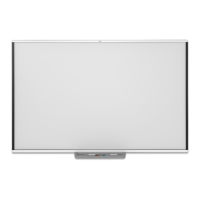
Your SMART product is a wall-mounted, front projection interactive whiteboard. It enables you to
do everything that you can do at your computer—open and close applications, scroll through files,
teach collaborative lessons, create or edit documents, visit websites, play video clips and more—
by touching the interactive surface with your finger or the included pen. When you connect the
interactive whiteboard to a computer and a projector, the computer image displays on the
interactive surface. You can write over any application in digital ink, and then save these notes to a
file in SMARTNotebook® collaborative learning software for future reference and distribution.
The SMARTBoard M600 series interactive whiteboard is a full-speed USB 2.0 device with an
external power supply. If the interactive whiteboard is part of a system with a SMART projector, the
interactive whiteboard may receive power from the SMART projector. Otherwise, the interactive
whiteboard receives power from a wall outlet through the included country-specific power supply
and cable.



 To Next Page