English 8
Introduction
Introduction
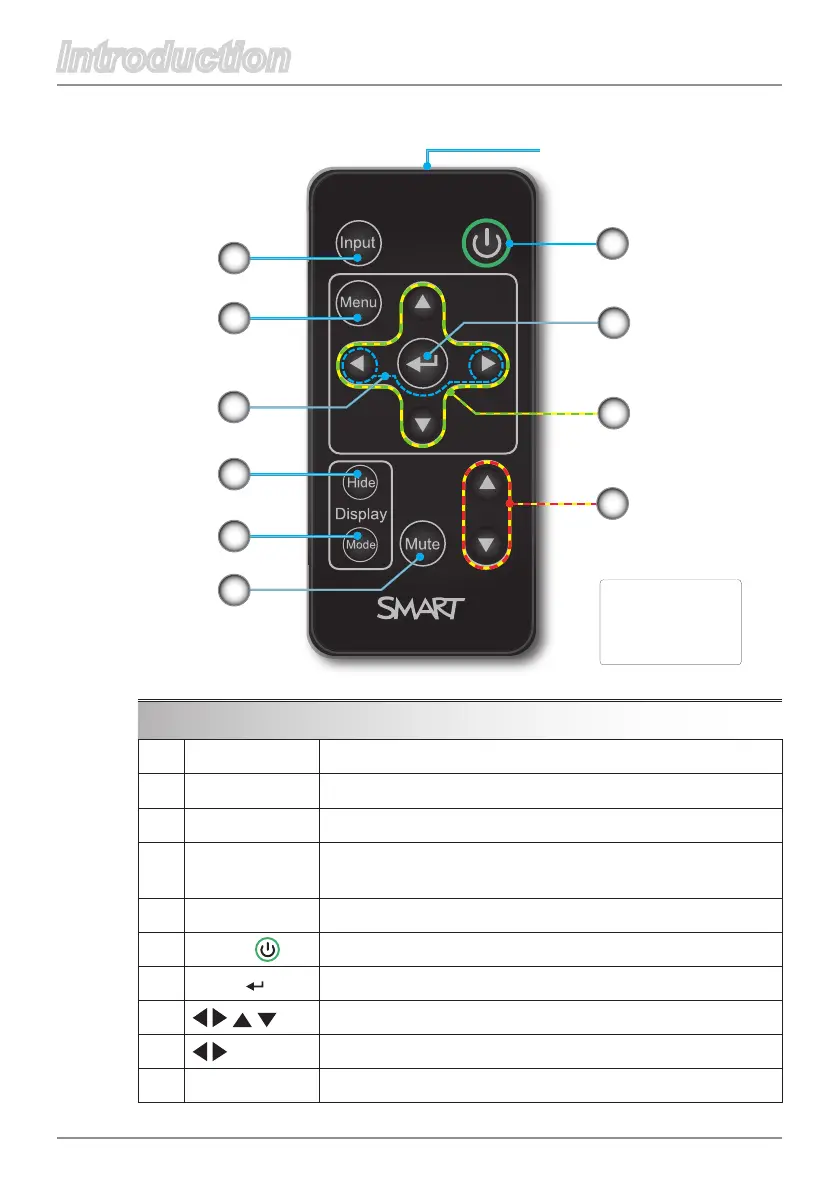
Remote Control
Use the remote control to control these functions:
1. Input Select input source.
2. Menu Display menus.
3. Hide Press to hide or display the image.
4. Mode
Select a display mode: BrightClassroom,Dark
Classroom,sRGBorUser.
5. Mute Turn off the sound temporarily.
6.
Power
Turn on the power or enter Idle Mode.
7. Enter Accept the selected mode.
8.
Menu selections and adjustments.
9.
Set the projector ID number.
10.
VOL. Adjust the volume.
6
1
2
3
4
5
10
Remote control transmitter
8
Remote Control
SBP-10X/SBP-20W
Projector, UF55
Model No
.:
03- 001 31- 20
9
7



 To Next Page