9
http://support.weathermatic.com
4.0 Manual Start Functions
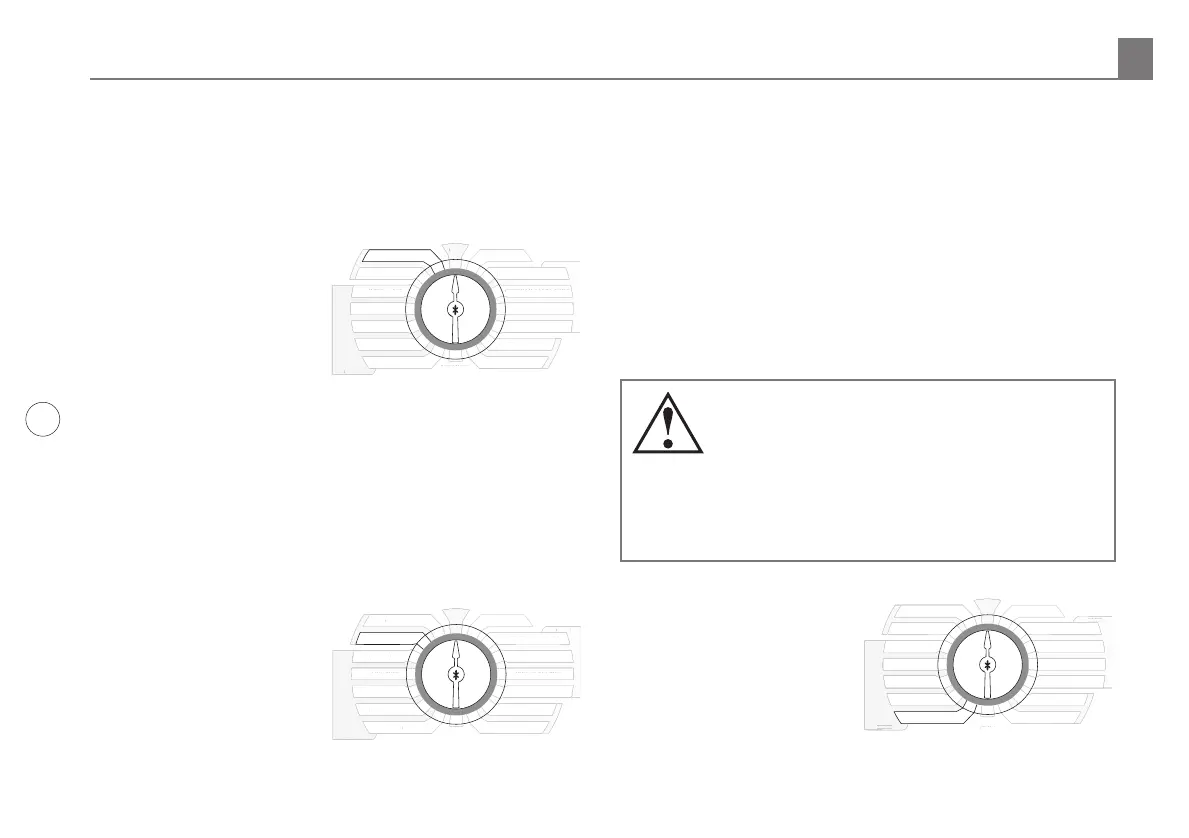
The SmartLine® controller has two dial positions for manual
system starts:
4.1 Manual Zone
Manual Zone allows user
to water a single zone for
specified period of time. Use
NEXT and BACK buttons to
select zone. Use UP and DOWN
to select run time for the zone.
A zone can be operated with
the Manual Zone function
regardless of whether the zone
has an assigned run time. You
must return dial to RUN for Manual Zone operation to begin. All
manual watering operations will override watering day settings,
omit settings, and rain/freeze events.
4.2 Manual Test
The Manual Test can be used to set a test run time for all zones
which have an assigned zone run time in any program. Any
zone without an assigned
zone run time will NOT run in
the Manual Test. Use UP and
DOWN buttons to set Manual
Test run time. The Manual Test
can be set to run a minimum
of 10 seconds or a maximum
of 10 minutes. You must return
dial to RUN for Manual Test
operation to begin.
Manual Test will detect open circuits (less than 30 mA draw) on
any used zone or a short on any output (master valve or zone).
If the display indicates FAULT while running a Manual Test, refer
to Advanced Menu to identify the FAULT.
5.0 Programming for Smart Watering Mode
Weathermatic’s patented SMART mode overrides user assigned
zone run times and calculates zone run times based on the
location of the site, inputs by zone, and weather readings
from the SLW Series On-Site Weather Sensor. SMART mode is
designed to help you protect your landscaping, reduce wasteful
run o, and minimize your water costs.
Warning: Smart mode positions on the dial can
only be selected when an optional SLW Series
On-Site Weather Sensor accessory is installed.
Additionally, Basic Program Function must be
set up completely before setting up SMART mode. SMART
Mode replaces the Zone Run Times with a calculated value
using the SMART settings.
5.1 Set ZIP Code or Latitude
SMART operation first requires
that the SmartLine® Controller
know “where in the world” it
is located. Users in the USA
can set location by ZIP Code.
Users outside of the USA can
set location by latitude. Use
UP and DOWN buttons to
SMART
BASIC
RUN
SYSTEM OFF
CURRENT TIME / DATE
PROGRAM START TIMES
ZONE RUN TIMES
DAYS TO WATER
OMIT TIMES / DAYS
SEASONAL % ADJUST
ADVANCED
MENU
ZIP CODE/LATITUDE
SPRINKLER TYPE
PLANT TYPE
SOIL TYPE
MORE
/
LESS
MANUAL TEST
MART
BASI
YSTEM OFF
CURRENT TIME
DAT
R
RAM START TIME
NE RUN TIME
DAYS T
WATER
OMIT TIMES
DAYS
EAS
NAL % ADJUS
ADVAN
E
IP
LATIT
DE
PRINKLER TYPE
PLANT TYPE
S
IL TYPE
RE
E
AN
AL TE
T
MANUAL ZONE
SMART
BASIC
MANUAL ZONE
RUN
SYSTEM OFF
CURRENT TIME / DATE
PROGRAM START TIMES
ZONE RUN TIMES
DAYS TO WATER
OMIT TIMES / DAYS
SEASONAL % ADJUST
ADVANCED
MENU
ZIP CODE/LATITUDE
SPRINKLER TYPE
PLANT TYPE
SOIL TYPE
MORE
/
LESS
MART
BASI
ANUAL ZONE
YSTEM OFF
CURRENT TIME
DAT
R
RAM START TIME
NE RUN TIME
DAYS T
WATER
OMIT TIMES
DAYS
EAS
NAL % ADJUS
ADVAN
E
IP
LATIT
DE
PRINKLER TYPE
PLANT TYPE
S
IL TYPE
RE
E
MANUAL TEST
4.0 Manual Start Functions
SMART
BASIC
MORE
/
LESS
SOIL TYPE
PLANT TYPE
SPRINKLER TYPE
MANUAL ZONE
MANUAL TEST
RUN
SYSTEM OFF
CURRENT TIME / DATE
PROGRAM START TIMES
ZONE RUN TIMES
DAYS TO WATER
OMIT TIMES / DAYS
SEASONAL % ADJUST
ADVANCED
MENU
MART
BASI
RE
E
S
IL TYPE
PLANT TYPE
PRINKLER TYPE
ANUAL ZONE
AN
AL TE
T
YSTEM OFF
CURRENT TIME
DAT
R
RAM START TIME
NE RUN TIME
DAYS T
WATER
OMIT TIMES
DAYS
EAS
NAL % ADJUS
ADVAN
E
ZIP CODE/LATITUDE



 To Next Page