23
http://support.weathermatic.com
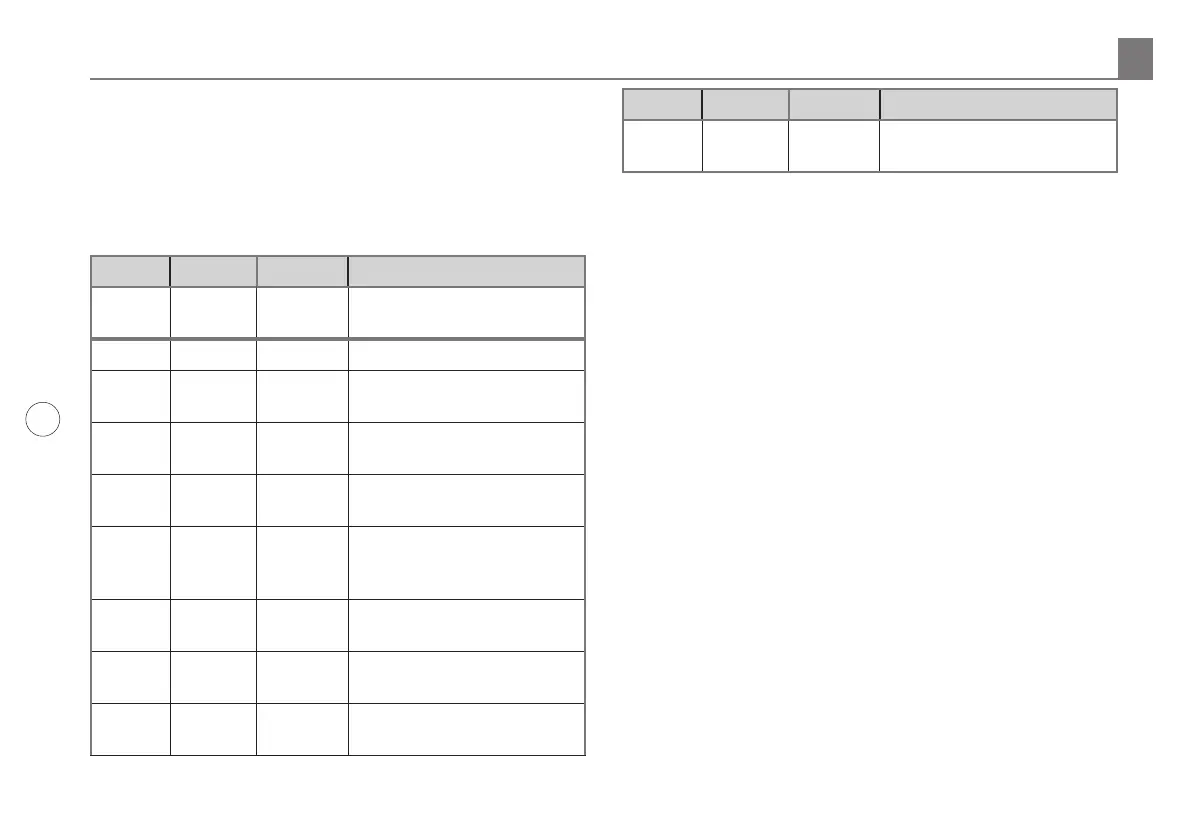
7.2 Watering Cycle Pause Functions
SmartLine® controllers will “pause” watering cycles in response
to certain sensor readings or program settings in the controller.
Pauses are a normal function of the controller. Watering pauses
will be indicated on all SmartLine® controllers by the presence of
a RED or ORANGE LED as shown in the table and the reason for
the pause will be displayed.
MODE SENSOR
LED
Color
LED
Color
Display
Message Reason
Red Controller dial is set to OFF
Green Red RAIN Rain sensor disks are wet
(SLW Only)
Green Red FREEZE Temperature is 37 degrees F
or colder (SLW Only)
Green Red SENS Sensor tripped at the SEN
terminals
Green Orange RAIN
DLY
Irrigation cancelled for
additional hours in SLW DLY
(SLW Only)
Orange Green Omit-
Time
Cycle paused for omit hours
set
Orange Green SOAK Zone waiting for soak time
out
Orange Green ZONE
DLY
Waiting for next zone valve
to open
MODE SENSOR
Orange Green PAUSE Waiting for MVP to turn on
or off
7.3 Changing SLW or RFS5 Batteries
• Loosen bottom cover section on the SLW or RFS5 and
rotate the cover in the keyholes and remove the cover.
• Replace the existing batteries with two (2) AAA lithium
batteries.
• Reactivate the SLW or RFS5 by holding down the rain
tab on the top of the unit for 5 seconds.
• Return to the controller. The antenna icon will be
flashing in the display.
• Push mode and sensor buttons to verify a green LED at
SMART and Active positions.
If you have an SLW5 or SLW15 Weather Sensor, you can verify
the remaining voltage in the SLW battery at any time by turning
the dial to Advanced Menu, Tests. Push Next to get Outputs,
then push DOWN button to get SLW Battery. Push Next to
read the remaining voltage. Note: The SLW Battery function is
visible after you have established communication with the SLW.
If you have an SLW10 or SLW20 you can view the battery
level by turning the dial to any Smart Watering position on the
dial. With the dial in that position, the battery image you see
at the bottom of the screen is the battery in the SLW device.
Solid black is a full battery. Half of the image black means
the battery is nearing replacement. An image outline means
immediate replacement required.
Troubleshooting 7.0



 To Next Page