-11-
No.DOC1048575-1
2. Wiring
Connect the EtherCAT
®
communication cables, the power cables and the FE cable.
Select the appropriate cables to mate with the connectors and terminal mounted on the SI Unit.
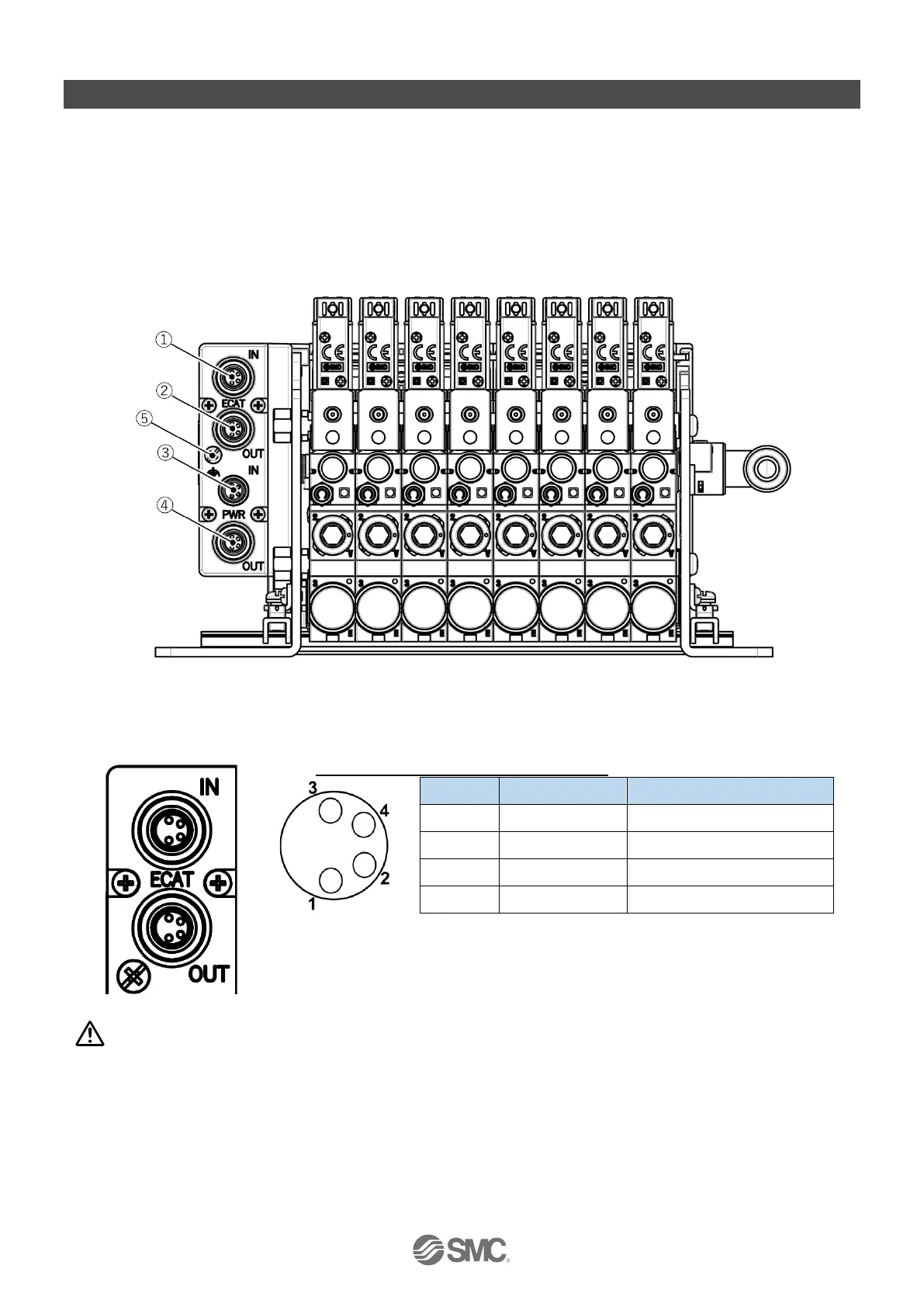
1. M8 4-pin socket, A-coded, EtherCAT
®
communication connector ECAT IN
2. M8 4-pin socket, A-coded, EtherCAT
®
communication connector ECAT OUT
3. M8 4-pin plug, A-coded, Power connector PWR IN
4. M8 4-pin socket, A-coded, Power connector PWR OUT
5. M3, FE (Functional Earth) terminal screw
Fig 2-1. Connectors and FE terminal identification
2.1. Communication connector
ECAT IN/OUT: M8 4-pin socket, A-coded
Fig 2-2. Pin allocation of communication connector
Caution
Pay attention not to confuse the communication connectors with the power connectors.
Incorrect connection may result in SI Unit failure. Check the printed characters on the product.


 To Next Page