EasyManua.ls Logo

smith&nephew RENASYS GO - User Manual

smith&nephew RENASYS GO
42 pages
Print Icon
To Next Page IconTo Next Page
Loading...
Home Healthcare
User Manual
REF 66021496
200ml
100ml
50ml
300ml
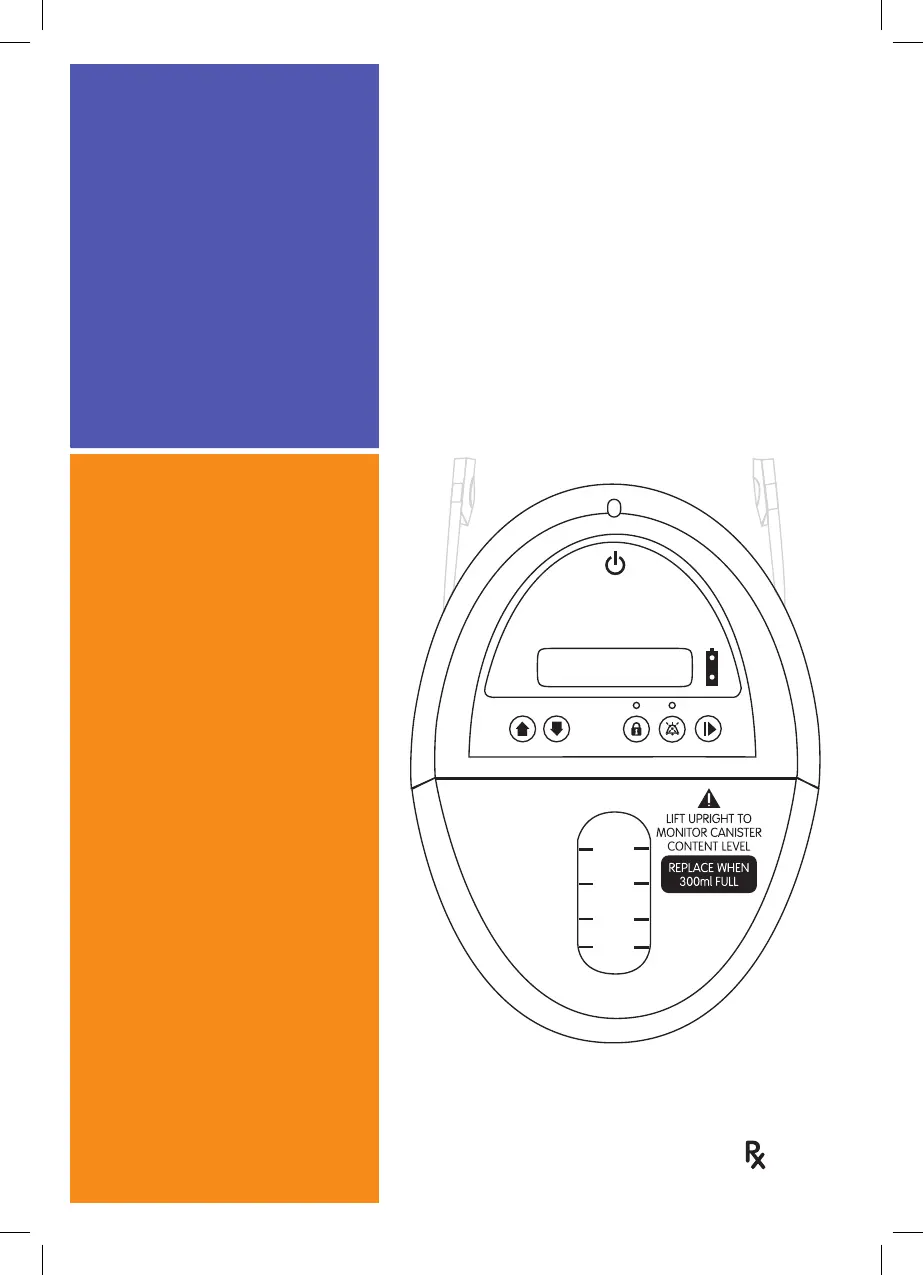
RENASYS™ GO
Negative Pressure Wound
Therapy
*smith&nephew
RENASYS™ GO
Negative Pressure Wound
Therapy
onl
y
*smith&nephew

Other manuals for smith&nephew RENASYS GO

Questions and Answers

  • C
    Christopher ThompsonAug 21, 2025
    What to do if my smith&nephew RENASYS GO Medical Equipment displays 'Over vacuum alarm ! THERAPY STOP ! OVER VACUUM'?
    • C
      Chase HowardAug 22, 2025
      If your smith&nephew Medical Equipment displays 'Over vacuum alarm ! THERAPY STOP ! OVER VACUUM', it means the device vacuum exceeds a pressure of 255mmHg and the device has stopped delivering therapy. In this case, contact your healthcare provider.
  • A
    aaron04Sep 4, 2025
    What to do if my smith&nephew RENASYS GO displays 'High vacuum alarm ! THERAPY STOP ! HIGH VACUUM'?
    • B
      Brandon ButlerSep 4, 2025
      If your smith&nephew Medical Equipment displays 'High vacuum alarm ! THERAPY STOP ! HIGH VACUUM', it means the device vacuum level is higher than the prescribed therapy and the device has stopped delivering therapy. Contact your healthcare provider.
  • E
    Elizabeth HoltSep 2, 2025
    What to do if my smith&nephew RENASYS GO displays '! Attention ! Low Battery'?
    • M
      Mr. John CalhounSep 3, 2025
      If your smith&nephew Medical Equipment displays '! Attention ! Low Battery', plug the device into an electrical outlet. Therapy will continue to be delivered while the device battery is charging.
  • J
    John GarciaSep 1, 2025
    What to do if my smith&nephew Medical Equipment displays '! RECHARGE ! V. Low Battery'?
    • H
      Hector BeanSep 1, 2025
      If your smith&nephew Medical Equipment displays '! RECHARGE ! V. Low Battery', plug the device into an electrical outlet. Therapy will continue to be delivered while the device battery is charging.
  • P
    Patricia BrooksAug 30, 2025
    What to do if my smith&nephew RENASYS GO Medical Equipment displays '! RECHARGE ! EX. LOW BATTERY'?
    • V
      Victoria GilesAug 30, 2025
      If your smith&nephew Medical Equipment displays '! RECHARGE ! EX. LOW BATTERY', plug the device into an electrical outlet. Therapy will continue to be delivered while the device battery is charging.
  • J
    jeff15Aug 29, 2025
    What to do if my smith&nephew RENASYS GO shows '! BATTERY FAILED ?' message?
    • S
      Shane BuchananAug 29, 2025
      If your smith&nephew Medical Equipment shows '! BATTERY FAILED ?' message, and the device is plugged into an electrical outlet but the battery is not charging, contact your healthcare provider for a replacement device.
  • J
    Jessica BrownAug 27, 2025
    What to do if my smith&nephew RENASYS GO displays a 'Complete blockage/canister over-capacity alarm'?
    • E
      Elizabeth FranklinAug 28, 2025
      If your smith&nephew Medical Equipment displays a 'Complete blockage/canister over-capacity alarm', it means that the canister needs replacement or there is a complete blockage in the system. Here’s what you should do: 1. Check your canister. If the canister level has reached the maximum fill line (300ml or 750ml), replace the canister. 2. Check all connections, tubing and Soft Port aeration disk (located on Soft Port, near the orange quick click connector) to ensure they are free of obstructions. Ensure there are no kinks in canister tubing. 3. If you cannot locate the source of the blockage, contact your healthcare provider.
  • D
    David CampbellAug 27, 2025
    What to do if I see a 'Low vacuum alarm' on my smith&nephew RENASYS GO?
    • S
      Sally McgeeAug 27, 2025
      If you see a 'Low vacuum alarm' on your smith&nephew Medical Equipment, it indicates that the device vacuum level is lower than the prescribed therapy. Follow these steps: 1. Press down around the edges of your dressing. If your dressing begins to recompress, you have resealed your dressing and addressed the air leak. 2. Check the connectors on the tubing between your dressing and the canister. Ensure the connection is secure. 3. Disconnect the orange quick click connectors and insert attached caps into tubing connectors. If the alarm continues, replace the canister and contact your healthcare provider.
  • S
    Samuel HarrisonAug 25, 2025
    What to do if I see a 'High flow/leak alarm' on my smith&nephew RENASYS GO?
    • H
      Heidi HowellAug 25, 2025
      If you see a 'High flow/leak alarm' on your smith&nephew Medical Equipment, it means the device has detected a significant air leak. Here's what you should do: 1. Press down around the edges of your dressing. If your dressing begins to recompress, you have resealed your dressing and addressed the air leak. 2. Check the connectors on the tubing between your dressing and the canister to ensure the connection is secure. 3. Disconnect the orange quick click connectors and insert attached caps into tubing connectors. If the alarm continues, replace the canister and contact your healthcare provider.
  • C
    Christopher LeeAug 23, 2025
    How to fix low vacuum alarm on Smith & Nephew Medical Equipment?
    • Q
      qzamoraAug 23, 2025
      To address a low vacuum alarm on your Smith & Nephew Medical Equipment, start by checking the wound dressing for air leaks. Look for loose areas, listen for air movement, and feel for temperature differences. Seal any leaks with transparent film or adhesive gel. Make sure the orange quick click connector and the canister are securely connected to the device. If the alarm persists, disconnect the Soft Port, cap the connectors, and if the alarm continues, replace the canister and contact Smith & Nephew. If the alarm stops, the leak is in the dressing or Soft Port; reassess and replace if needed.

Summary

When to Use and When Not to Use RENASYS GO

RENASYS GO Warnings

RENASYS GO Precautions

RENASYS GO System Features

RENASYS GO Device Operation

System Setup Procedures

Disconnecting Your Dressing

Step-by-step guide on how to safely disconnect the dressing from the tubing.

Attaching a New Canister

Instructions for correctly attaching a new canister to the RENASYS GO device.

Confirming System Setup and Reconnecting Dressing

Steps to confirm canister setup and reconnect the dressing tubing securely.

RENASYS GO Alarms and Troubleshooting

Low Battery and Attention Alarms

Explains the 'Low Battery' and 'Attention' alarms, indicators, and remedies.

Recharge and Critical Battery Alarms

Describes 'Recharge' and 'EX. LOW BATTERY' alarms, their impact, and remedies.

Over Vacuum Alarm

Explains the 'Over vacuum alarm', its indicators, and the required action.

High Flow;Leak Alarm

Details the 'High flow/leak alarm', its causes, and troubleshooting steps.

Low Vacuum Alarm

Describes the 'Low vacuum alarm', its indicators, and troubleshooting steps.

High Vacuum Alarm

Explains the 'High vacuum alarm', its indicators, and the required action.

Blockage;Canister Over-Capacity Alarm

Covers 'Complete blockage/canister over-capacity alarm' and troubleshooting.

Device Failed Alarm

Details the 'Device failed alarm' and the necessary steps to take.

Caution Statements for RENASYS GO

smith&nephew RENASYS GO Specifications

General IconGeneral
TypeNegative Pressure Wound Therapy (NPWT) System
Therapy ModesContinuous and intermittent
ApplicationWound Care
Power SupplyAC adapter or rechargeable battery
Battery LifeUp to 12 hours
Canister Capacity300ml
AlarmsBlockage, canister full, battery low
PortabilityPortable
IndicationsAcute and chronic wounds, surgical wounds

Related product manuals