snom 3x0 VoIP Phones User Manual English
© snom technology AG 2007
Basic Call Functions
• 57
English
Audio Operation Mode
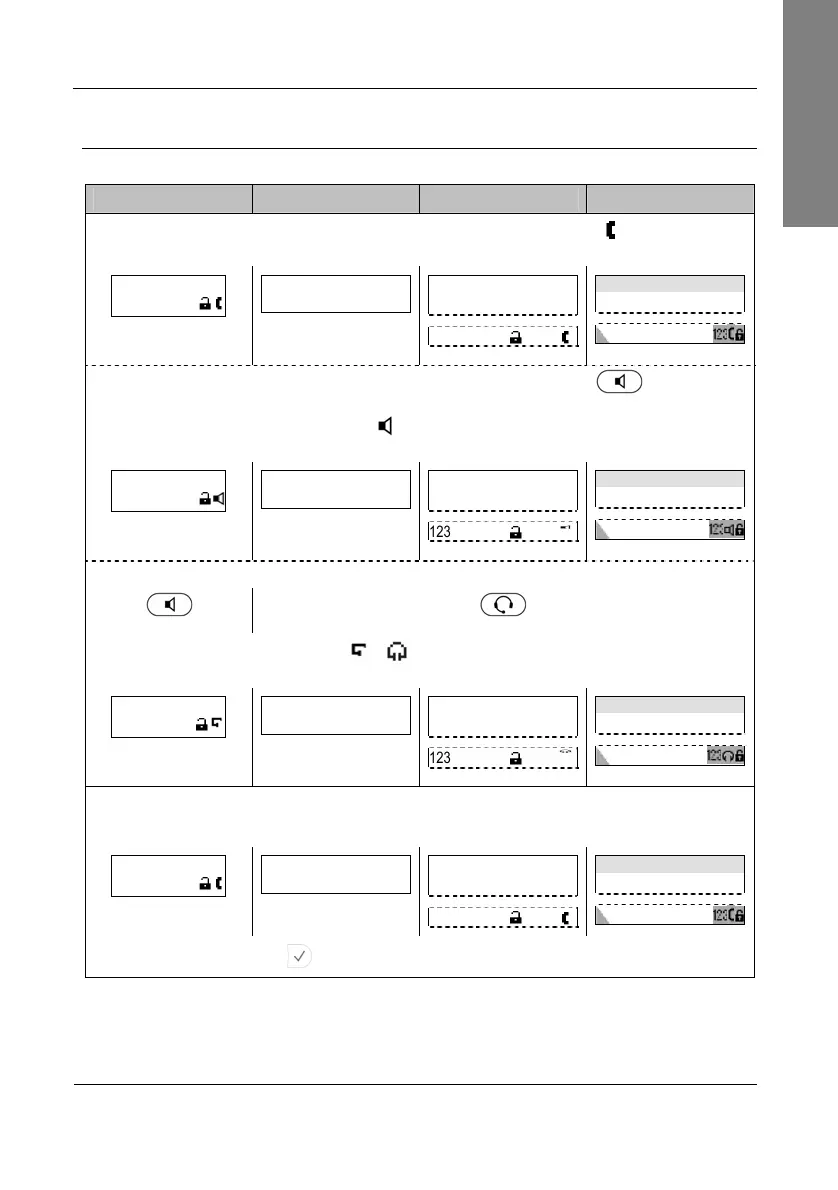
Action: Make a call using handset, handsfree, or headset mode (see page 9)
snom 300 snom 320 snom 360 snom 370
Take the handset off the hook. Handset mode has been activated ( symbol) and a
dial tone is heard in the handset speaker. The display shows:
>█
123
█
1>A C<- Clear
(no symbol when in
dialing mode)
—— Enter Number ——
I
123
Enter Number time
I
or leave the handset on the hook and press
Speaker
Handsfree mode will be activated ( symbol) and a dial tone can be heard in the
casing speaker. The display shows:
>█
123
█
1>A C<- Clear
(no symbol when in
dialing mode)
—— Enter Number ——
I
123
Enter Number time
I
or switch from handsfree to headset mode by pressing
Speaker
Headset
Headset mode will be activated (
/
symbol) and a dial tone can be heard in the
headset speaker. The display shows:
>█
123
█
1>A C<- Clear
(no symbol when in
dialing mode)
—— Enter Number ——
I
123
Enter Number time
I
Make sure the phone is in numeric mode (see page 56), then enter the number
using the alphanumeric keys (see page 55)
>12345678█
123
12345678█
1>A C<- Clear
—— Enter Number ——
12345678I
123
Enter Number time
12345678I
Press to
confirm that number is complete
.
Result: The phone number entered will be dialed.



 To Next Page