snom 3x0 VoIP Phones User Manual English
© snom technology AG 2007
Basic Call Functions
• 77
English
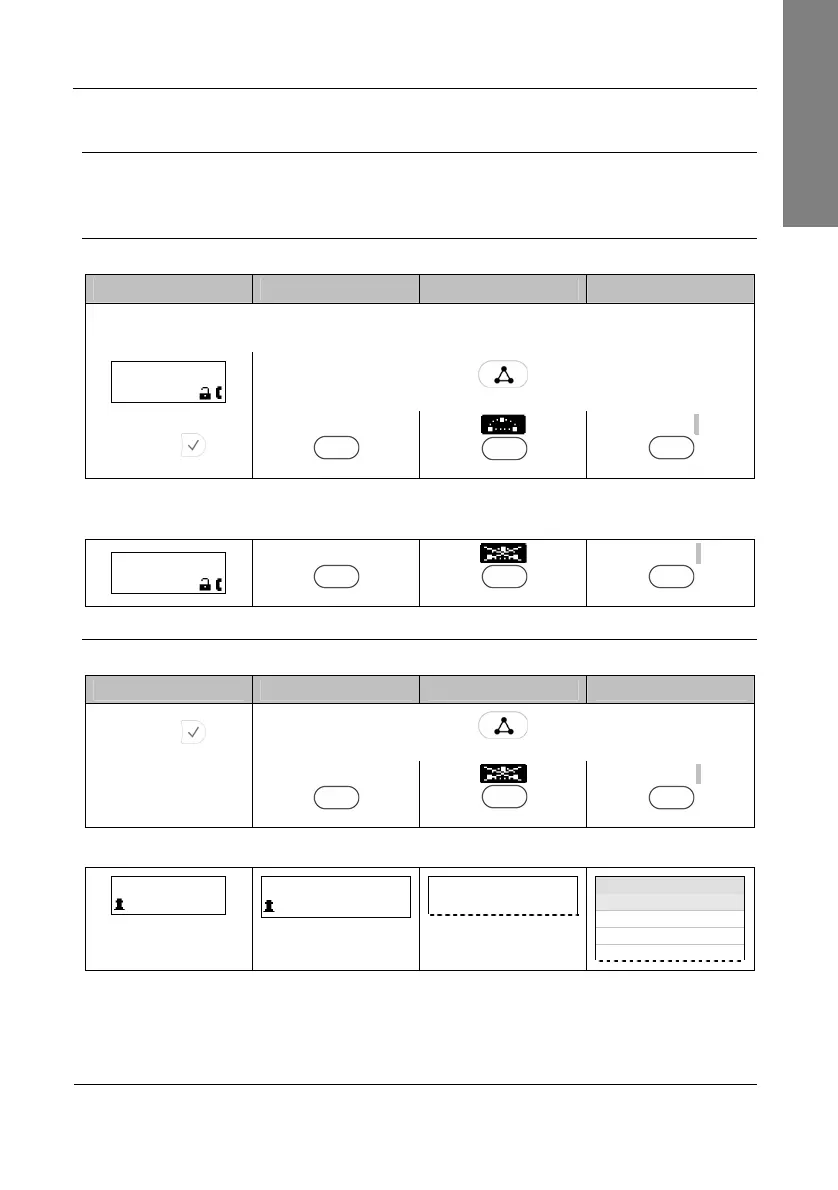
Conference
This call function allows your phone (
extA
) to establish a three-party conference, i.e.
three phone parties can communicate with each other.
Establishing
Action: Establish three-party conference on your phone (
extA)
snom 300 snom 320 snom 360 snom 370
Call
extB
and place the call on hold (see page 71)
Call
extC
and initiate the conference as follows:
extC 0:10
Cnf.On
Press
Conference
or press
Press
Cnf.On
S4
S4
Cnf.On
S4
Result: The three-party conference has been established. The participants
extA
,
extB
, and
extC
can hear each other. This is indicated as shown:
extC 0:10
Cnf.Off
Cnf.Off
S4
S4
Cnf.Off
S4
Disconnecting
Action: Disconnecting a Conference
snom 300 snom 320 snom 360 snom 370
Press
Press
Conference
or press
Cnf.Off
S4
S4
Cnf.Off
S4
Result: The conference has been disconnected;
extB
and
extC
are placed on hold:
Calls on Hold: 2
extC
Calls on Hold: 2
extC
— Calls on Hold: 2 —
extC
Calls on Hold: 2
extC
extA
extB
extA



 To Next Page