NETYS RT 5 - 7 - 9 - 11 kVA - 551570A - SOCOMEC
45
EN
7.5. External Battery Pack Connection
To increase the battery back-up time, you can connect several external battery
packs to the UPS. Please follow the steps below (Figure 7-5 & Figure 7-6) and
information in §5.8 External Battery Connector to complete the connection.
When connecting the external battery pack to the UPS, you must install an
appropriate non-fuse DC breaker or a fast-acting fuse that meets the safety
certication. Do not use an AC breaker.
The breaker must be a 2-pole non-fuse DC breaker with characteristics of
1-pole 250Vdc, 2-pole 500Vdc and 35kA (or above) DC breaking capacity.
1
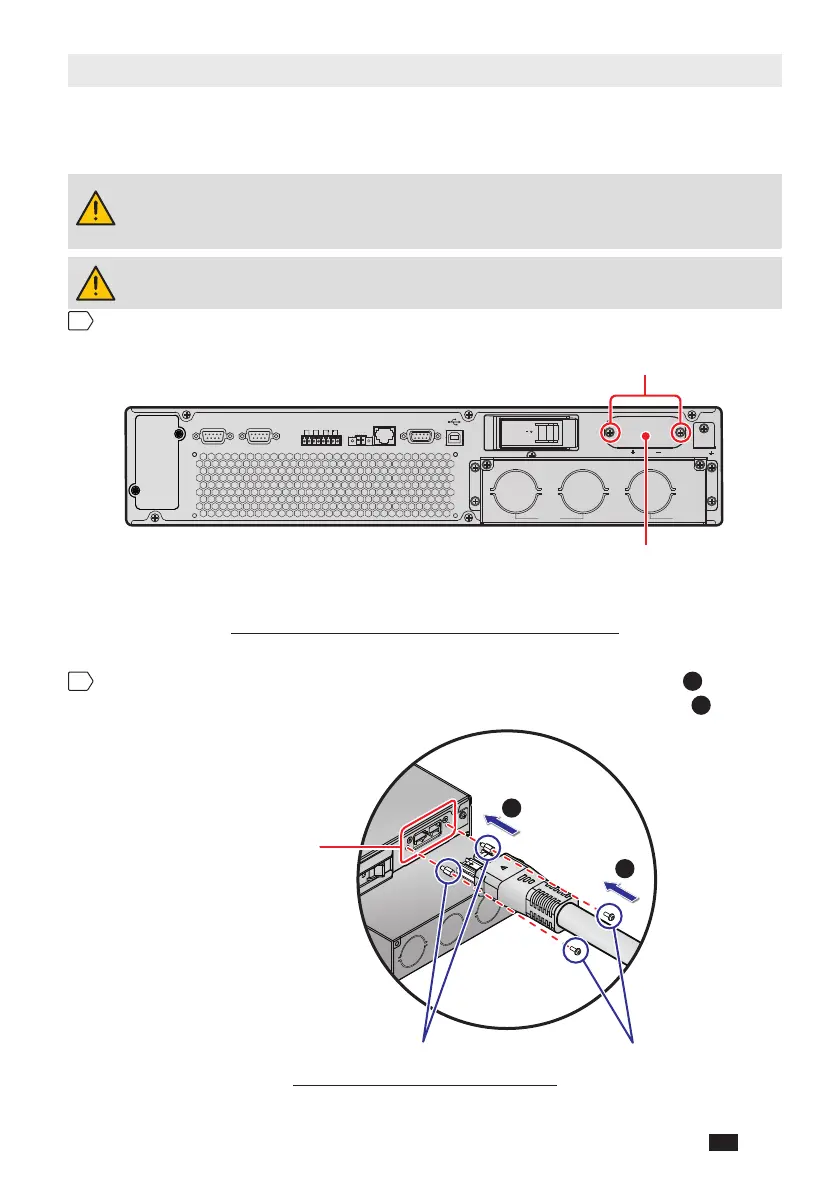
Remove the two screws from the external battery connector’s panel shown below.
SMART SLOT
DRY CONTACT
P2 P3 P4
RS-485
RS-232
P1
REPO
EXTERNAL BATT.
CONNECTOR
192V DC 29A
PARALLEL PARALLEL
INPUT
BREAKER
TMOV
TUPNITUPTUO
ON
OFF
Two Screws
External Battery
Connector’s Panel
(Figure 7-5: Remove External Battery Connector’s Panel)
2
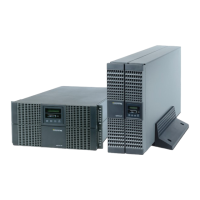
Insert the provided battery cable into the external battery connector
1
and use
the provided two screws and two standoffs to rmly x the battery cable
2
.
After Removal of
the External Battery
Connector’s Panel
Standoffs Screws
1
2
(Figure 7-6: Battery Cable Connection)




 To Next Page