Paramount MX User Guide
123 | Page
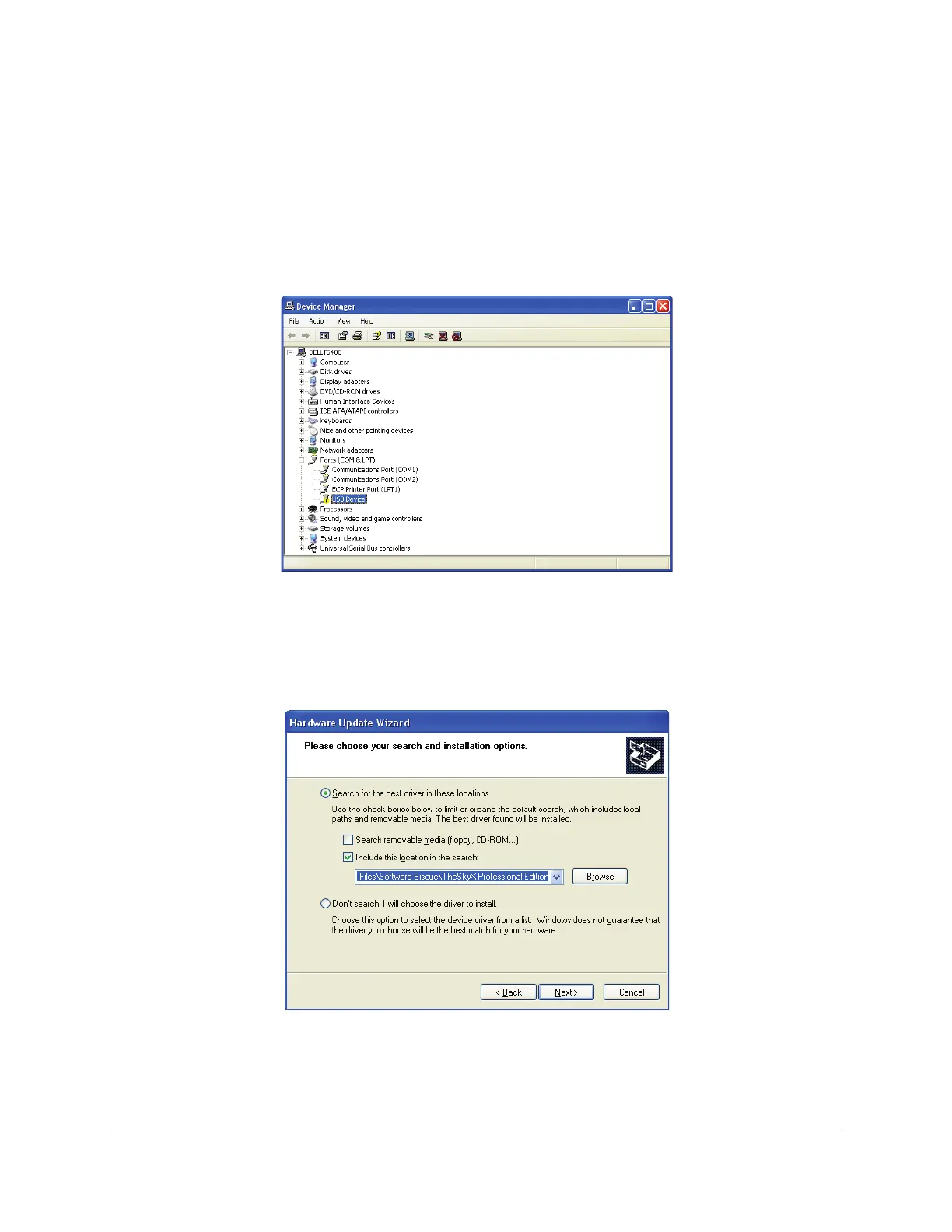
If the Found New Hardware Wizard window does not appear, MKS 5000 driver
installation can be initiated using Windows Device Manager (see “Accessing Windows
Device Manager” on page 121). Expand the Ports (COM & LPT) tree on the Device
Manager window to see the Paramount MX USB port. It appears as a USB Device. Note
the small yellow exclamation mark next to the device’s name. This means the device is
currently not functioning, which is expected since the MKS 5000 driver has not yet been
installed. Right-
Figure 66: The Windows XP Device Manager showing the Paramount MX USB port before driver has been installed.
5. Choose the Install From List or Specific Location radio button and click the Next button to
proceed. (Or, from the Device Manager window, right-click on the USB Device text and choose
the Update Driver command from the pop-up menu.
Figure 67: Choose the location of the MKS 5000 USB driver.
6. Turn on the Include this Location in the Search checkbox, then click the Browse button to
navigate to the folder that holds the MKS 5000 driver. The Software Bisque MKS 5000 driver,



 To Next Page