Paramount MX User Guide
46 | Page
• Protects the internal right ascension worm block components from dust and debris.
• Provides a convenient handle to grasp when lifting the mount.
• Houses the right ascension axis Three Position Switch (page 46).
RA Cable Conduit
This access hole in the right ascension shaft allows custom cables to be passed through the mount. See
“Through the Mount Cabling” on page 28 for more information.
Dec Cable Conduit
This access hole in the declination shaft allows custom cables to be passed through the mount. See
page 28 for more information.
Right Ascension Carrying Handle
Use this carrying handle to lift the mount. Make sure to place the three position switch in the Lock
position before lifting the mount.
RA Worm Block Three Position Switch
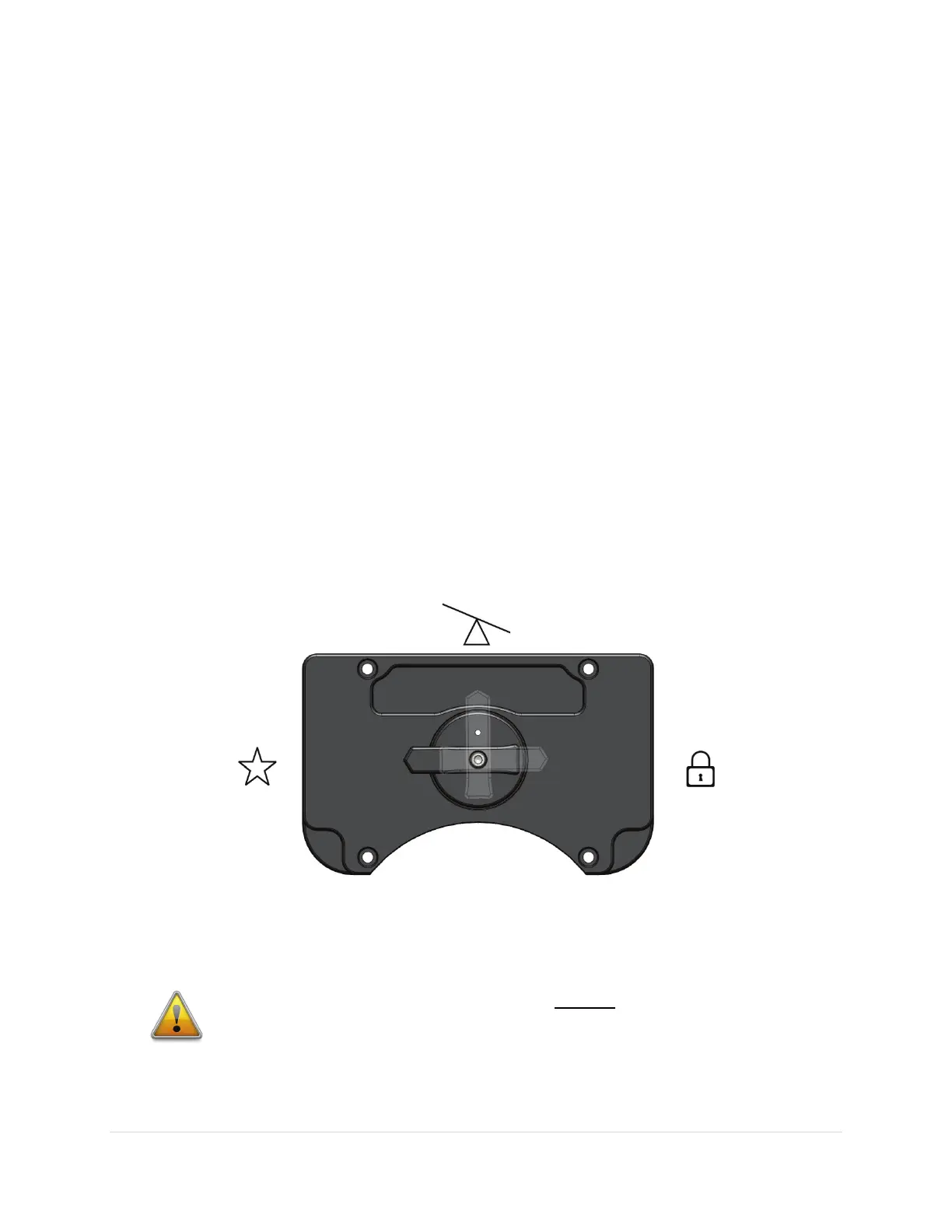
The RA and Dec Axis have an arrow-shaped knob as part of a rotatable, mechanical Three Position
Switch. This switch can be rotated to one of three positions and each position places the mount in a
different operational state as described in the table below.
Figure 19: The Three Position Switch in the Track Position.
The balance, star and lock symbols shown in Figure 19 are etched into the top of the cover, where they
are most visible when setting up the mount.
ADJUSTING THE THREE POSITION SWITCH ALWAYS REQUIRES BOTH HANDS!
Rotating the Three Position Switch for both the RA axis and the Dec axis requires the
use of both hands to prevent sudden or unexpected rotation of the mount.
• Before rotating the Dec Axis Three Position Switch with your right hand,



 To Next Page