Paramount MX User Guide
57 | Page
The amount of counterweight required to achieve balance depends on the weight of the optical tube
assembly and accessories. Estimate how much counterweight is required, and then add this amount to
the counterweight shaft. Err on the heavy side. The counterweights should “outweigh” the optical tube
assembly by being too far down the shaft. This way, when fine-tuning the balance, the counterweights
will tend rotate downward, instead of your expensive optical tube assembly.
Once sufficient counterweights are added, the right ascension axis should be very “bottom heavy.” At
this point, adding the optical tube assembly should result in a system that is somewhat close to being
balanced.
Each counterweight weighs 20 lb (9 kg). Please u
caution so that you do not accidentally drop one
yourself or others!
After the counterweights are added, firmly tighten each of the counterweight knobs to ensure they do
not slip. Also, make sure to install the counterweight safety knob on the bottom of the counterweight
shaft.
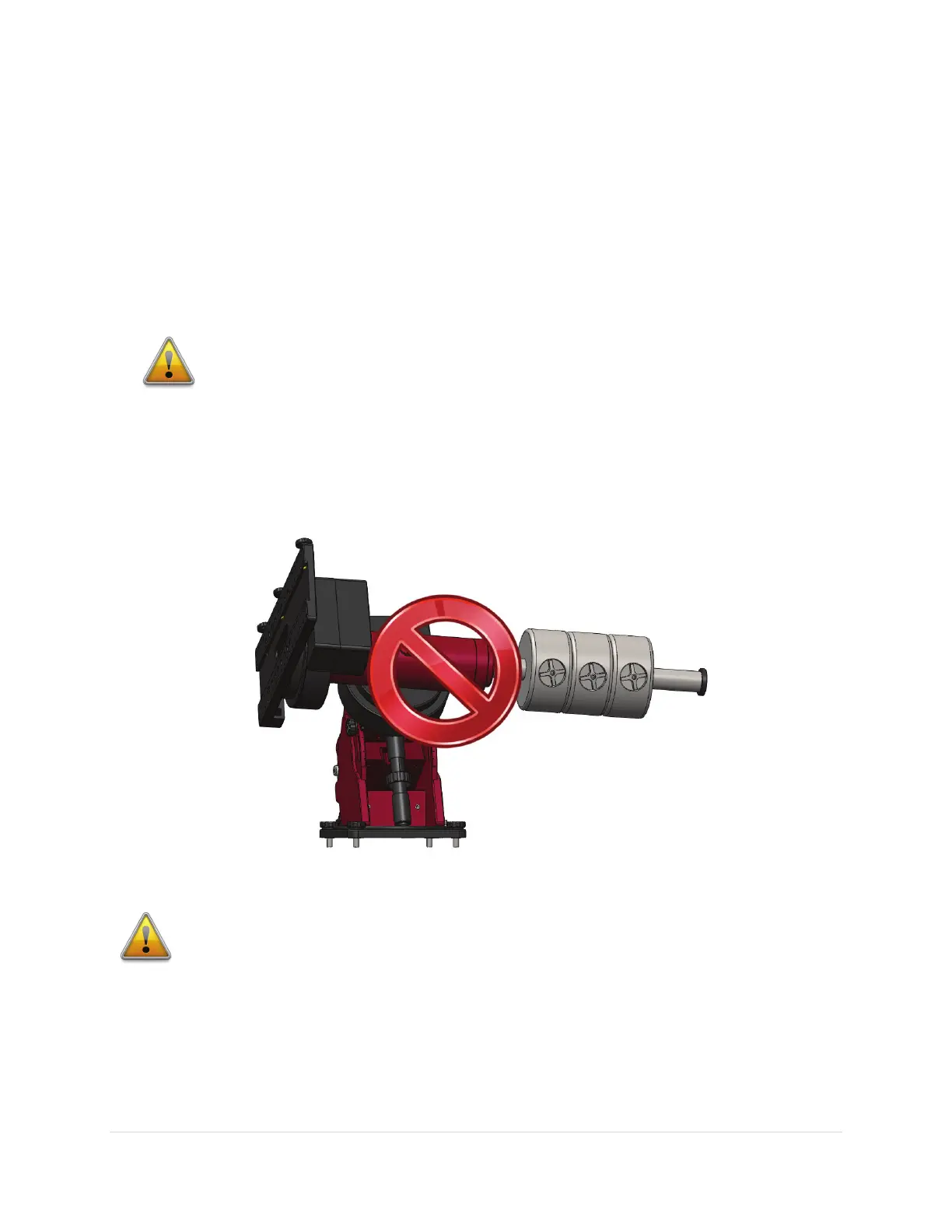
Figure 28: Please, never ever position the mount in this orientation, even with a single counterweight.
Never position the Paramount MX in the above orientation when the
Three Position Switch is in the Track position!
Figure 28 shows the Paramount MX in an unstable configuration that places extreme and
potentially destructive torque on the teeth of the right ascension worm and gear. The
counterweight shaft should always remain in the vertical position while the Paramount MX
is being loaded with counterweights and optical payload.



 To Next Page