Paramount MX User Guide
96 | Page
5. On the Drive Settings tab, click the Advanced option.
VERY IMPORTANT: DISABLE AUTOGUIDING CORRECTIONS IN BOTH
AXES.
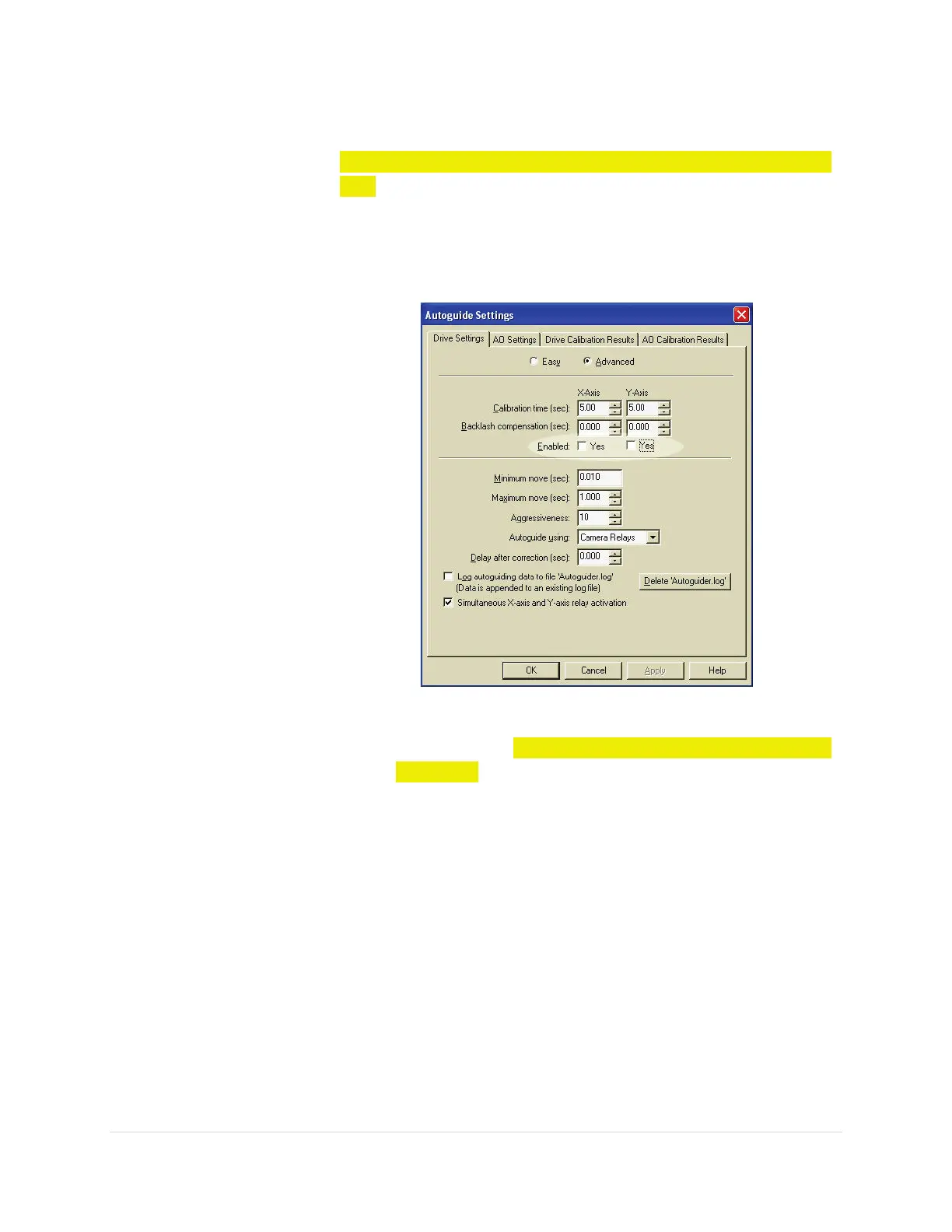
6. Turn off both Yes checkboxes for Enabled X-Axis and Y-Axis.
Turning these options off prevents corrections to the position
of the guide star.
Figure 42: CCDSoft's Autoguide Settings window.
Make sure to
DISABLE AUTOGUIDING CORRECTIONS IN
BOTH AXES by turning off the Enabled Yes options for both
the X-Axis and Y-Axis.
7. Click Delete 'Imager.log' to delete the existing log file. Click
Yes to confirm deletion.
8. Mark the Log Autoguiding Data To File 'Imager.log' option.
9. Click OK.
Locate and appropriate guide star (see Tips below) and then click the
Autoguide button.
Camera Orientation Requirements
• Make sure the CCD camera is oriented correctly. The camera's
detec
tor must be oriented so that telescope motion in right
ascension closely corresponds to x-



 To Next Page