EasyManua.ls Logo

sol-ark 5K - Start System Monitoring

Default Icon
48 pages
Print Icon
To Next Page IconTo Next Page
To Previous Page IconTo Previous Page
Loading...
April 21, 2021 18
7. Start Monitoring
IP Address Setup Instructions (PC or Smart Phone)
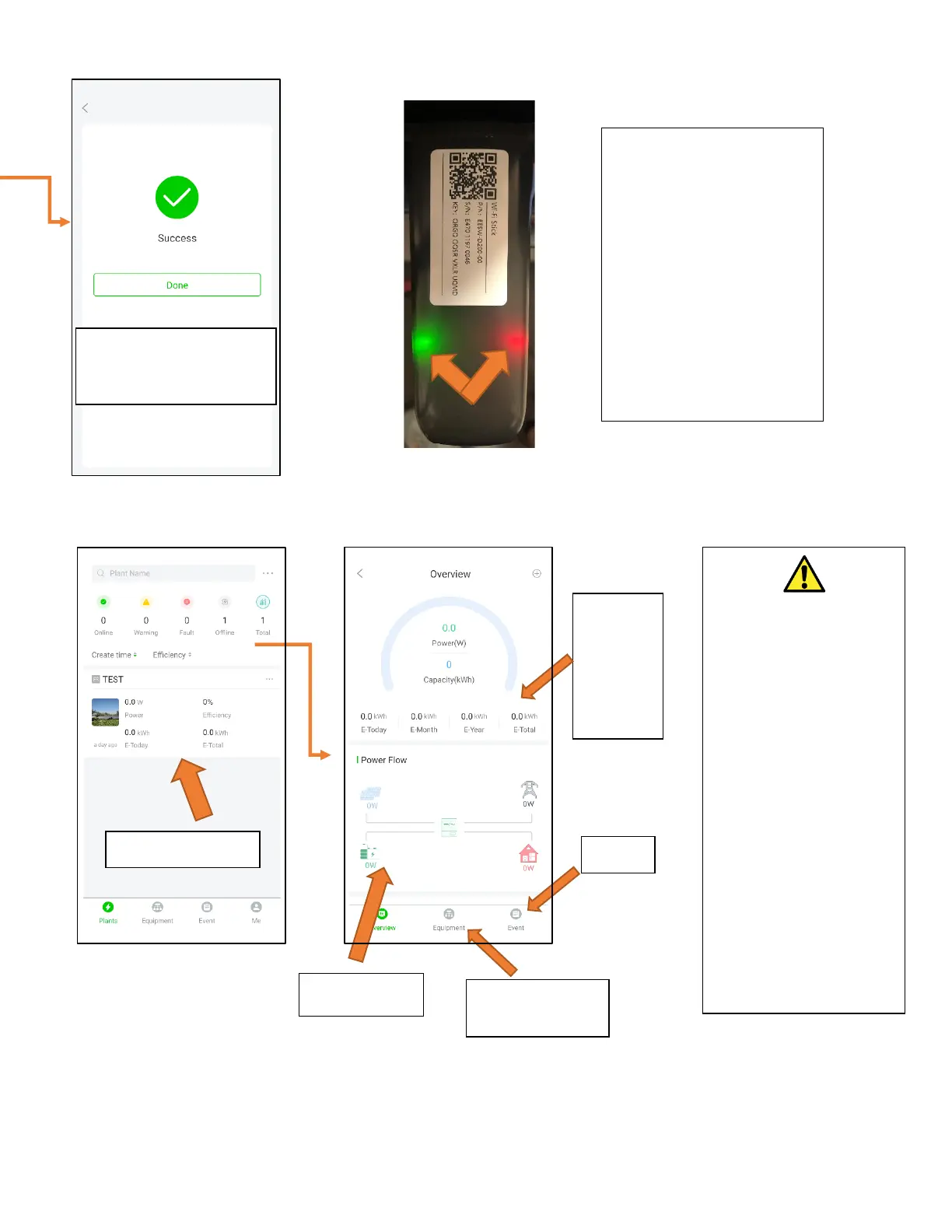
You will get confirmation
once connection is
established.
It takes about 60sec for the
lights to turn on after setup.
Red LED: Connected to
Sol-Ark and has power.
Green LED: Connected to
Internet and Server
Flashing Green LED:
Connected to router but
not server (usually a VPN
or firewall issue)
Select your plant
This
screen is
the real
time
view
Graphed data
System info and
programming
Alarms
Attention
If you are installing
parallel systems, DO
NOT create a plant for
each inverter.
Create one plant for the
Master unit and then use
the browser version of
PowerView (mysol-
ark.com).
Click on the “…” for the
MASTER’s plant and hit
“Add Gateway” then put
the S/N and Key of the
SLAVE’s dongle.

Related product manuals