April 21, 2021 25
Off-Grid Install Tips
• Limiter Sensors are not required for completely Off-Grid installs unless
using gen peak shaving with a gen connected to grid input breaker.
• The Grid input breaker on the Sol-Ark should be used as the Generator
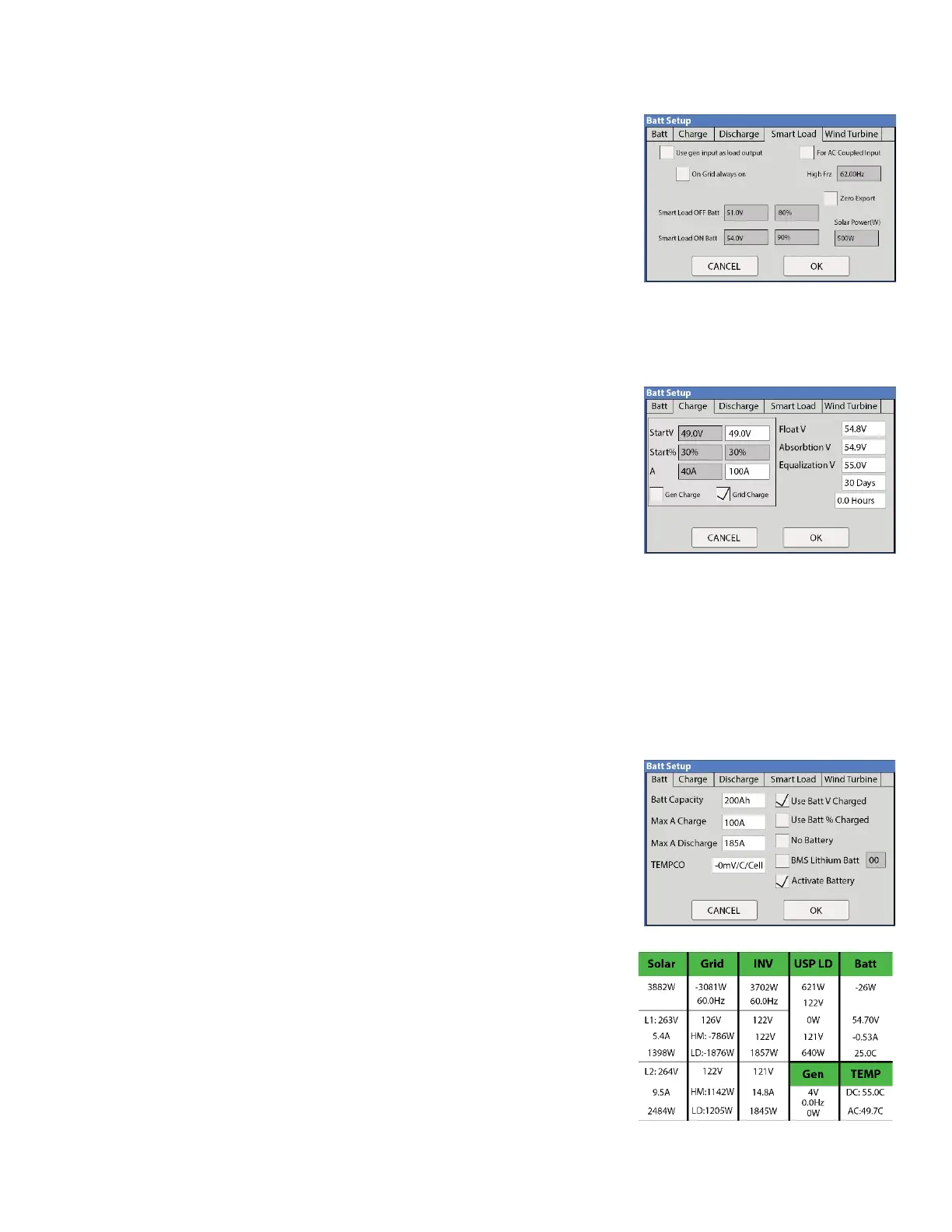
input (4-30kW generators) so that you maintain Smart Load output
capability when off-grid. Smart Load will allow you to run high power non-
essential appliances (hot water, dehumidifier, heat pump, irrigation
pump) on solar power instead of batteries. Therefore, you will use Grid
Charge (default) in the Battery Setup/Charge menu.
• When off grid there is no need for a transfer switch, simply connect the load output of the Sol-Ark to the whole
home.
• Do not use Grid Sell or Limited To Home Modes. Only Limited power to load (default).
• The Auto Generator start functions as a 2-wire switch (closes the circuit when needing charging)
o Auto Gen-start will be triggered when the battery voltage or
percent reaches the level programmed in the battery setup menu.
Then once triggered the generator will continue to charge the
batteries until they are about 95% full (this percentage is not
programmable) before turning the generator off.
o When using the Sol-Ark to control a generator, an exercise
function will turn on the generator one a week on Monday
mornings at 8AM
• When using a generator off-grid, we recommend changing the “grid reconnect time” under the Sell control tab
of the grid setup menu to 30 seconds otherwise the Sol-Ark will not charge from the generator until is has been
on for at least 5 minutes per the default value of 300 seconds.
• Under setup for Grid/Sell Control, select General Standard and “GEN connect to Grid Input”. Then go to
Grid/Grid input to widen the input frequency range to 55-65Hz to work with any frequency generator.
• If you would like to use a wind turbine in conjunction with the Sol-Ark 5K, the turbine must have a 48V charge
controller with a dump load as to prevent overcharging of the batteries. Simply connect the charge controller on
the turbine to the battery bank the Sol-Ark is using and the turbine will help charge your batteries.
• Don’t forget to set the Battery capacity and proper charge rates.
Grid-Tie / No Battery Install Tips
• Under Battery setup, select no Battery & disable Activate Battery (or
system will beep).
• Note: full system power cycle maybe required when changing between
battery and no battery settings.
• Under Grid Setup, select Grid Sell.
• Touch Battery Icon to see the Detailed Volts View to verify your inputs &
outputs.



 To Next Page