Solarwise SWF850 QuickStart/Troubleshooting Manual 13 / 73
2.4.7 Connecting the Ethernet
SWF850 has two 100M Ethernet interfaces, they have their own MAC addresses and IP addresses.
User can check the IP address by LCD and set the IP address by the buttons on the button panel.
For further information about LCDs and buttons are described in Chapter 3.
2.4.8 Connecting the COM
SWF850 has two separate COM interfaces; the isolation of the COM is 500VAC, 1 min.
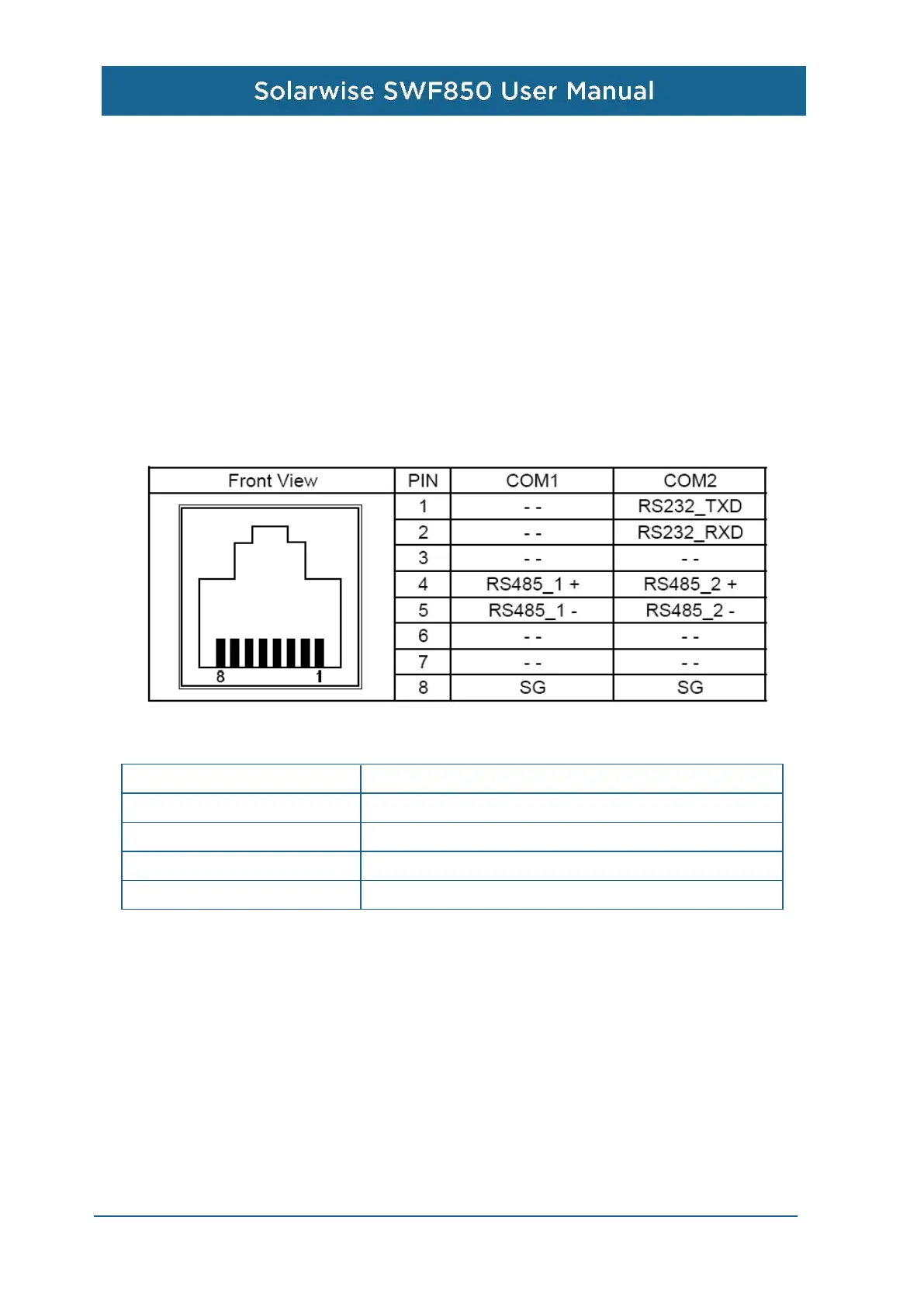
The two COM interfaces adopt RJ45 connector, COM1 is independent RS485 interface, COM 2 is
RS485 and RS232 mixed interface. Specific definitions for COM1 and COM2 are shown as below:
For COM2, RS485 and RS232 cannot be used at the same time; otherwise, can lead to
communication conflicts. The RS485 parameters of the interfaces are shown as follows:
Max Wire Length 1000 m
Max Connected Devices 32 Devices
Supported Baud Rates 4800 - 38400bps
Isolation Optically Isolated
Isolation Capability 1000VAC, 1min.
2.4.9 Powering up and Checking for Status LED
Before powering up, double check one final time the wire connections and the pin positions to see if
wrong pins are used and loose connections exist. Check also if ground connector is connected to
the ground terminal inside the array box. Ensure the voltage input being measured is well within
24VDC +10% ranges before powering up.
After power up, the RUN LED light will flash green each second to indicate device is ON and
running firmware. RX and TX LED lights will flash red and yellow respectively upon serial
communications. Alarm LED is lid when there is an alarm set point of SWF850 triggered in the
system, this may sometimes be due to incorrect AI alarm setting used so that over or under set
points are triggered.


 To Next Page