Solarwise SWF850 QuickStart/Troubleshooting Manual 18 / 73
3.2.4 Maintenance
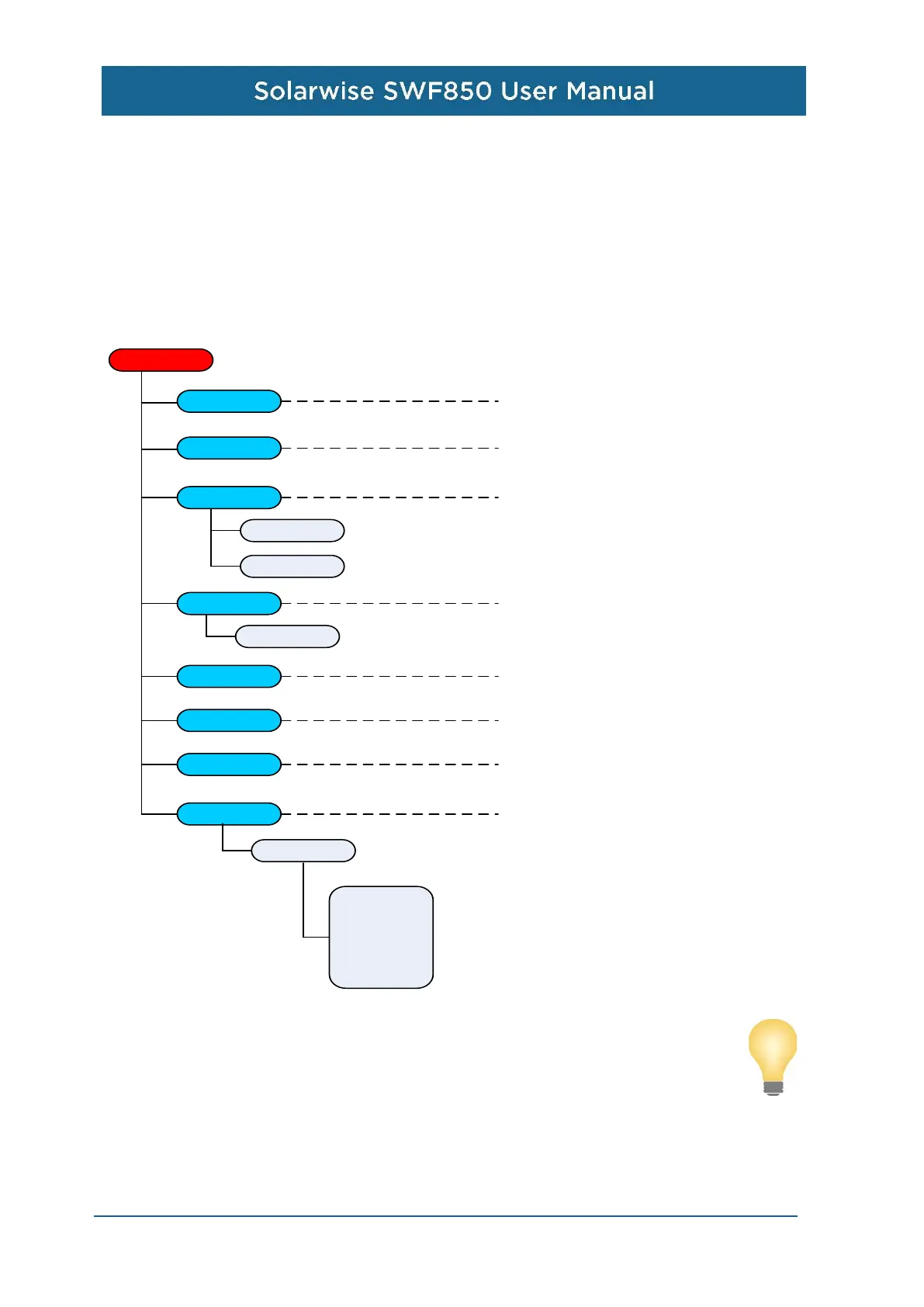
When the device is working, user can select the “Maintenance” menu to change some system
parameters by inputting the right password, and the initial password is “000000”. There are four sub
menus: Language, Time Zone, Date & Time setup, Display setup, Relay Control, Authorization,
Password, AI adjustment.
Note:
Analog measurements have been calibrated with right input source before left factory,
user do not need to recalibrate it in the general case.
Maintenance
Password
Display setup
Contrast
Date & Time
Date
Time
Language
Authorization
Time Zone
Relay Control
AI Adjustment
AI Coefficient
AI1: 1000
AI2: 1000
AI3: 1000
AI4: 1000
AI5: 1000
AI6: 1000
Set display language.
Set time zone of swf850.
Set system date and time.
Set the contrast of LCD.
Change the password of LCD
operation.
Authorization number for connection
device.
Set the DO to “Open” or “Closed”.
Calibrate analog measurements.


 To Next Page