Solarwise SWF850 QuickStart/Troubleshooting Manual 23 / 73
The graph plots the bar every year on “all year”.
IMPORTANT:
1. In general, the Import, Export, and Load energy are configured to input of energy pulse
from electricity meter in the page “Setting-I/O Setup-Energy Pulse”. For this procedure,
please goto section 4.12.1.7.3.
2. If there is not exported meter in the system, the export energy also can be configured as
total AC energy of all inverters in the page “Setting-Manage Formulas”. For this procedure,
please goto section 4.12.6.1.
4.5.2 Power
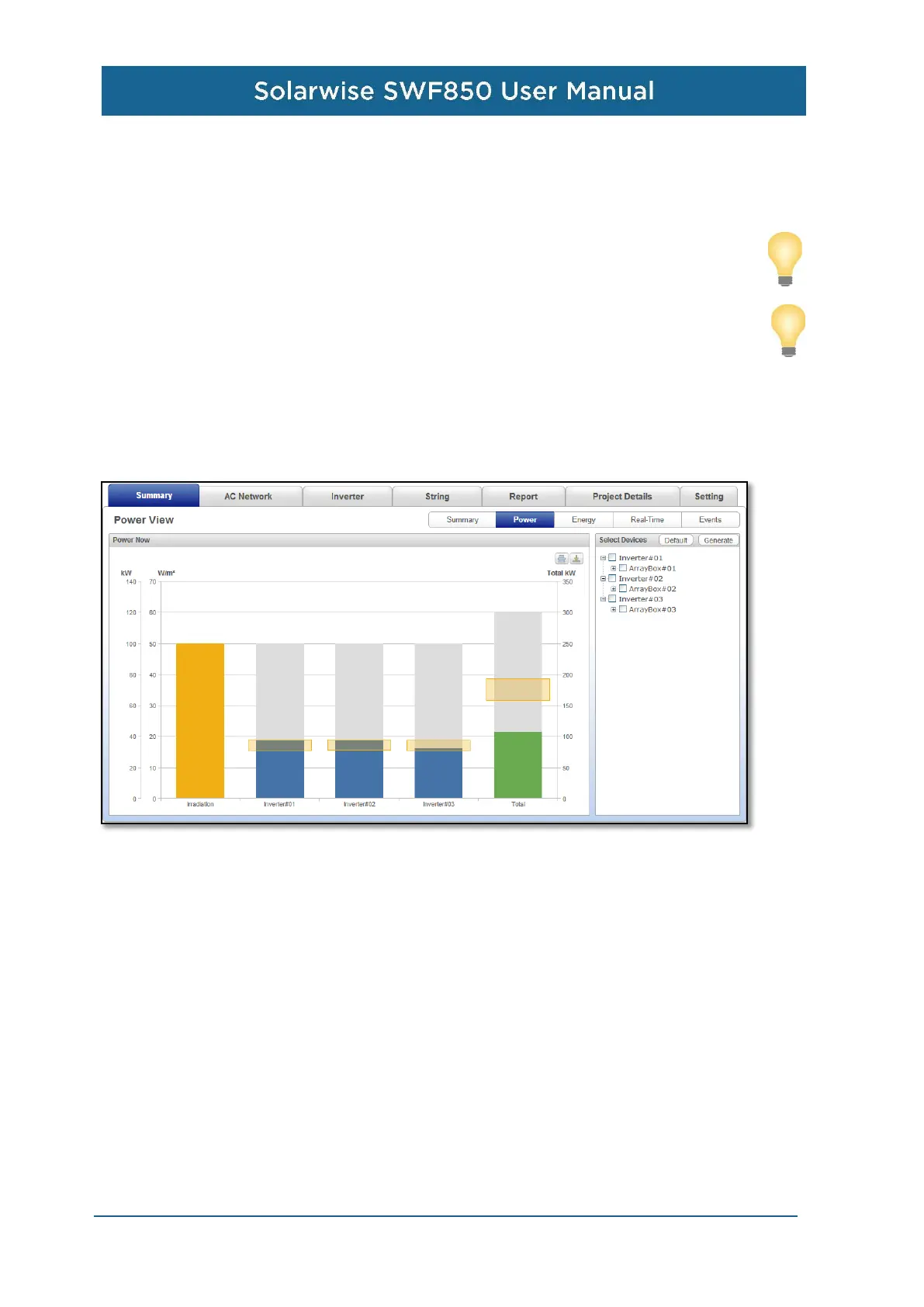
All the power generated by critical equipments can be show on the power view graph.
Then, on the right of this page, there is the graph which could show the power bar graph of the
selected equipments comparing with the irradiation. In the device list on the right hand, there are
three level equipments to be selected, from inverter, array box to string. Only the same type of the
equipments can be selected at the same time to compare with each other, but the different type
can’t. For example, after the users select the ArrayBox#01 and ArrayBox#02, they can’t select the
inverter or string any more. Then, clicking the “generate”, the bar graph will show on the left hand.


 To Next Page