Solarwise SWF850 QuickStart/Troubleshooting Manual 8 / 73
2.4.2 Connecting the Power Supply Input
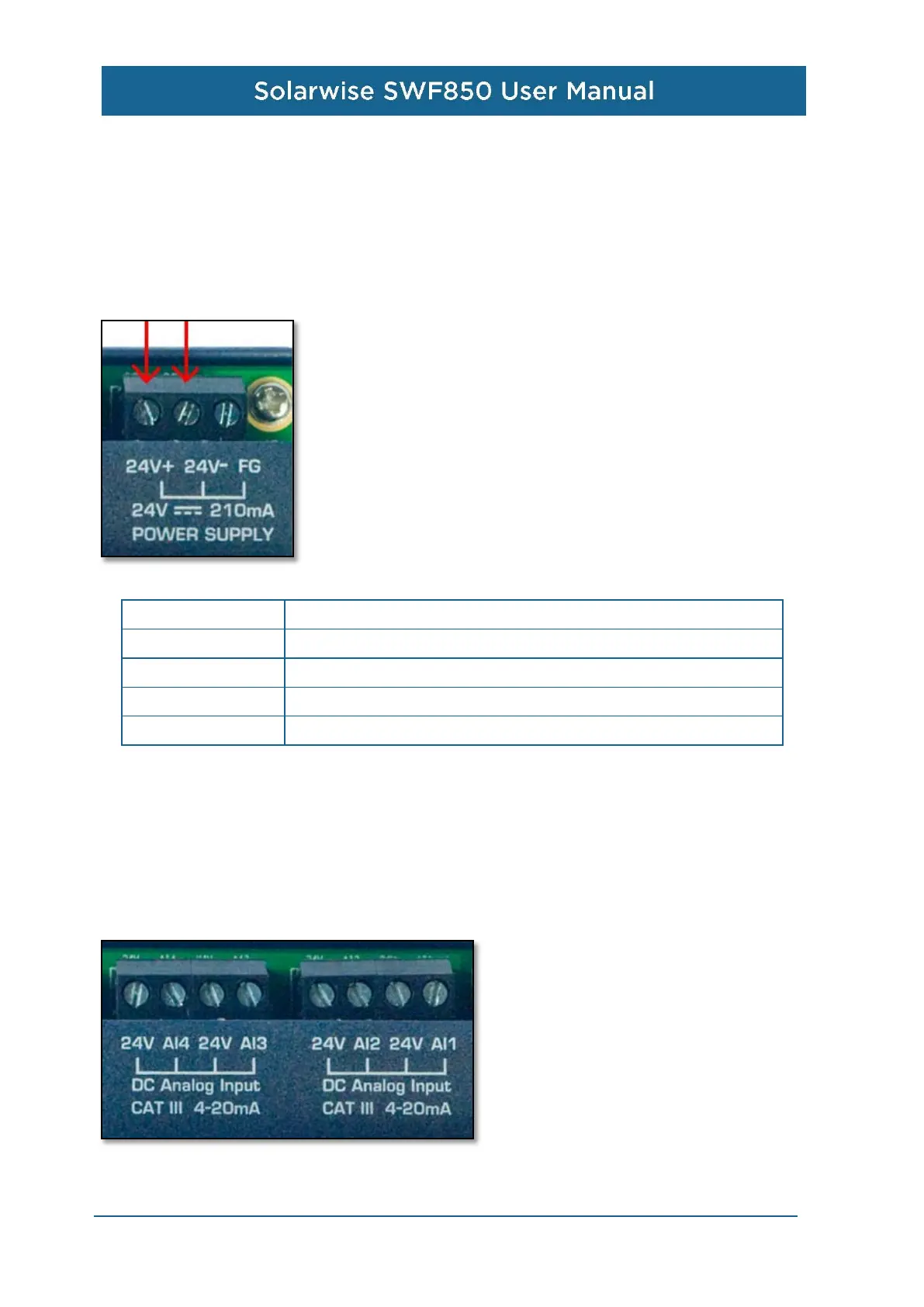
The DC input power supply for SWF850 is 24VDC, ensuring the positive pole of power connect to
the 24+ of SWF850 and the negative pole of power connect to the 24- of the SWF850 (as the
following image).
Connector Type Screw Type Terminal
Wire Size
AWG 12-30,length of exposed copper 6-7mm
Signal Type Direct Voltage
Signal Range 18 – 28 V
Power
max
5W
2.4.3 Connecting the Analog Input (AI)
SWF850 has a total of 6 analog inputs AI1 to AI6, and AI1 to AI4 are applied for current signal input,
AI5 to AI6 are applied for voltage signal input.
AI1 to AI4 input connectors for SWF850 are shown respectively below. The terminals marked “AI1”
to “AI4” are used for current input, and the terminals marked “24V” are the output power for external
two-wire sensors.


 To Next Page