THERMOCUBE II 200-650W THERMOELECTRIC CHILLER MANUAL 52-14790-1
SOLID STATE COOLING SYSTEMS, 167 MYERS CORNERS ROAD, WAPPINGERS FALLS, NY 12590 29
TELEPHONE: (845) 296-1300, FAX: (845) 296-1303, WEB: WWW.SSCOOLING.COM VERSION M2
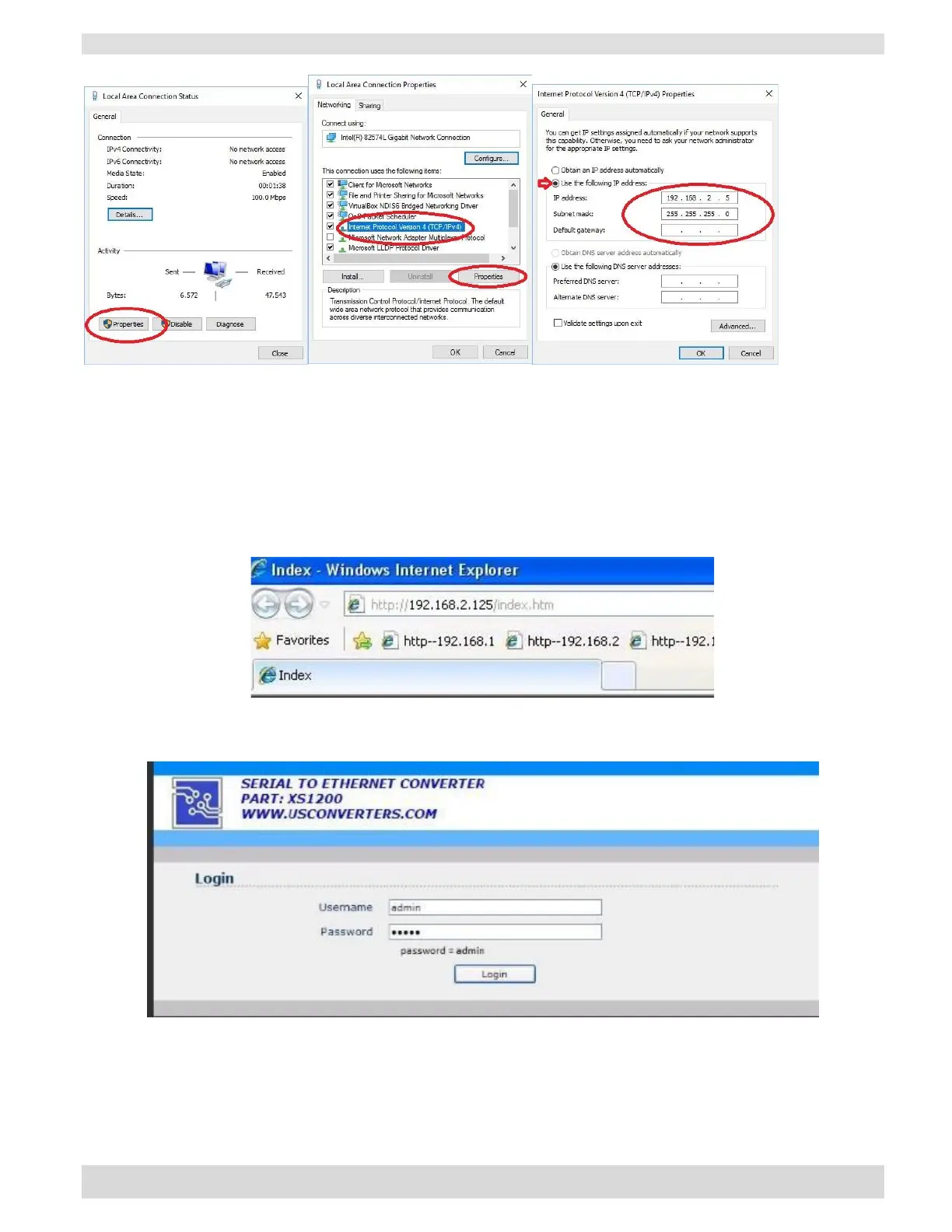
3. Local area connection status, Click on ‘Properties’.
4. Local area connection properties, Highlight the ‘Internet Protocol Version 4’ and click ‘Properties’.
5. Internet protocol Version 4 (TCP/IPv4) properties, Click the radio button “Use the following IP
address”.
Enter a static IP address in the 192.168.2.2 to 192.168.2.254 range (except 192.168.2.125 which is the
XS1200’s IP address) and a Subnet mask of 255.255.255.0 and click OK. Click OK at the Local Area
Connection Properties window and close the Local Area Connection Status window.
You have now assigned a static IP address to the network connection where to the XS1200 is connected.
6. Type the address into the browser as shown.
7. The user name and passwords are both: admin.


 To Next Page