THERMOCUBE II 200-650W THERMOELECTRIC CHILLER MANUAL 52-14790-1
SOLID STATE COOLING SYSTEMS, 167 MYERS CORNERS ROAD, WAPPINGERS FALLS, NY 12590 28
TELEPHONE: (845) 296-1300, FAX: (845) 296-1303, WEB: WWW.SSCOOLING.COM VERSION M2
7.4 ETHERNET COMMUNICATIONS
ThermoCube II may be configured to communicate via Ethernet using the same commands as RS-232.
When this option is selected, the communications port changes from a 9-pin dsub to a standard CAT-5
ethernet jack. The default Ethernet settings are listed below:
IP Address: 192.168.2.125
Subnet Mask 255.255.255.0
Gateway: 192.168.2.1
IP Configuration: Static
User Name: admin
Password: admin
Port Number: 10001
Use the following procedure to re-configure the Ethernet settings to match your system requirements:
1. Connect the XS1200 to your computer using a standard cross over cable (EIA/TIA T568B) LAN cable.
2. Connect the XS1200 to the power supply and turn on the power.
Assigning a static IP address
The XS1200’s IP address is 192.168.2.125. For your computer to be able to find the XS1200 you need to
assign a static IP address in the 192.168.2.2 to 192.168.2.254 range to the network connection to where
you connect the XS1200:
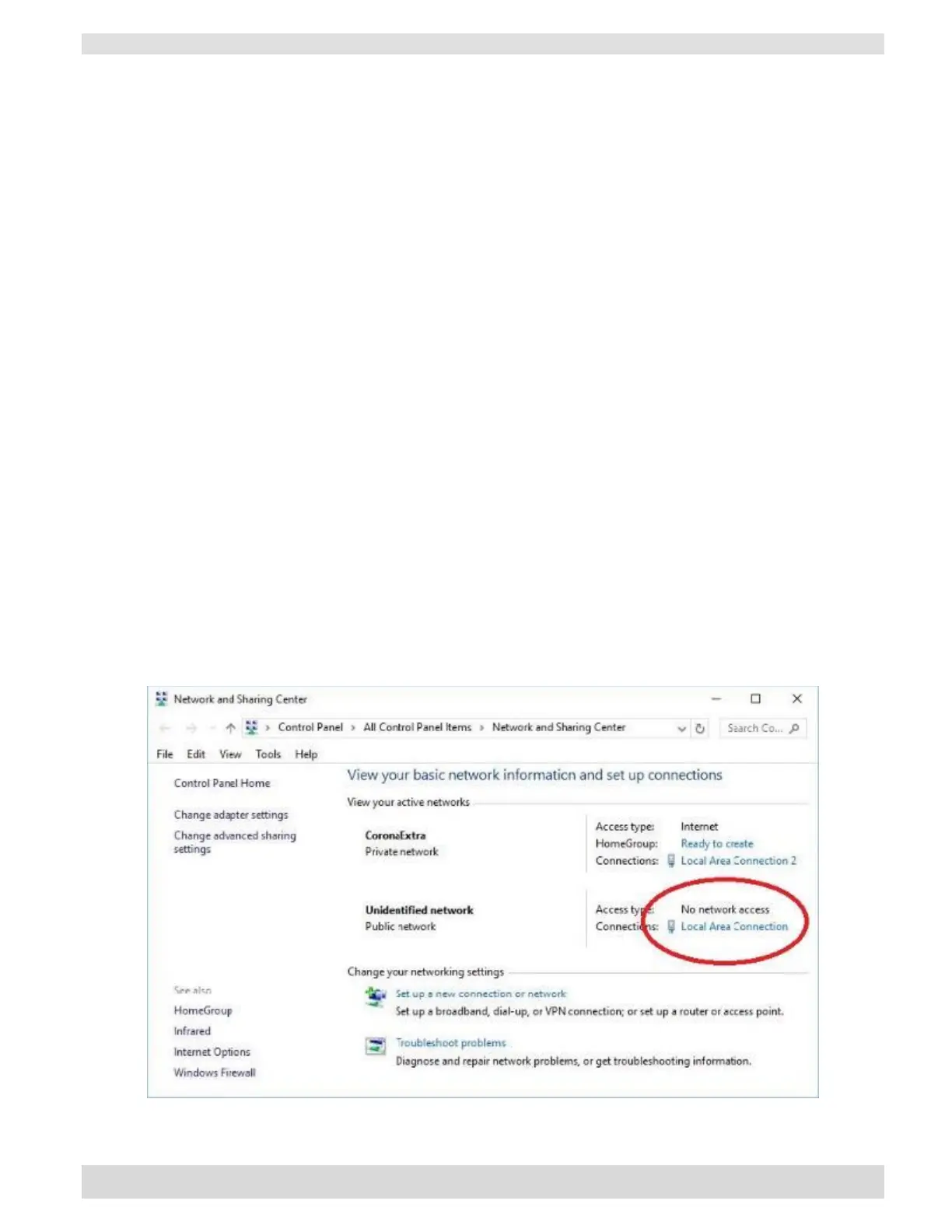
1. Click Start and go to: Control Panel\All Control Panel Items\Network and Sharing Center.
2. Click on ‘Local Area Connection’ (this is the connection where the XS1200 is connected). If you have
not connected the XS1200 to your computer, or if the cable is incorrectly connected you might not be able
to see this ‘Local Area Connection’, so make sure the XS1200 is properly connected to your computer:


 To Next Page