5. Commissioning
User Manual
28
5.3 Log in the APP via bluetooth
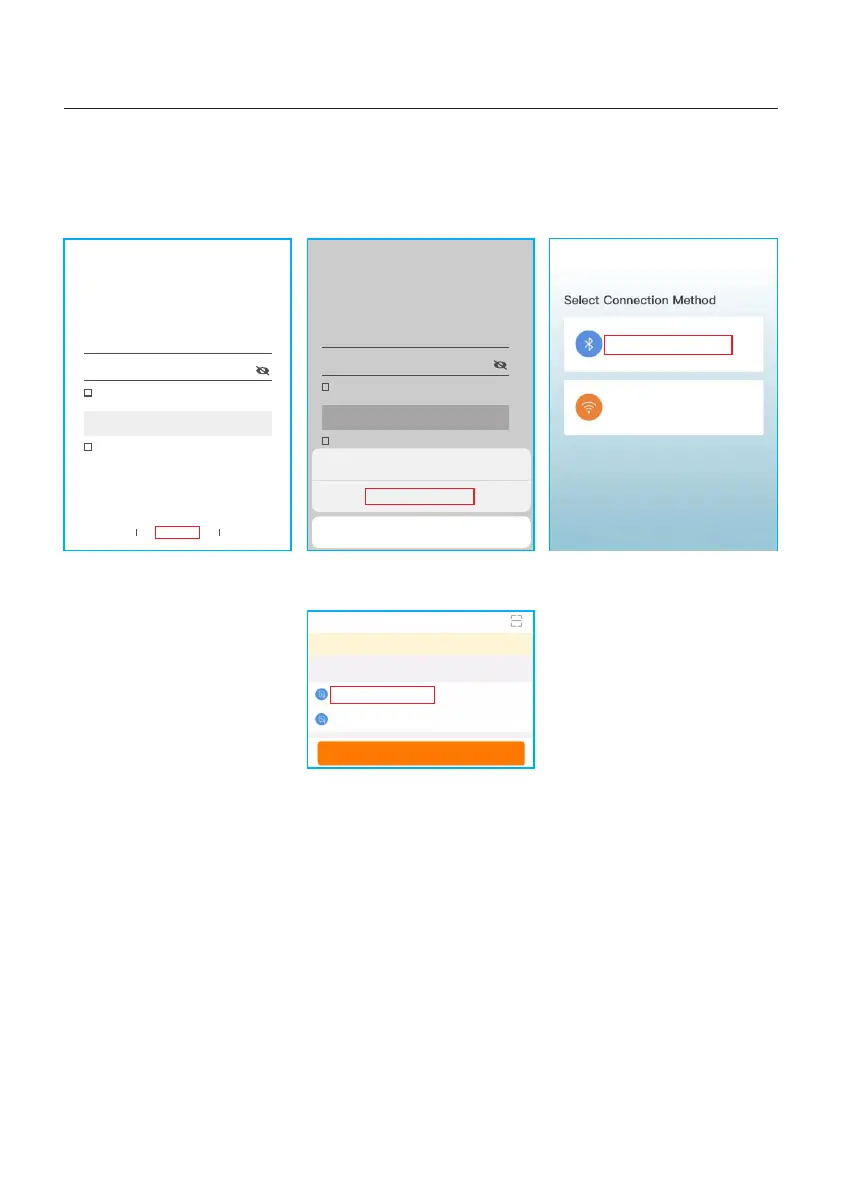
Step 1: Connect with Bluetooth.
Turn on Bluetooth switch on your mobile phone and then open the Soliscloud APP.
Click “More Tools”->”Local Operation”->”Connect with Bluetooth”
Hello,
Welcome to SolisCloud
Register
Username/Email
Password
I have agreed Privacy Policy
Remember Forgot Password
Language More Tools Data Migration
Log in
Hello,
Welcome to SolisCloud
Register
Username/Email
Password
I have agreed Privacy Policy
Remember Forgot Password
Log in
WiFi Configuration
Local Operation
Cancel
Local Operation
Connect With Bluetooth
Connect With WiFi
<
Step 2: Select the Bluetooth signal from the inverter. (Bluetooth Name: INV-Inverter SN)
INV-xxxxxxxxxxx
Nearby Device
<
vivo TWS 2
<
<
Search Device
If the d ev ice is not in the lis t, p lease click the “ Se arch Device”
butt on a t the bottom or dro p- down to refresh t he p age
Other Device







 To Next Page