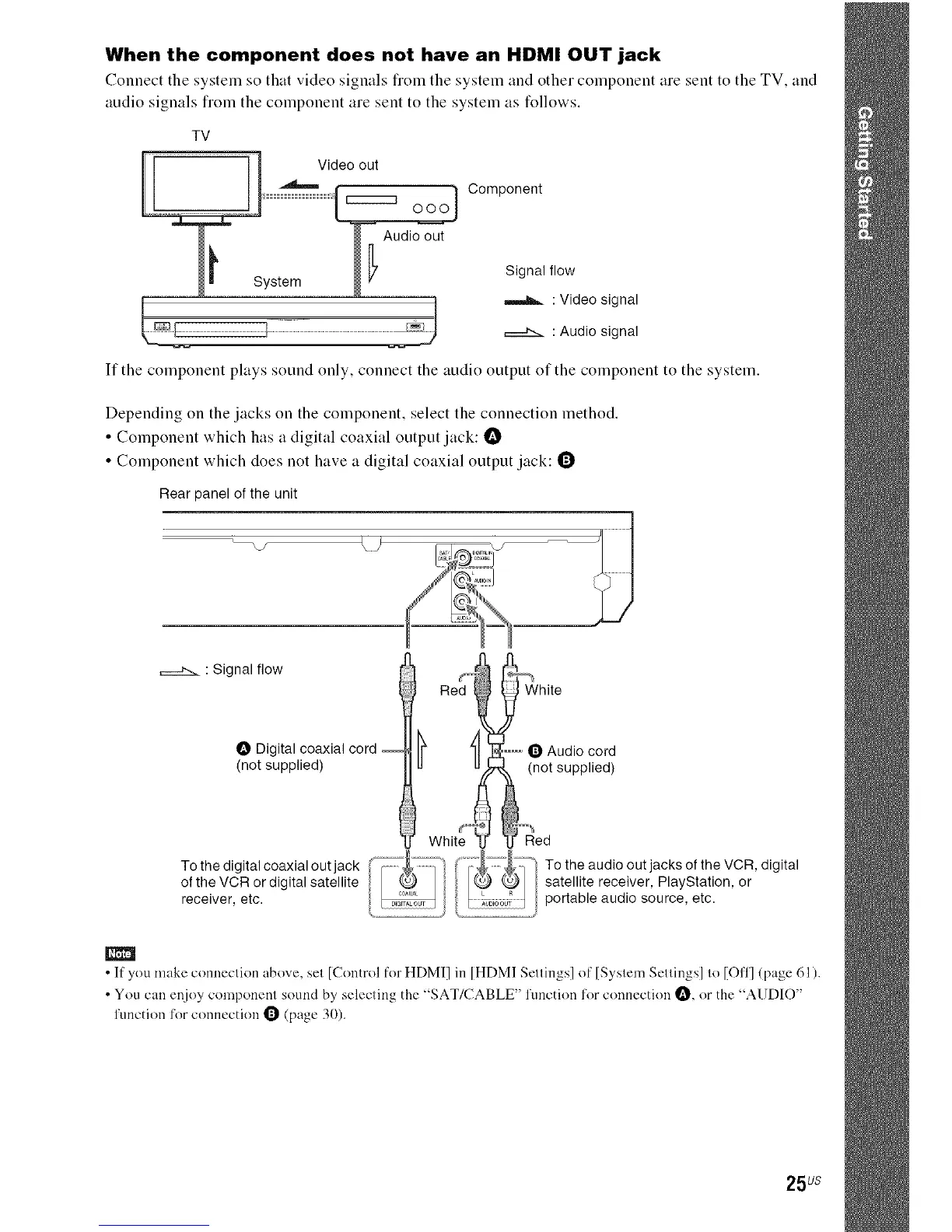
When the component does not have an HDMI OUT jack
Connect the system so that video signals from the system and other component are sent to the TV, and
audio signals flom the component are sent to the system as follows.
TV
Component
Signal flow
: Video signal
: Audio signal
If the component plays sound only, connect the audio output of the component to the system.
Depending on the jacks on the component, select the connection method.
• Compoueut which has a digital coaxial output jack: I_
• Compoueut which does uot have a digital coaxial output jack: Q
Rear panel of the unit
.-J-_ : Signal flow _ ¢ _ J'J_
_l Red_ white
O Digital coaxial cord _) _1_,,o_ O Audio cord
(n°t supplied) _11 _._ (n°t supplied)
]J- White _r
To the digital coaxial out jack
of the VCR or digital satellite
receiver etc.
To the audio out jacks of the VCR, digital
satellite receiver, PlayStation, or
portable audio source, etc
• If you make connection above, set [Control for HDMI] in [HDMI Settings] of [System Settings] to [Off] (page 61).
• You can enjoy component sound by selecting the "SAT/CABLE" function for connection I_, or the "AUDIO"
function for connection _ (page 30).
25us



 To Next Page