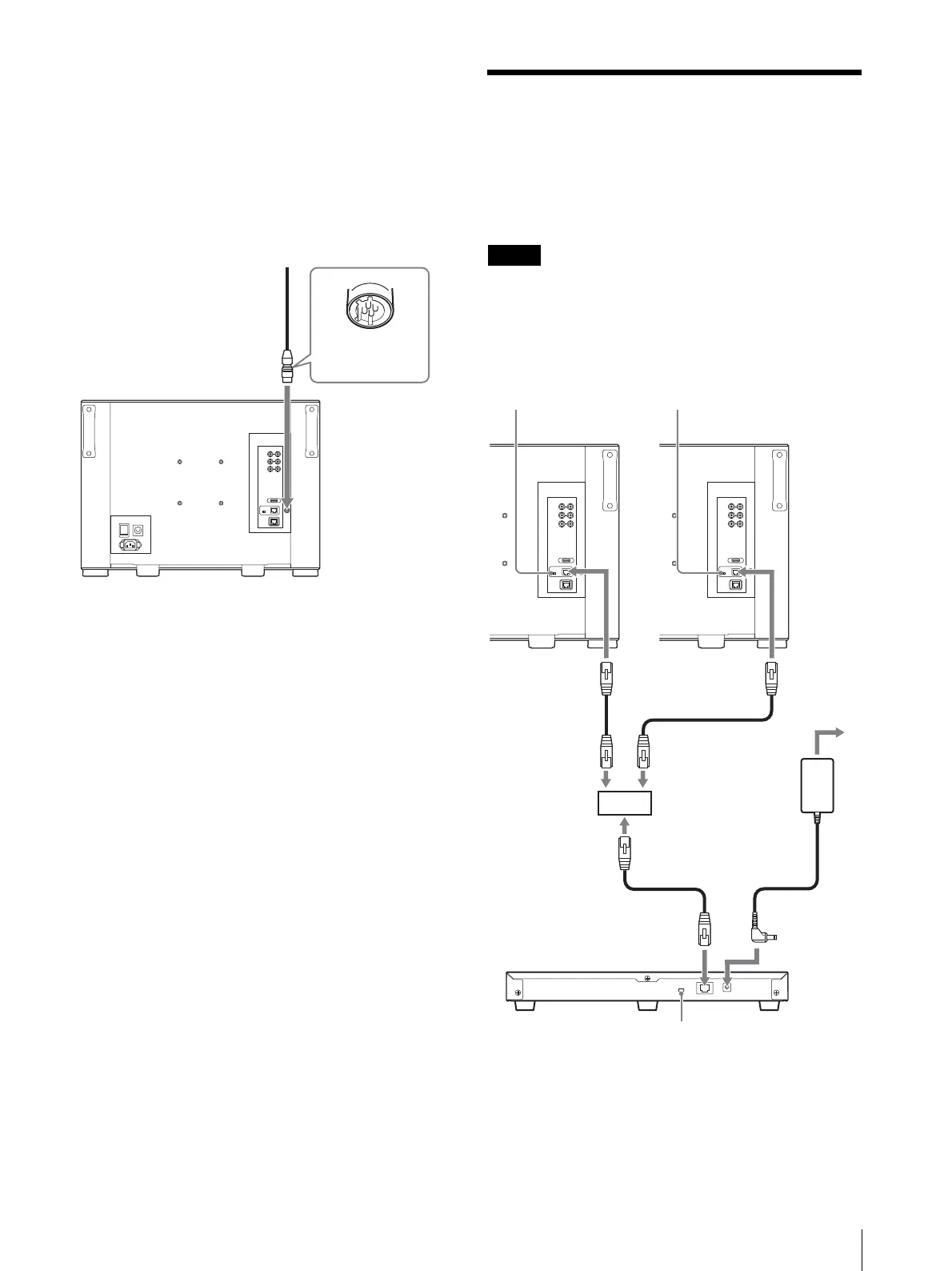
Connecting Multiple Units with the LAN
17
BKM-37H/38H/39H. Or connect the output cable
of the AC adaptor supplied with the controller to
the DC 12V connector of the controller.
Note on connecting the cable to the DC 12V
OUT connector
Insert the connector so as to fit the shape of the DC 12V
OUT connector.
Connecting Multiple Units
with the LAN
The controller controls up to 32 monitors. Up to three
controllers are connected to one monitor in single mode.
The controller cannot control monitors in another
subnetwork.
When you connect the BKM-16R, refer to the
operating instructions of BKM-16R.
1
Turn off the power switch of the monitor before
connecting the units.
Fit the shape of the
connector.
NETWORK switch:
Set to LAN.
NETWORK switch:
Set to LAN.
LAN (10/100)
connector
LAN (10/100)
connector
Switching hub
(recommended:
with AUTO MDI/
MDI-X function)
AC adaptor
(supplied with the
BKM-17R)
LAN (10/100)
connector
DC 12V
connector
Controller
(BKM-17R)
NETWORK switch:
Set to LAN.






 To Next Page