Initial settings
20
Initial settings
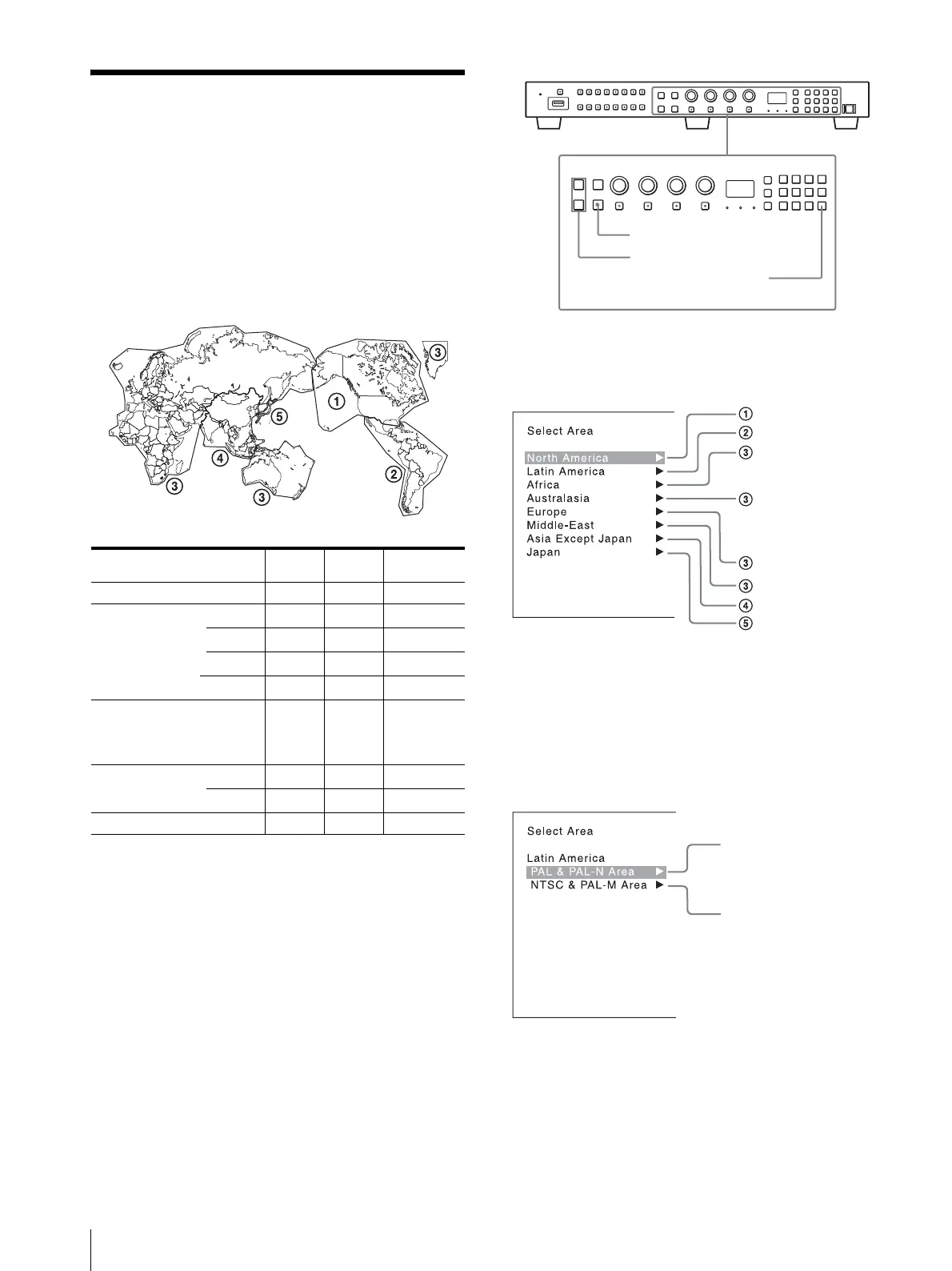
When you turn on the monitor for the first time after
purchasing it, select the area where you intend to use this
monitor from among the options.
When the area is selected, the menu item settings
suitable for the selected area are applied.
Default value for each area
Note on the setting of color temperature
If you measure the color temperatures of different
display types, such as CRT, LCD, or OLED, by using a
common (or general) color analyzer that is based on CIE
1931, and adjust the xy chromaticity to the same value,
the appearance may be different because of optical
spectrum differences.
To compensate for this difference, the [D93], [D65],
[D61], [D55], and [User1] to [User5] settings (except
[DCI]) of the monitor are adjusted by an offset
1)
.
1) The offset value applied (x-0.006, y-0.011) is based on the
Judd’s function to the CIE 1931 (x, y) value.
1
Turn on the monitor with the power switch.
The [Select Area] screen appears.
2
Press the UP or DOWN button of the controller to
select the area where you intend to use the monitor
and press the ENTER (Ent) button.
If you select either [Latin America] or [Asia Except
Japan], one of the following screens appears.
If [Latin America] is selected:
Select [PAL & PAL-N Area] or [NTSC & PAL-M
Area], and press the ENTER (Ent) button.
If [Asia Except Japan] is selected:
[Color
Tem p]
[Setup
Level]
[Color Profile]
[North America] [D65] [7.5%] [ITU-R BT.709]
[Latin America]
[PAL & PAL-N Area]
Argentina [D65] [0%] [ITU-R BT.709]
Paraguay [D65] [0%] [ITU-R BT.709]
Uruguay [D65] [0%] [ITU-R BT.709]
[NTSC & PAL-M Area]
Other Area [D65] [7.5%] [ITU-R BT.709]
[Africa]
[Australasia]
[Europe]
[Middle-East]
[D65] [0%] [ITU-R BT.709]
[Asia Except Japan]
[NTSC Area] [D65] [7.5%] [ITU-R BT.709]
[PAL Area] [D65] [0%] [ITU-R BT.709]
[Japan] [D93] [0%] [ITU-R BT.709]
ENTER button
UP/DOWN buttons
Ent button
North America
Latin America
Africa
Australia/New Zealand
Europe/Russia
Middle East
Asia Except Japan
Japan
PAL&PAL-N area
NTSC&PAL-M area






 To Next Page