15
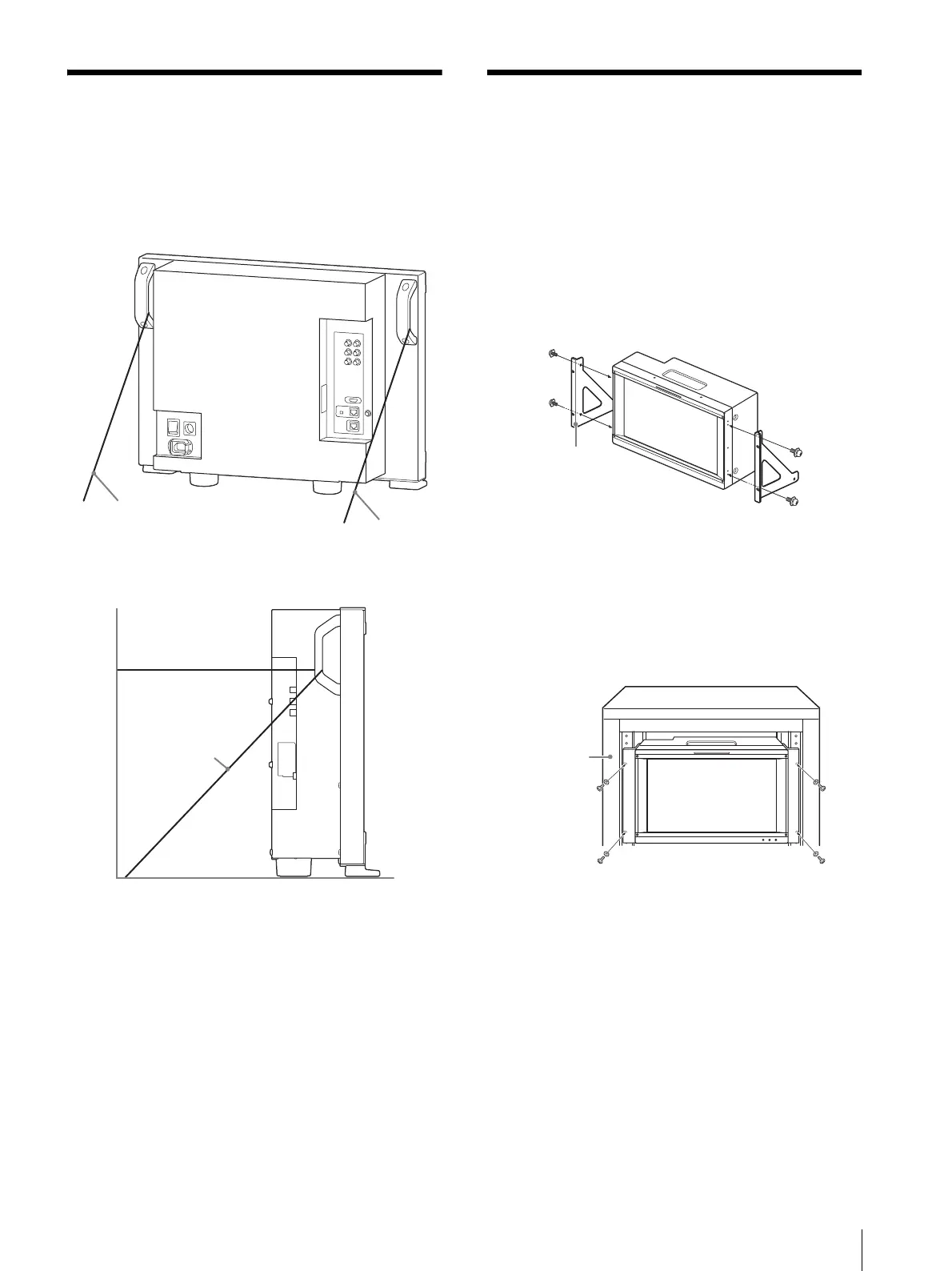
Preventing Falling of the Monitor (BVM-E251) / Mounting the Unit in a Rack (BVM-E171)
Preventing Falling of the
Monitor (BVM-E251)
1
Tie a piece of stout string (commercially available)
to the left and right handles of the monitor.
2
Secure the ends of the string to the floor or wall.
Mounting the Unit in a
Rack (BVM-E171)
To mount the unit in an EIA standard 19-inch rack, use
the supplied rack mount brackets and screws.
1
Remove the four feet from the bottom of the unit.
2
Attach the rack mount brackets to each side of the
unit with the supplied screws.
3
Screw the rack mount brackets to the rack to mount
the unit.
Use the commercially available screws that match
the size of the rack’s holes.
Rack mount
bracket
Screws (supplied)






 To Next Page