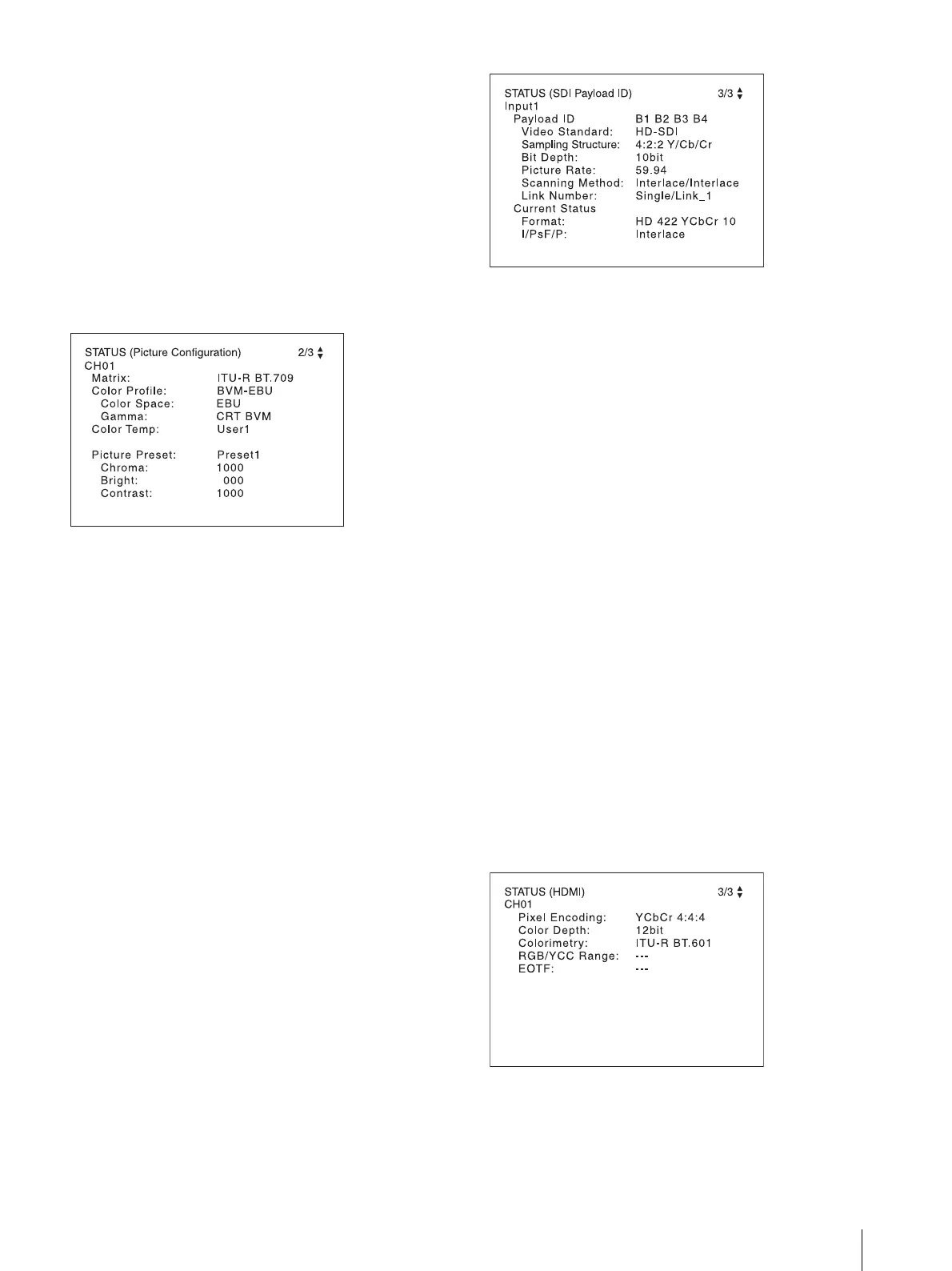
Displaying the Monitor Status Page
75
[RGB Range]: Displays [RGB Range] set in the
[Channel Configuration] menu.
[1080I/PsF]: Displays [1080I/PsF] set in the [Channel
Configuration] menu.
[Scan Mode]: Displays the selected scan mode.
[Aspect Mode]: Displays the selected aspect ratio.
[Interlace Display]: Displays On/Off of the interlace
display.
[Flicker Free]: Displays On/Off of flicker free.
Page 2/3
Information on the picture adjustments is displayed.
[Matrix]: Displays [Matrix] set in the [Channel
Configuration] menu.
[Color Profile]: Displays [Color Profile] set in the
[Channel Configuration] menu.
[Color Space]: Displays [Color Space] set in [Color
Profile].
[Gamma]: Displays [Gamma] set in [Color Profile]
[Color Temp]: Displays [Color Temp] set in the
[Channel Configuration] menu.
[Picture Preset]: Displays [Picture Preset] set in the
[Channel Configuration] menu.
[Chroma]: Displays the [Chroma] value of the
selected [Picture Preset].
[Bright]: Displays the [Bright] value of the selected
[Picture Preset].
[Contrast]: Displays the [Contrast] value of the
selected [Picture Preset].
Page 3/3
When the SDI signal is input
The same information as that of [SDI Payload ID Status]
in the [System Status] menu is displayed.
InputX: Input connector [Input1], [Input2], or
[Input1&2] of the displayed information is displayed.
[Payload ID]: Displays the 4-byte data for Payload ID of
the SMPTE-352M standard in hexadecimal in sequence
of Byte 1, Byte 2, Byte 3, and Byte 4.
When the Payload ID information is not set, only
[Current Status] is displayed, and [---] is displayed for
other items. When the following information is not
decoded, [Unknown] is displayed.
[Video Standard]: Decode display of Byte 1_Bit 6-0
[Sampling Structure]: Decode display of Byte 3_Bit 3-
0
[Bit Depth]: Decode display of Byte 4_Bit 1-0
[Picture Rate]: Decode display of Byte 2_Bit 3-0
[Scanning Method]: Decode display of Byte 2_Bit 7/
Byte 2_Bit 6
[Link Number]: Decode display of Byte 4_Bit 7-6
[Current Status]: Displays the current status of the
monitor.
[Format]: Displayed as “[Video Standard] +
[Sampling Structure] + [Bit Depth]”.
[Video Standard]: 3G / DL / HD / SD
[Sampling Structure]: 422 YCbCr / 444 YCbCr /
444 RGB / 444 XYZ
[Bit Depth]: 10 / 12
[I/PsF/P]: [Interlace] / [PsF] / [Progressive]
When the HDMI signal is input
The same information as that of [HDMI Status] in the
[System Status] menu is displayed.
[Pixel Encoding]: [RGB 4:4:4] / [YCbCr 4:4:4] / [YCbCr
4:2:2]
[Color Depth]: [8bit] / [10bit] / [12bit]
[Colorimetry]
1)
: [ITU-R BT.601] / [ITU-R BT.709] /
[ITU-R BT.2020]






 To Next Page