After about 3 seconds, the setting is complete.
To return to normal play mode, select "Repeat
off'
or "Shuffle off."
Operating
an
iPod
directly
-
Passenger
control
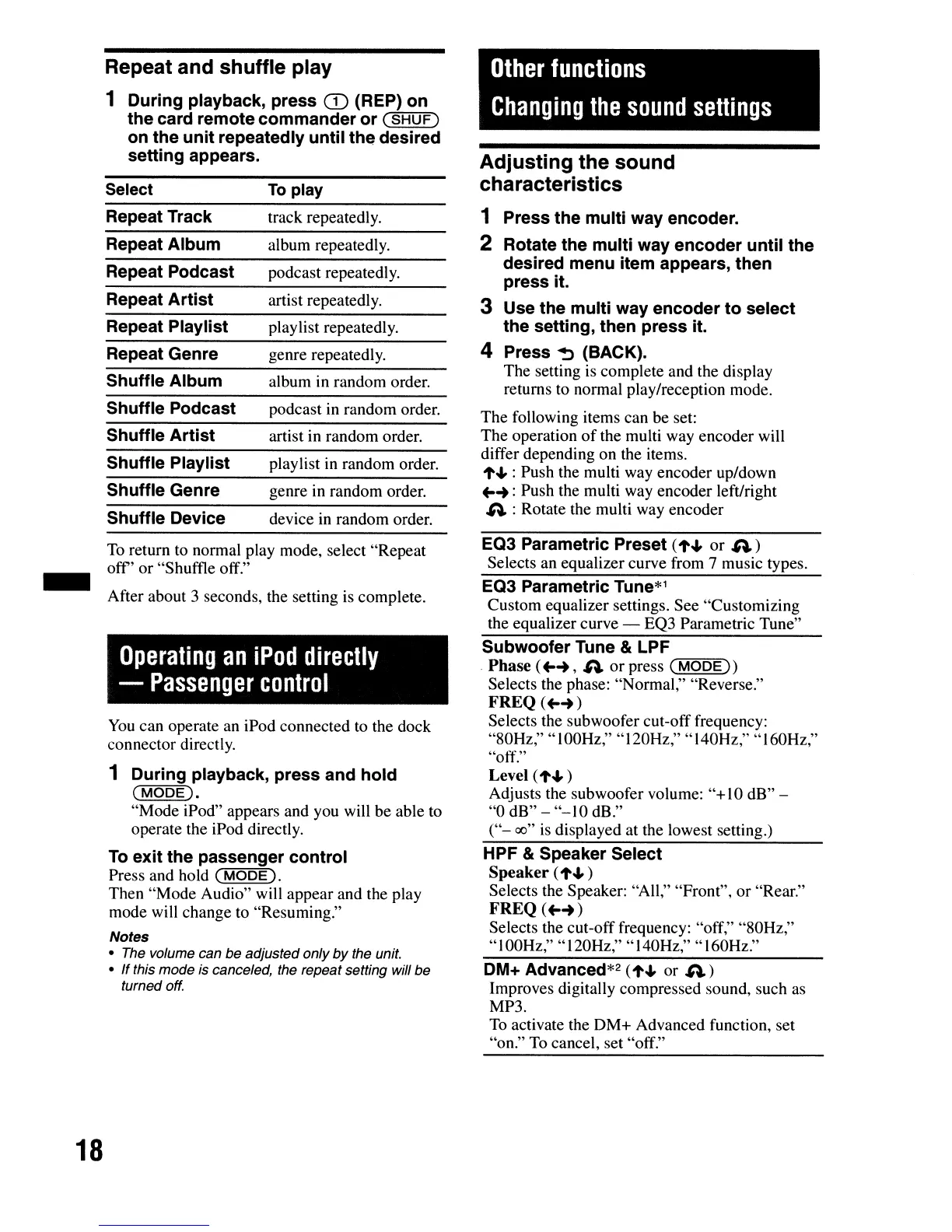
Repeat and shuffle play
1 During playback,
press
CD
(REP)
on
the
card remote
commander
or
(SHUF)
on
the
unit
repeatedly
until
the
desired
setting
appears.
DM+ Advanced*2 (
...
..,
or
A)
Improves digitally compressed sound, such as
MP3.
To activate the
DM+
Advanced function, set
"on." To cancel, set "off."
HPF & Speaker Select
Speaker (
...
.., )
Selects the Speaker:
"All,"
"Front",
or
"Rear."
FREQ(
..
-+)
Selects the cut-off frequency: "off," "80Hz,"
"100Hz," "120Hz," "140Hz," "160Hz."
Level (.....,)
Adjusts the subwoofer volume:
"+
10
dB" -
"0
dB"
-
"-10
dB."
("-
00"
is displayed at the lowest setting.)
Other
functions
Changing
the
sound
settings
EQ3 Parametric Preset (
.....,
or
A)
Selects an equalizer curve from 7 music types.
EQ3 Parametric Tune*1
Custom equalizer settings.
See
"Customizing
the equalizer curve -
EQ3 Parametric Tune"
Subwoofer
Tune & LPF
Phase (
..
-+,
A
or
press
(r;M'"'"'O=D=E"'"'»
Selects the phase: "Normal," "Reverse."
FREQ(
..
-+)
Selects the subwoofer cut-off frequency:
"80Hz," " 100Hz," "120Hz," "140Hz," "160Hz,"
"off."
Adjusting the sound
characteristics
1 Press
the
multi
way encoder.
2 Rotate
the
multi
way
encoder
until
the
desired menu item appears,
then
press
it.
3 Use
the
multi
way
encoder
to
select
the
setting, then
press
it.
4 Press ~ (BACK).
The setting is complete and the display
returns to normal play/reception mode.
The
following items can be set:
The operation
of
the multi way encoder will
differ depending on the items.
....., : Push the multi way encoder up/down
..
-+
:Push the multi way encoder left/right
A : Rotate the multi way encoder
playlist in random order.
podcast in random order.
device in random order.
genre in random order.
artist in random order.
playlist repeatedly.
album in random order.
podcast repeatedly.
genre repeatedly.
artist repeatedly.
track repeatedly.
album repeatedly.
To
play
You
can operate an iPod connected to the dock
connector directly.
1
During
playback,
press
and
hold
(MODE).
"Mode
iPod" appears and you will
be
able to
operate the iPod directly.
To
exit
the
passenger
control
Press and hold
(MODE
).
Then
"Mode
Audio" will appear and the play
mode will change to "Resuming."
Notes
• The volume can be adjusted only
by
the unit.
• If this mode
is
canceled, the repeat setting will be
turned off.
Shuffle Genre
Shuffle
Device
Shuffle Podcast
Shuffle
Play
list
Shuffle
Artist
Shuffle
Album
Repeat
Artist
Repeat Genre
Repeat Playlist
Repeat Track
Repeat Podcast
Repeat
Album
Select
-
18


 To Next Page