EasyManua.ls Logo

Sony CDX-GT930UI - Card Remote Commander Functions; Remote Commander Button Layout

Sony CDX-GT930UI
37 pages
Print Icon
To Next Page IconTo Next Page
To Previous Page IconTo Previous Page
Loading...
..
,
:cl
~
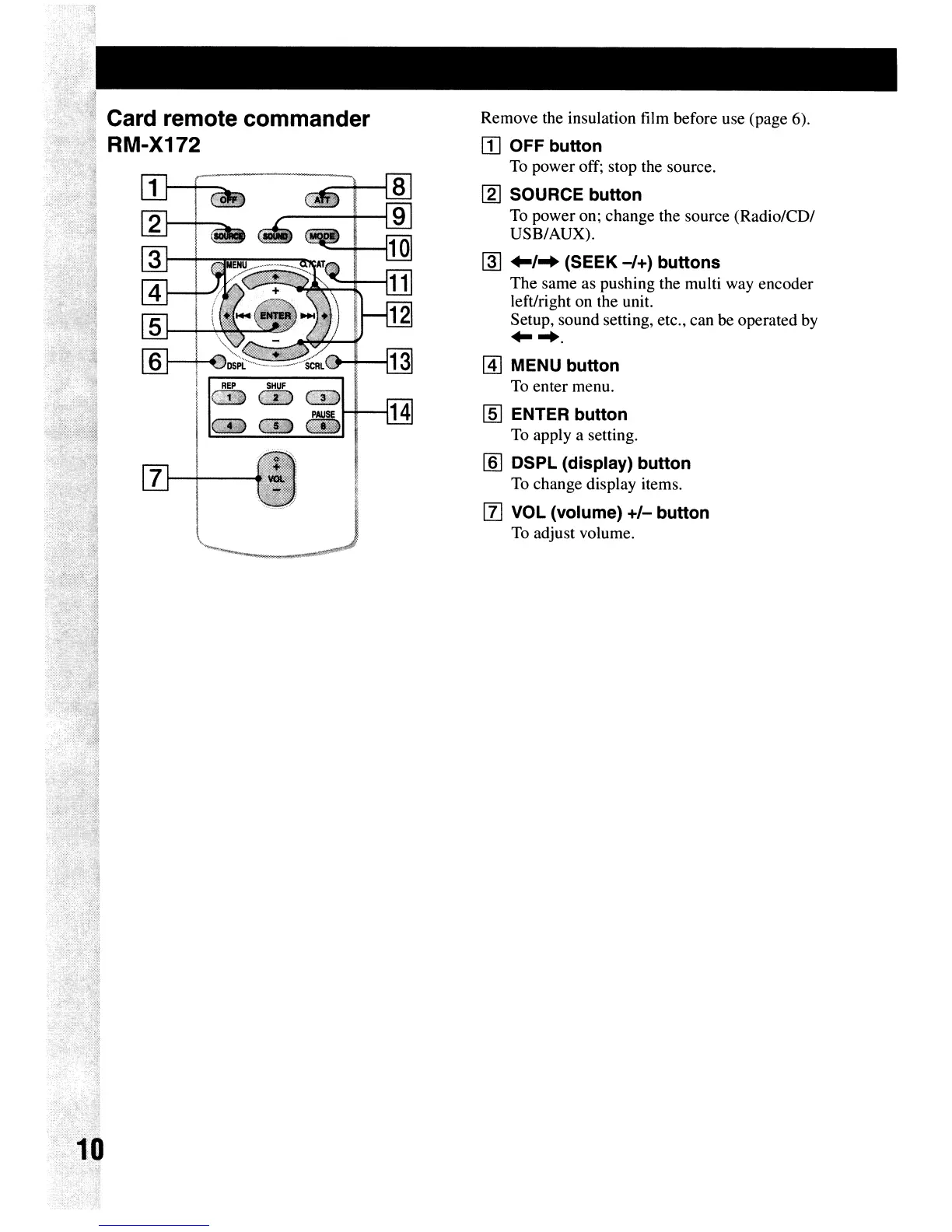
Card remote commander
· RM-X172
REP
SHUF
~;%;(?
G!\:lJw)
CW''3h11
PAUSE
1-+---114
8Ii(iB
__
7
1--i-------1
Remove
the insulation film before use (page 6).
[I] OFF button
To
power
off; stop the source.
[g] SOURCE button
To
power
on;
change
the source
(Radio/CD/
USB/AUX).
~
..
/
..
(SEEK
-/+)
buttons
The
same
as pushing the multi way
encoder
left/right
on
the unit.
Setup,
sound
setting, etc.,
can
be operated by
.....
[4] MENU button
To
enter
menu.
[§] ENTER button
To apply a setting.
[§] DSPL (display) button
To
change
display items.
[l]
VOL (volume)
+/-
button
To adjust volume.

Other manuals for Sony CDX-GT930UI

Related product manuals