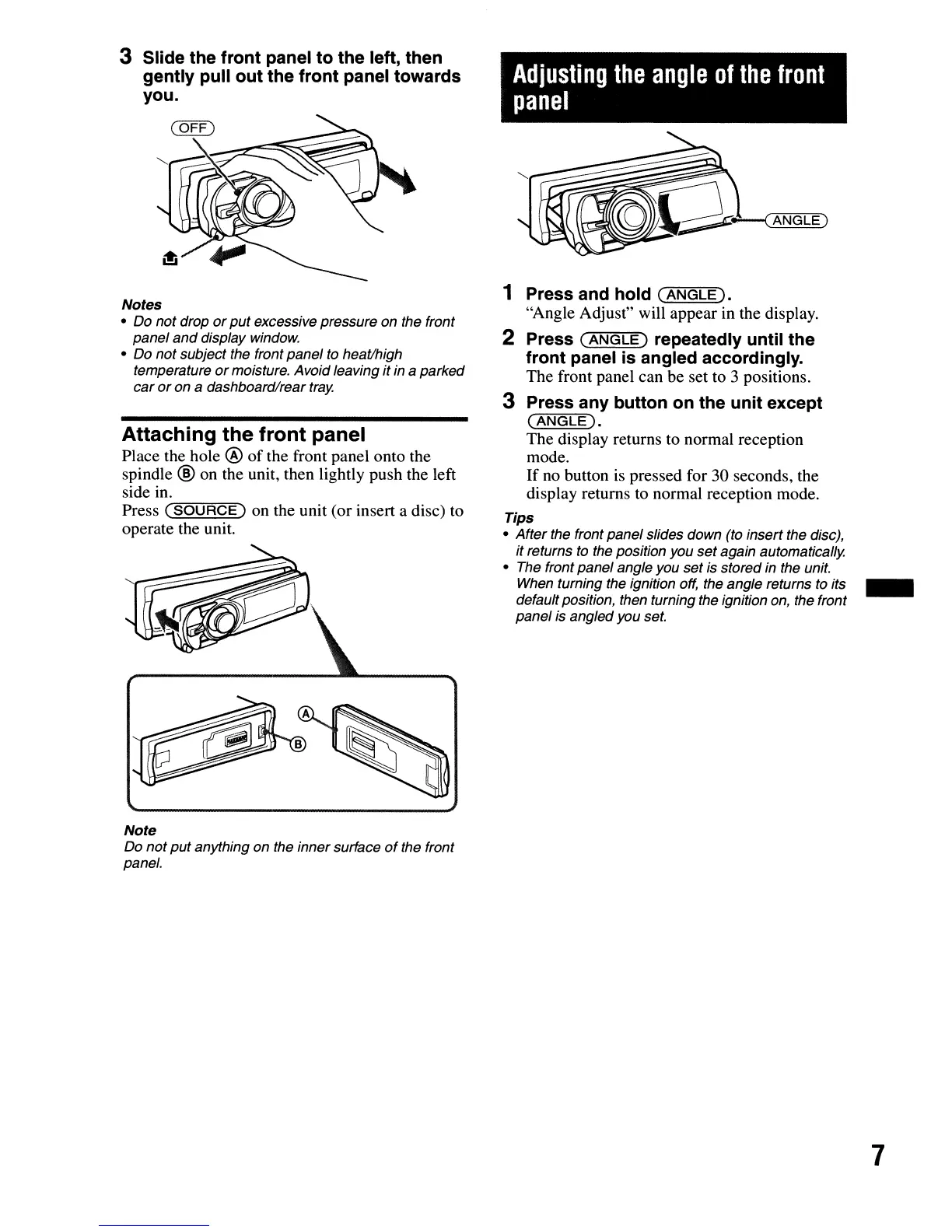
3 Slide the front panel to the left, then
gently pull out the front panel towards
you.
Notes
• Do not drop
or
put
excessive pressure on the front
panel
and
display window.
• Do not subject the front panel to heat/high
temperature
or
moisture. Avoid leaving it in a parked
car
or
on a dashboard/rear
tray.
Attaching the front panel
Place the hole @
of
the front panel onto the
spindle
®
on
the unit, then lightly push the left
side in.
Press
C"'-:S=-=O=U-'-;R=C=E=")
on the unit
(or
insert a disc)
to
operate
the unit.
Note
Do
not
put
anything on the inner surface
of
the front
panel.
Adjusting
the
angle
of
the
front
panel
1 Press and hold
(ANGLE).
"Angle Adjust" will
appear
in the display.
2 Press
(ANGLE)
repeatedly until the
front panel is angled accordingly.
The
front panel can
be
set to 3 positions.
3 Press any button on the unit except
(ANGLE).
The
display returns to normal reception
mode.
If
no button is pressed
for
30 seconds, the
display returns to normal reception mode.
Tips
• After the front panel slides down (to insert the disc),
it returns
to
the position you
set
again automatically.
• The front panel angle you
set
is stored in the unit.
When turning the ignition off, the angle returns to its _
defaultposition, then turning the ignition on, the front
panel is angled you set.
7


 To Next Page