DSO (Dynamic Soundstage Organizer) (...... or
A)
Creates a more ambient sound field.
To select the DSO mode:
"I,"
"2,"
"3"
or "off."
The larger the number, the more enhanced the
effect.
AUX Level*3(
......
or
A)
Adjusts the volume level for each connected
auxiliary equipment:
"+18
dB"
- "0
dB"
-
"-8
dB."
This setting negates the need to adjust the
volume level between sources.
Fader & Balance
FrontIRear/Center
(...... )
Adjusts the relative level.
Right/LeftlCenter (
.....
)
Adjusts the sound balance.
*I Hidden when EQ3 Parametric Preset is set
to
"off."
*2 When CDIUSBliPod source is activated.
*3 When
AUX
source is activated.
Customizing
the
equalizer
curve
- EQ3 Parametric Tune
"Custom"
of
EQ3 allows you to make your own
equalizer settings.
Select "Custom"
of
EQ3 Parametric Preset.
1 Select a source,
then
press
the
multi
way
encoder.
2 Rotate
the
multi
way
encoder
to
select
"EQ3 Parametric Tune,"
then
press
it
..
3
Setting
the
equalizer
curve.
• Frequency range
Push the multi way encoder left/right to select
the
"LOW,"
"MID"
or "HI."
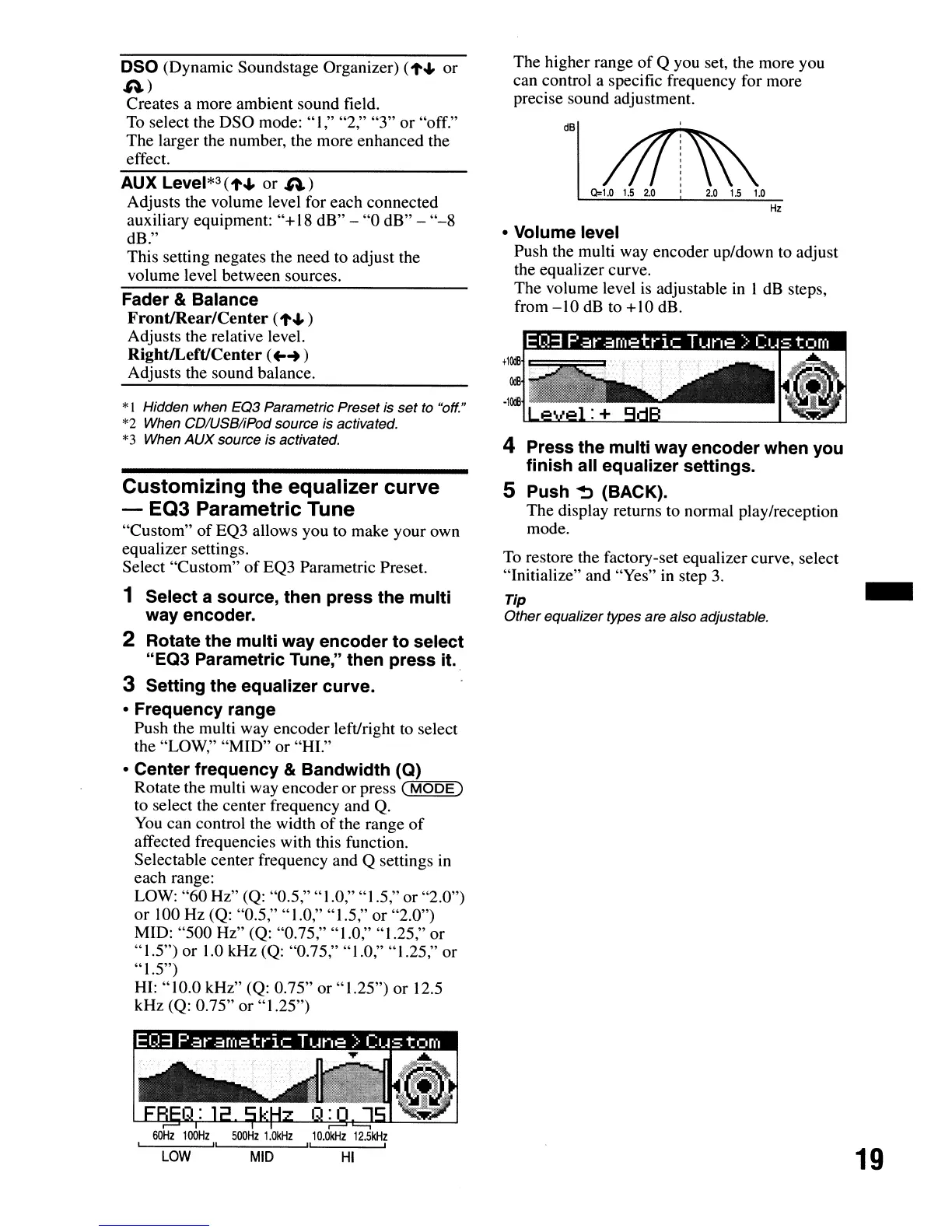
• Center
frequency
&
Bandwidth
(Q)
Rotate the multi way encoder or press
C"M7.0""D""E~)
to select the center frequency and Q.
You
can control the width
of
the range
of
affected frequencies with this function.
Selectable center frequency and Q settings in
each range:
LOW:
"60
Hz" (Q: "0.5," "1.0," "1.5," or "2.0")
or
100 Hz (Q: "0.5," "1.0," "1.5," or "2.0")
MID: "500 Hz" (Q: "0.75," "1.0," "1.25," or
"IS')
or
1.0 kHz (Q: "0.75," "1.0," "1.25," or
" 1.5")
HI: "10.0 kHz"
(Q: 0.75"
or"
1.25") or 12.5
kHz
(Q: 0.75" or "1.25")
60Hz
100Hz
500Hz
1.0kHz
10.0kHz
1205kHz
II
" ,
LOW
MID
HI
The higher range
of
Q you set, the more you
can control a specific frequency for more
precise sound adjustment.
dB
• Volume level
Push the multi way encoder up/down to adjust
the equalizer curve.
The volume level
is
adjustable
in
I dB steps,
from
-10
dB to +10 dB.
4 Press
the
multi
way
encoder
when you
finish
all equalizer
settings.
5 Push
~
(BACK).
The display returns to normal play/reception
mode.
To
restore the factory-set equalizer curve, select
"Initialize" and "Yes"
in
step
3.
Tip
Other equalizer types are also adjustable.
-
19


 To Next Page