Using
optional
equipment
Auxiliary audio equipment
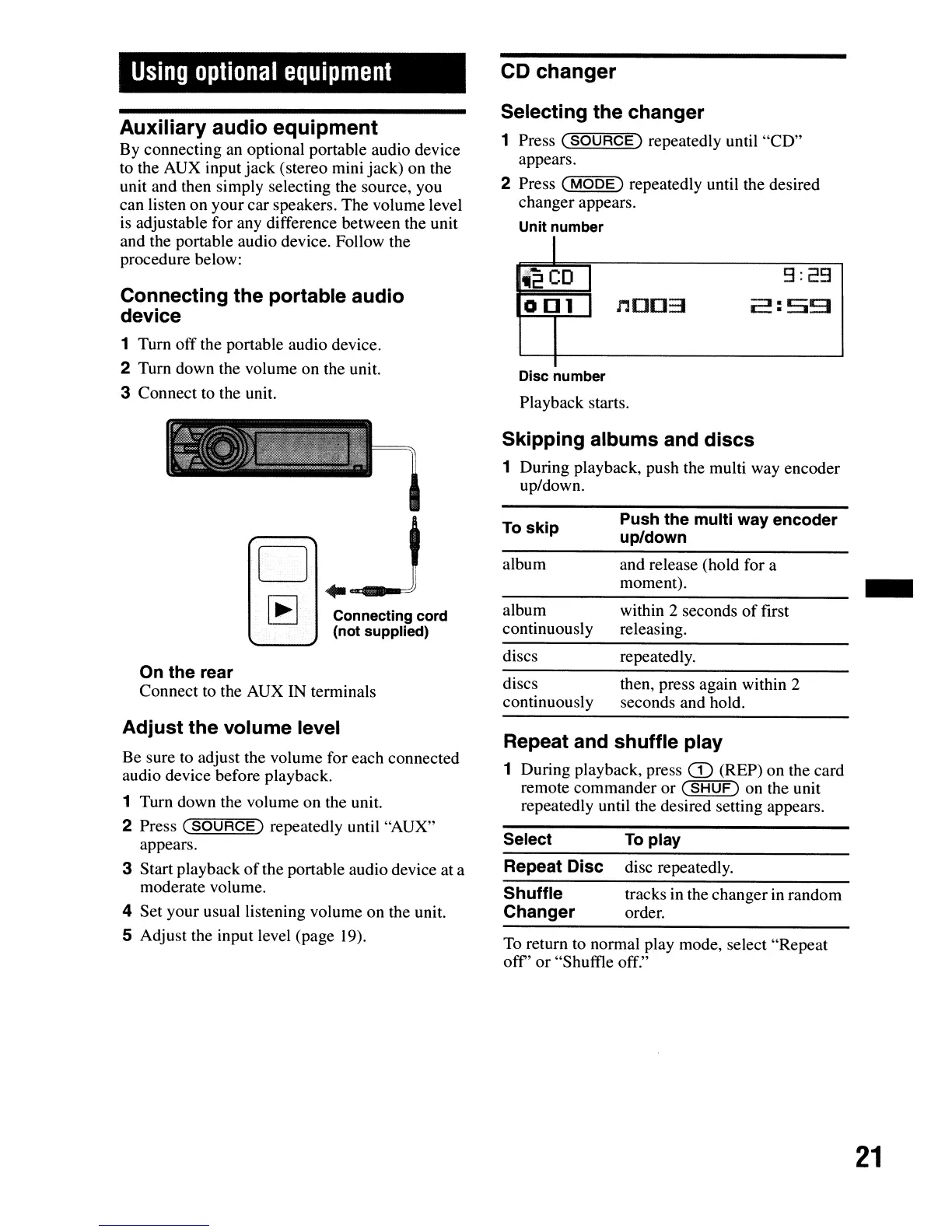
By connecting an optional portable audio device
to the AUX input jack (stereo mini jack) on the
unit and then simply selecting the source, you
can listen on your car speakers. The volume level
is
adjustable for any difference between the unit
and the portable audio device. Follow the
procedure below:
Connecting
the
portable
audio
device
1 Turn off the portable audio device.
2 Turn down the volume on the unit.
3 Connect to the unit.
CD
changer
Selecting
the
changer
1 Press
(SOURCe)
repeatedly until "CD"
appears.
2 Press
C""M
...
O=o=e:;-,)
repeatedly until the desired
changer appears.
Unit number
I
12
CD
9:29
o [] 1
n[][]3
2:59
Disc number
Playback starts.
Skipping
albums
and
discs
1 During playback, push the multi way encoder
up/down.
To return to normal play mode, select "Repeat
off'
or "Shuffle off."
Repeat and
shuffle
play
1 During playback, press
CD
(REP) on the card
remote commander or
(SHUF)
on the unit
repeatedly until the desired setting appears.
1
o
~
..
--J
I
~
I Connecting cord
(not supplied)
On
the
rear
Connect to the AUX IN terminals
Adjust
the
volume
level
Be sure to adjust the volume for each connected
audio device before playback.
1 Turn down the volume on the unit.
2 Press
(SOURCE)
repeatedly until "AUX"
appears.
3 Start playback
of
the portable audio device at a
moderate volume.
4 Set your usual listening volume on the unit.
S Adjust the input level (page
19).
To
skip
album
album
continuously
discs
discs
continuously
Select
Repeat Disc
Shuffle
Changer
Push
the
multi way
encoder
up/down
and release (hold for a
moment).
within 2 seconds
of
first
releasing.
repeatedly.
then, press again within 2
seconds and hold.
To
play
disc repeatedly.
tracks in the changer in random
order.
-
21


 To Next Page