Playback
Playback
49
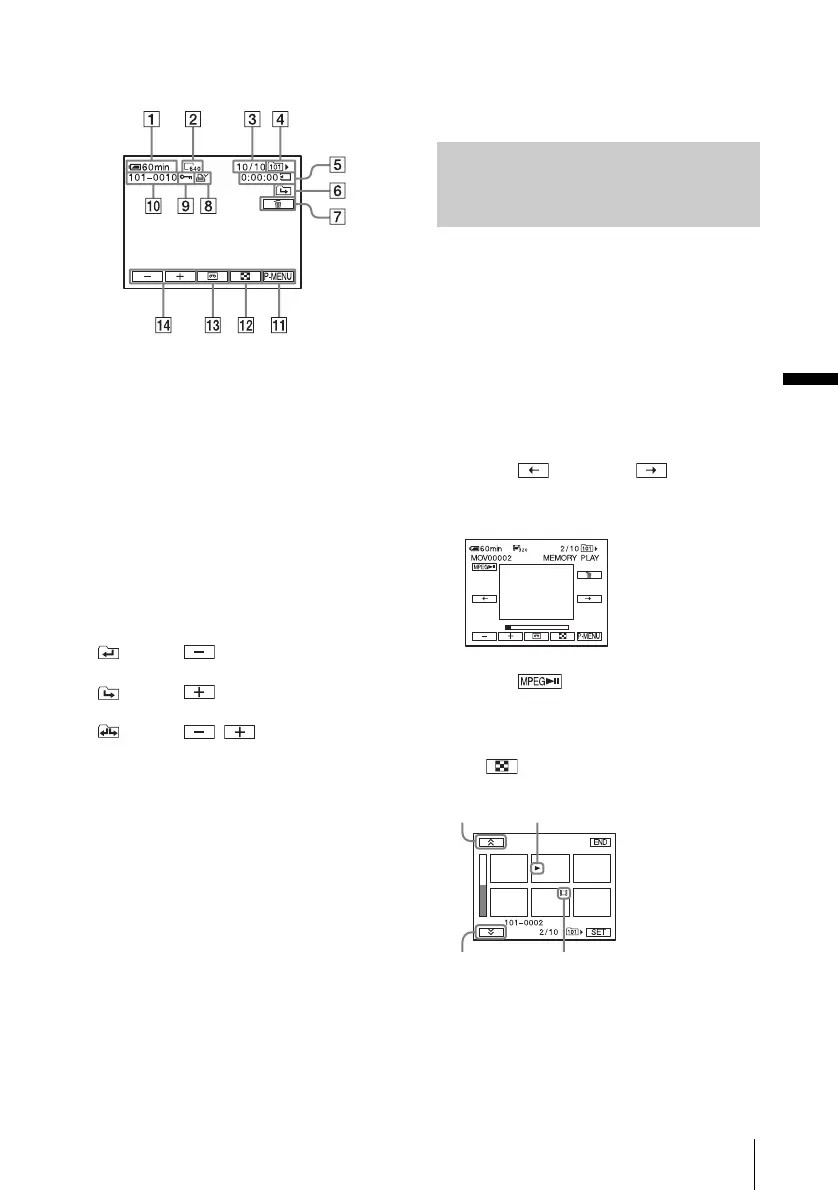
Indicators displayed during “Memory
Stick” playback
A Remaining battery
B Still image size
C Picture number/Total number of
recorded pictures in the current
playback folder
D Folder name
E Playing time (movies only)
F Previous/next folder indicator
The following indicators appear when the
first or last picture of the current folder is
displayed and when there are multiple
folders on the same “Memory Stick.”
: Touch to move to the previous
folder.
: Touch to move to the next
folder.
: Touch / to move to either
the previous or the next folder.
G Image delete button
H Print mark (still images only) (p. 102)
I Image protection mark (p. 101)
J Data file name
K Personal Menu button
L Index screen display button
M Tape playback select button
N Picture select button
b Note
• Folders that you have created on a computer,
renamed folders, and modified pictures may not
appear on the screen.
z Tip
• Once you record a picture in a folder, the same folder
will be set as the default folder for playback. You
can select a playback folder in the menu (p. 67).
Playing back in various modes
from a “Memory Stick”
Using the screen in step 4 in “Viewing
recordings on a “Memory Stick”” (p. 48), the
following operations are available.
To search for a scene in a movie
You can divide a movie into a maximum of 60
scenes in order to start playback from a
particular scene. The number of scenes you can
divide the movie into depends on the length of
the movie.
1 Touch (previous)/ (next) to
select a scene from which to start the
playback.
2 Touch .
To display 6 pictures at a time,
including movies – Index Screen
Touch .
N mark*
Next
6 pictures
Previous
6 pictures
* The picture displayed before switching to the index
screen.
Movie mark
,continued















 To Next Page