EasyManua.ls Logo

Sony DCR-PC330 - Page 9

Sony DCR-PC330
136 pages
Print Icon
To Next Page IconTo Next Page
To Previous Page IconTo Previous Page
Loading...
Quick Start Guide
Quick Start Guide
9
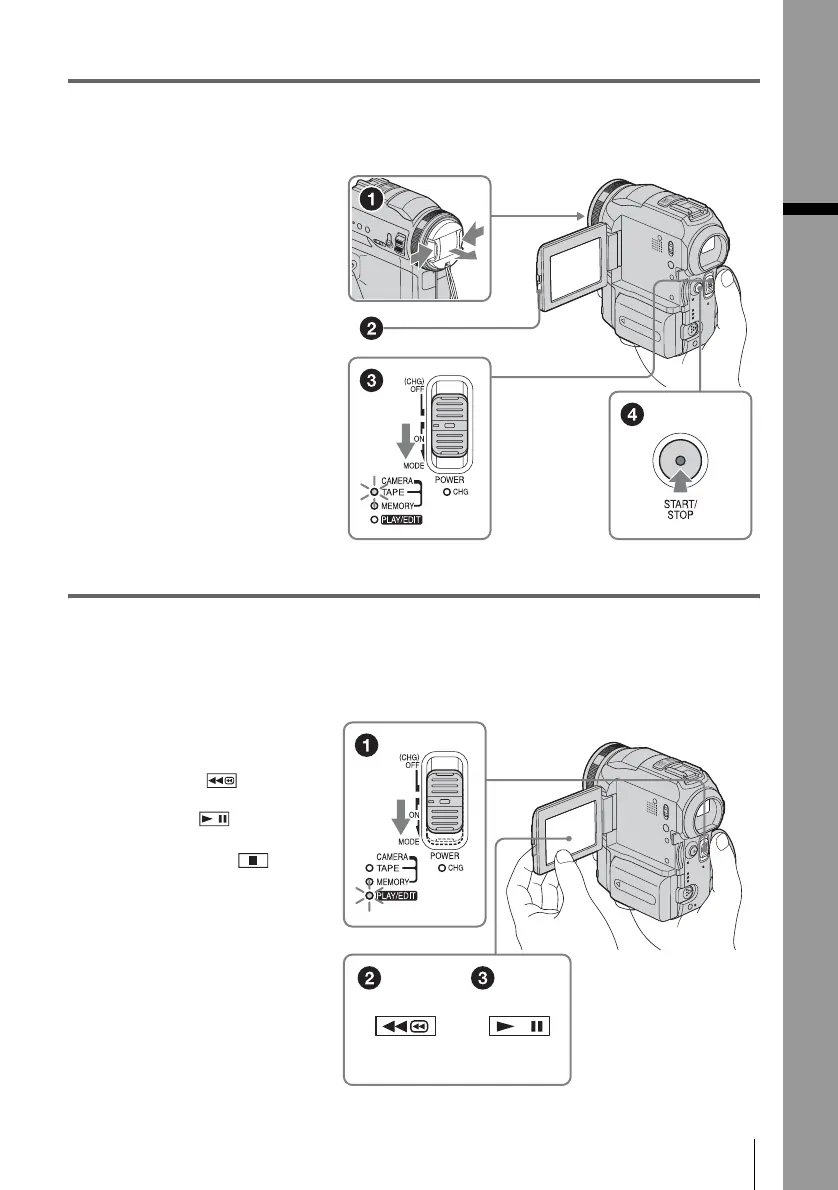
3 Start recording while checking the subject on the LCD screen.
The date and time is not set up in the default setting. To set the date and time, see page 18.
4 View the recorded picture on the LCD screen.
a Remove the lens cap.
b Press OPEN and
open the LCD panel.
c While pressing the
green button, slide
the POWER switch
down to light up the
CAMERA-TAPE lamp.
The power turns on.
d Press START/STOP.
Recording starts. To
change to standby mode,
press START/STOP again.
a Slide the POWER
switch repeatedly
until the PLAY/EDIT
lamp lights up.
b Touch (rewind).
c Touch (play) to
start the playback.
To stop, press .
To turn off the power, slide the
POWER switch up to (CHG)
OFF.

Table of Contents

Other manuals for Sony DCR-PC330

Related product manuals