46
GB
Items Functions
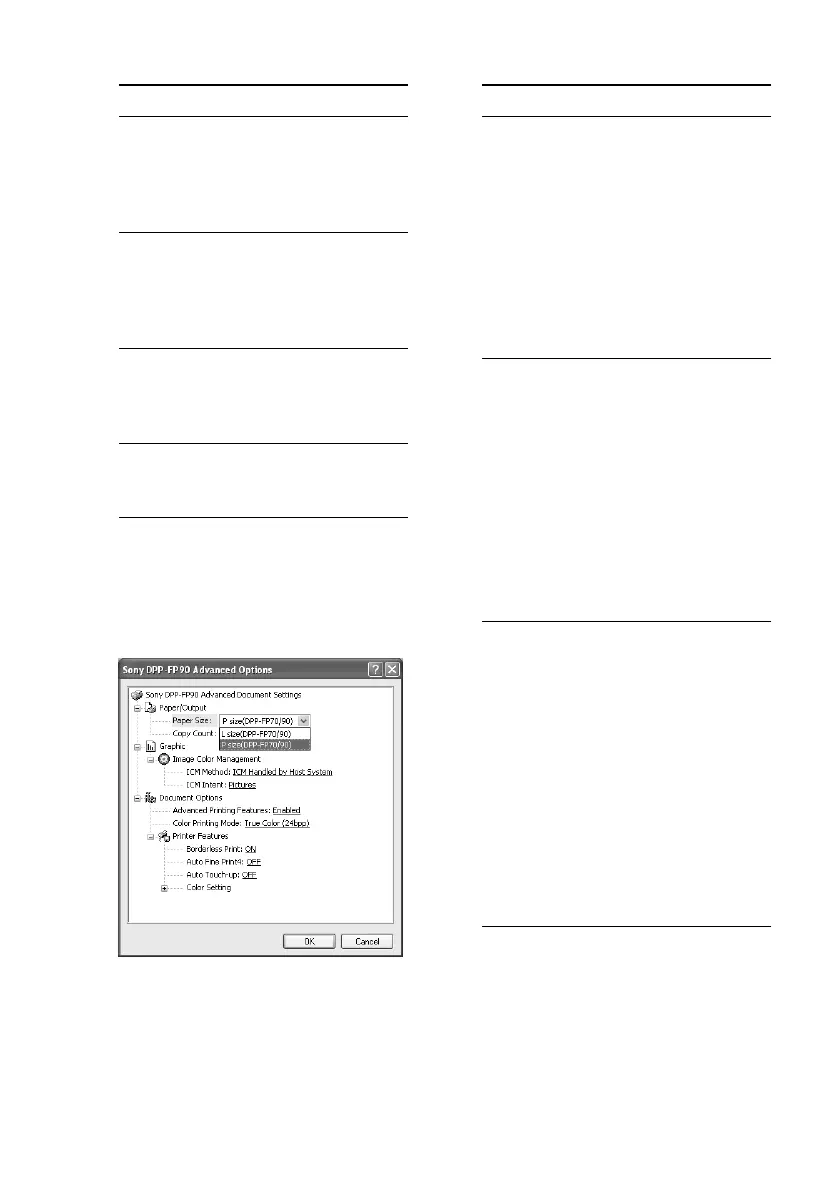
Paper/Output
•Paper Size: From the drop-
down list box, select the paper
size you actually use for
printing: P size (post card
size)/L size
Note: L size print paper is
not sold in some regions.
•Copy Count: Specify the
number of copies to be
printed.
Graphic - Image Color Management
•ICM Method: The printer does
not support the ICM method
settings. Even when you select
an option other than “ICM
Disabled”, the printed results
do not reflect the setting.
Leave the option as it is.
•ICM Intent: The printer does
not support the ICM Intent
settings. Leave the option as it
is.
Document Options
•Advanced Printing Features:
Select “Enabled” to turn on
advanced printing options
such as “Page Order”. If a
compatibility problem occurs,
disable this feature.
•Color Printing Mode: To print
in colors, select “True Color
(24bpp)”. To print in
monochrome, select
“Monochrome”.
For details, see the Windows
help.
Items Functions
Orientation
Select the orientation of an
image when printed:
•Portrait
•Landscape
Page Order
Select the order of the pages
when printed:
•Front to Back
•Back to Front
Pages Per Sheet
Specify the number of copies
per sheet to be printed.
Select “1”.
Advanced
Specifies the paper size or other
options.
8 Click “Advanced”.
The “DPP-FP70/FP90 Advanced
Options” dialog box is displayed.



 To Next Page