77
GB
Additional information
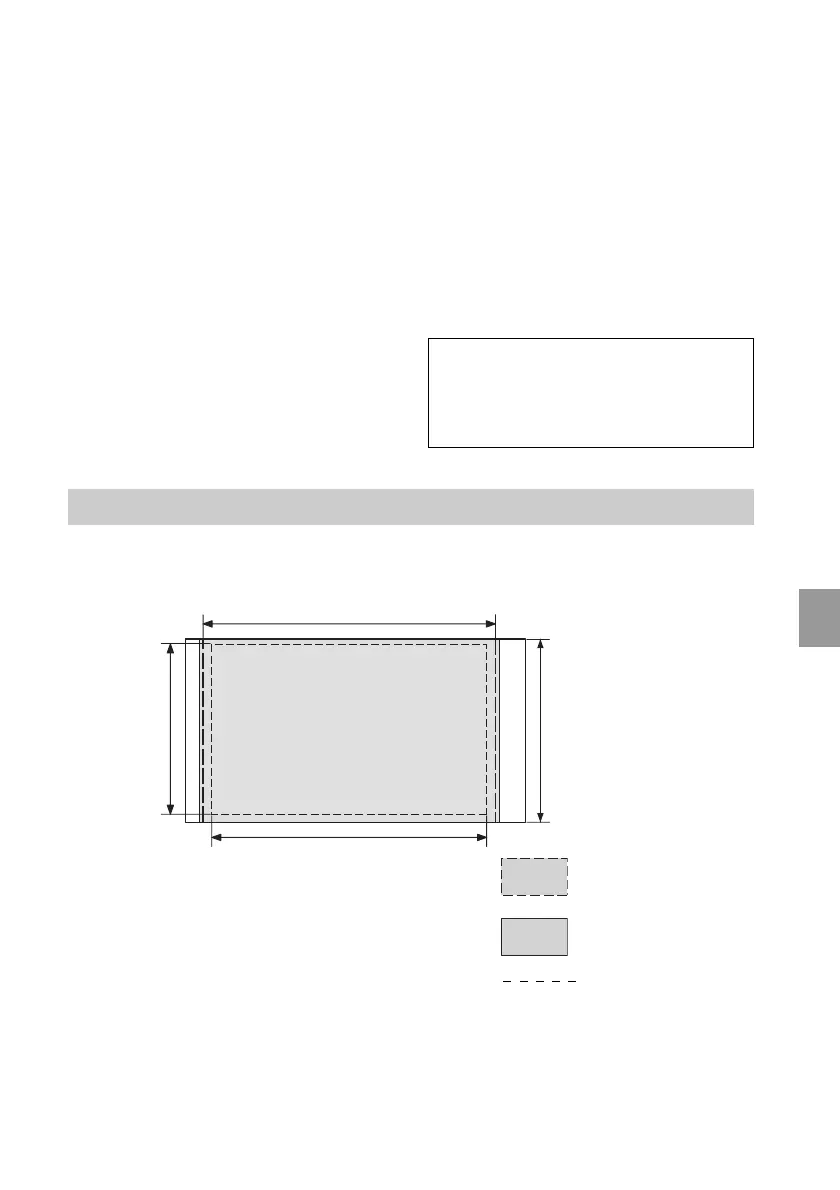
Printing range
P size
152.4 mm/6 inch
(1 800 dots)
95.5 mm/
3
7
/
8
inch
(1 128 dots)
101.6 mm/
4 inch
(1 200 dots)
The above illustrations are those when an image with a 2:3 aspect ratio is printed.
The printing range differs for a border or a borderless print.
Border print range
Borderless print
range
Perforations
146.3 mm/5
7
/
8
inch
(1 728 dots)
* The total number of sheets of P size print paper
that the printer can print is estimated to be
approximately 2,000. For the total number of
sheets, please check “Printer Information
Display” of the “Display/Printer setup” menu
(page 34).
*1: Print Settings: Borderless, No time stamp,
AutoFine Print 4: ON (Photo)
*2: When printing a photo (4.22 MB file size)
taken by a Sony digital still camera
containing effective picture elements of
approximately 10,100,000 or equivalent.
*3: Print Speed: Time from when the PRINT
button is pressed to when printing is
finished. (The printing time may vary
depending on a used equipment, a format
of an image, a used memory card, settings
of an application and operating conditions.)
*4: When printing from a “Memory Stick PRO
Duo” inserted in the printer ’s slot
*5: When printing via DSC-N2 connected by
USB cable. Time from when the “PRINT”
button on the OSD of the camera is pressed
to when the printing is finished.
*6:
The time for data processing and
transferring is excluded.
*7: Baseline JPEG with 4:4:4, 4:2:2, or 4:2:0
format
*8: You cannot print using the Picture Motion
Browser.
Customer support home page
The latest support information is available at
the following home page address:
http://www.sony.net/



 To Next Page