58
GB
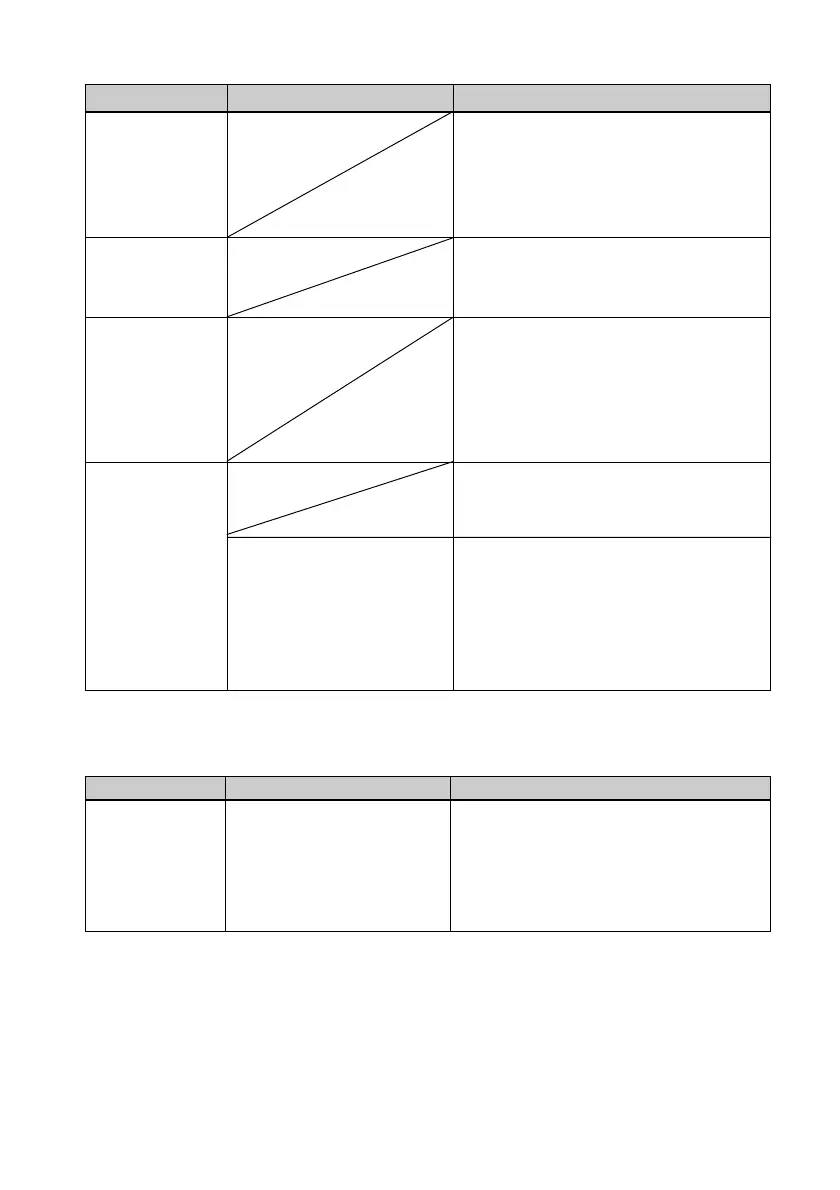
Symptom
The picture is
too bright, dark,
reddish,
yellowish, or
greenish.
The eyes of the
subject are red.
Red-eye
correction does
not take effect
with AUTO
TOUCH-UP
button.
Red-eye
correction does
not take effect
with “Red-eye
correction”
menu.
Check
• Did you enlarge, reduce
the size of, rotate, or
move an image after the
red-eye correction?
Cause/Solutions
c Adjust an image by selecting Menu -
Edit - Adjust. (.page 14)
c Press AUTO TOUCH-UP button to
adjust the red-eye phenomenon.
(.page 10)
c Adjust for the red-eye phenomenon
by selecting Menu - Edit - Red-eye
correction. (.page 16)
c Set the size of the adjustment frame to
be two to seven times as large as the
eye. (.page 16)
c Red-eye correction may not work
properly if other editorial operations
such as enlarging, reducing the size of,
rotating, or moving an image.
Perform these editorial operations first
and then perform red-eye correction.
Settings
Symptom
The
“Borderless”
and “Pattern1/
2” setting does
not take effect.
Check
• Are you operating the
Creative Print menu?
Cause/Solutions
c In the Creative Print menu, templates
are used and you cannot select
border/borderless prints.



 To Next Page