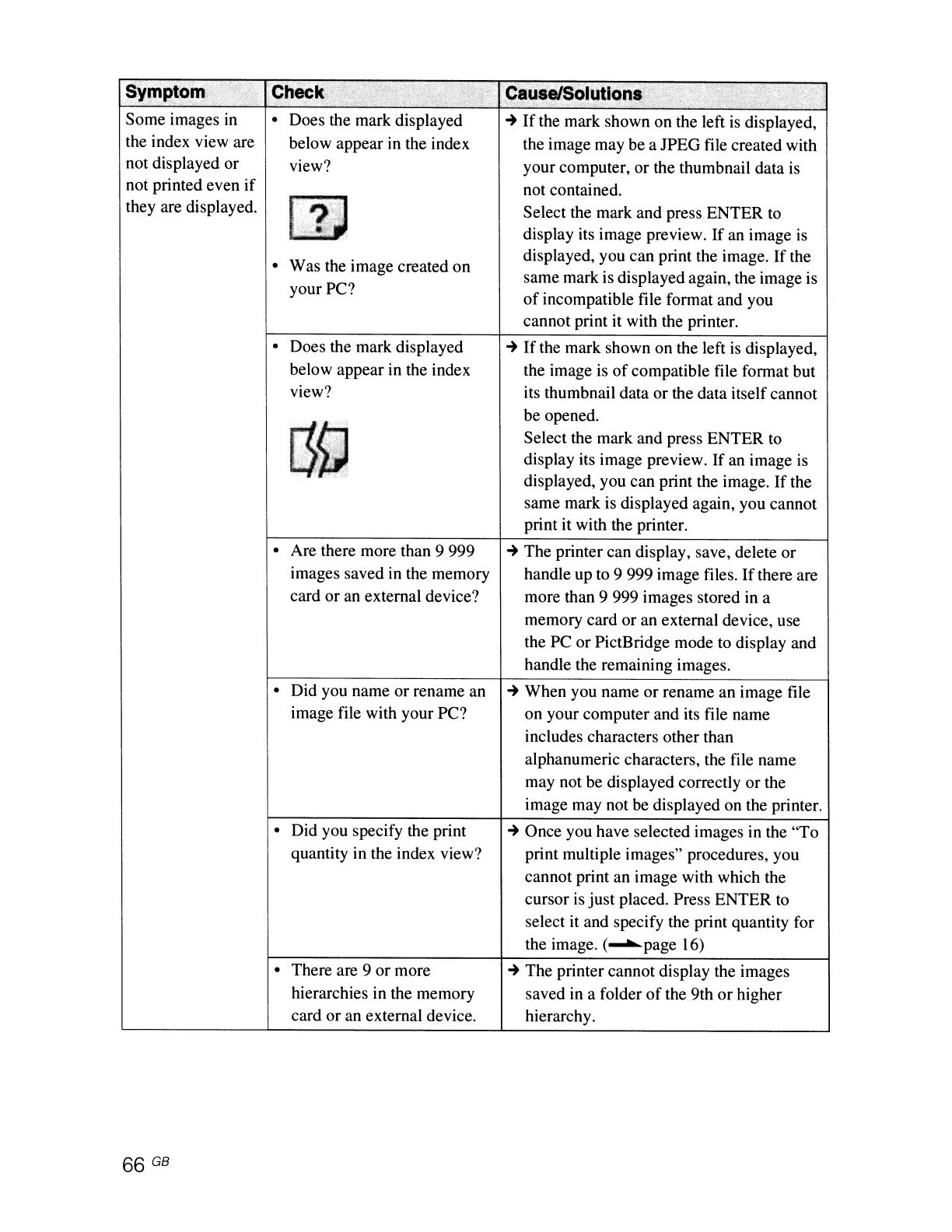
• Was the image created on
your PC?
Some images in
the index view are
not displayed or
not printed even
if
they are displayed.
• Does the mark displayed
~
If
the mark shown on the left
is
displayed,
below appear in the index the image may be a JPEG file created with
view? your computer, or the thumbnail data
is
not contained.
Select the mark and press ENTER to
display its image preview.
If
an image
is
displayed, you can print the image.
If
the
same mark is displayed again, the image is
of
incompatible file format and you
cannot print it with the printer.
• Does the mark displayed
below appear in the index
view?
llg
,
,.r
.,
• Are there more than 9 999
images saved in the memory
card or an external device?
~
If
the mark shown on the left
is
displayed,
the image
is
of
compatible file format but
its thumbnail data or the data itself cannot
be opened.
Select the mark and press ENTER to
display its image preview.
If
an image
is
displayed, you can print the image.
If
the
same mark is displayed again, you cannot
print it with the printer.
~
The printer can display, save, delete or
handle up to 9 999 image files.
If
there are
more than 9 999 images stored in a
memory card or an external device, use
the PC or PictBridge mode to display and
handle the remaining images.
• Did you name or rename an
~
When you name
or
rename an image file
image file with your PC? on your computer and its file name
includes characters other than
alphanumeric characters, the file name
may not be displayed correctly
or
the
image may not be displayed on the printer.
66 GB
• Did you specify the print
quantity in the index view?
• There are 9 or more
hierarchies in the memory
card or an external device.
~
Once you have selected images in the "To
print multiple images" procedures, you
cannot print an image with which the
cursor is
just
placed. Press ENTER to
select it and specify the print quantity for
the image. (........page 16)
~
The printer cannot display the images
saved in a folder
of
the 9th or higher
hierarchy.



 To Next Page