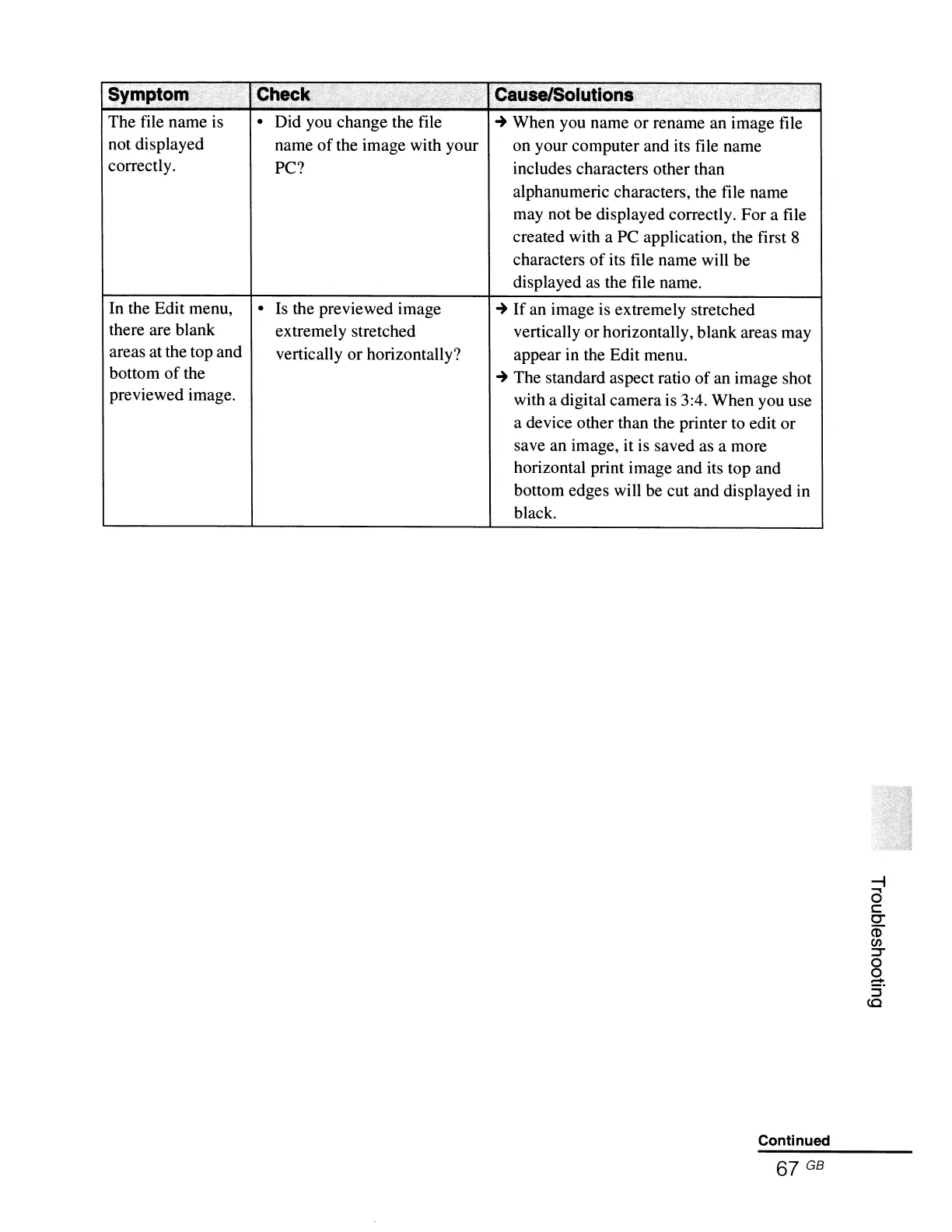
The file name is
not displayed
correctly.
In the Edit menu,
there are blank
areas at the top and
bottom
of
the
previewed image.
• Did you change the file
name
of
the image with your
PC?
• Is the previewed image
extremely stretched
vertically or horizontally?
~
When you name or rename an image file
on your computer and its file name
includes characters other than
alphanumeric characters, the file name
may not be displayed correctly. For a file
created with a PC application, the first 8
characters
of
its file name will be
displayed as the file name.
~
If
an image is extremely stretched
vertically or horizontally, blank areas may
appear in the Edit menu.
~
The standard aspect ratio
of
an image shot
with a digital camera is 3:4. When you use
a device other than the printer to edit or
save an image, it is saved as a more
horizontal print image and its top and
bottom edges will be cut and displayed in
black.
Continued
67 GB



 To Next Page