Adding audio files to
still images (VOICE)
Mode dial: m ISIAIMISCN
In the VOICE mode, the audio is also
recorded at the same time as recording
a still image. You can vividly record
the situation with audio.
4
s
1
f;;tCyde dial to m, S, A,
.
2 Press MENU.
The menu appears.
3
Select [MODE] (REC MODE)
with a, [VOICE] with A/V.
4 Record the image.
If you press and release the
shutter button,
sound is
recorded for five seconds.
If you hold down the shutter
button,
sound is recorded until
you release the shutter button for
up to 40 seconds.
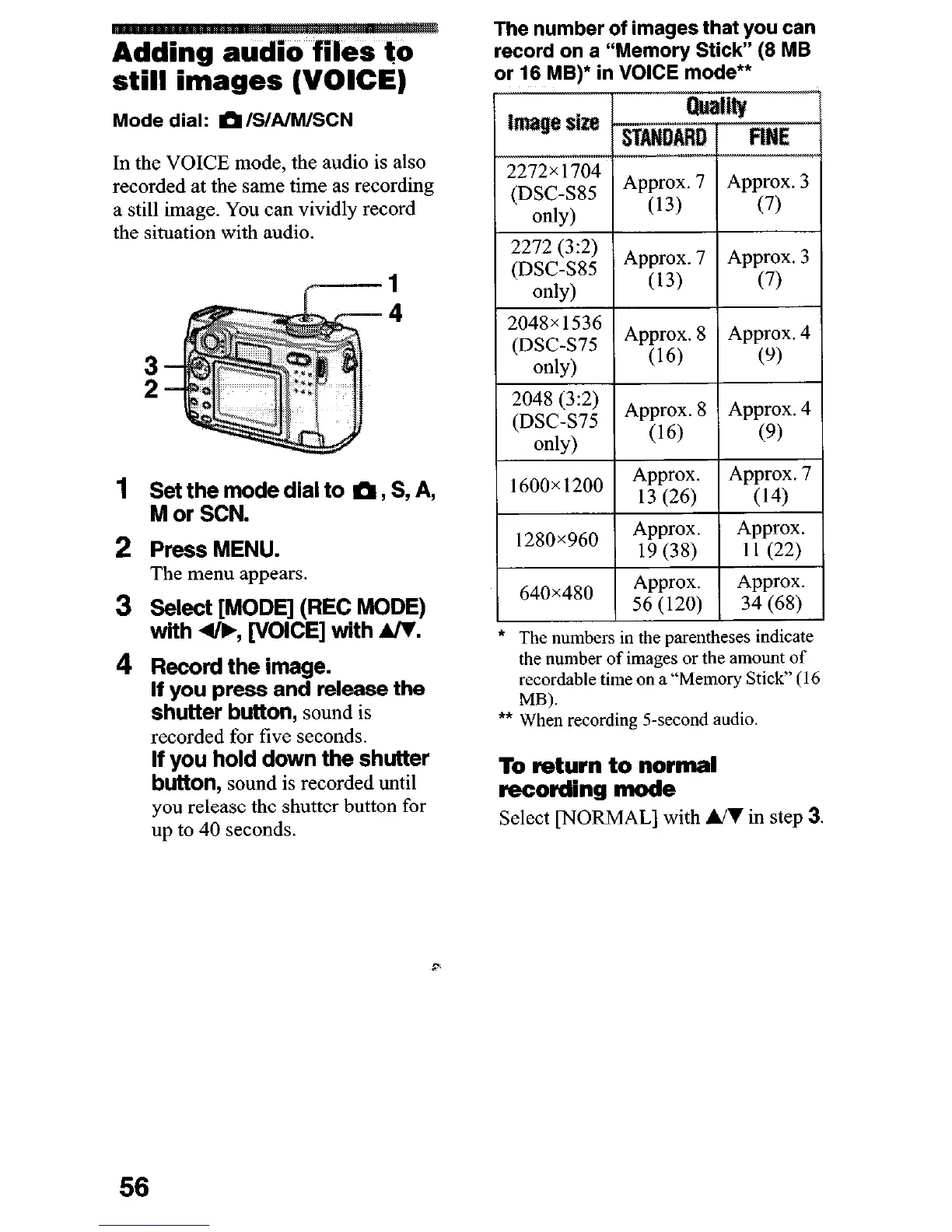
The number of images that you can
record on a “Mem&y Stick” (8 MB
or 18 MB)* in VOICE mode**
* The numbers in the parentheses indicate
the number of images or the amount of
recordable time on a “Memory Stick” (16
MB).
l
*
When recording 5-second
audio.
To return to normal
recording mode
Select [NORMAL] with UI in step 3.
56











 To Next Page