Preparing the power supply
Installing the battery pack
Your camera operates only with the “InfoLITHIUM” NP-FM50 battery pack* (M
series). You cannot use any other battery pack. See page 85 for more information
about “InfoLITHIUM” battery pack.
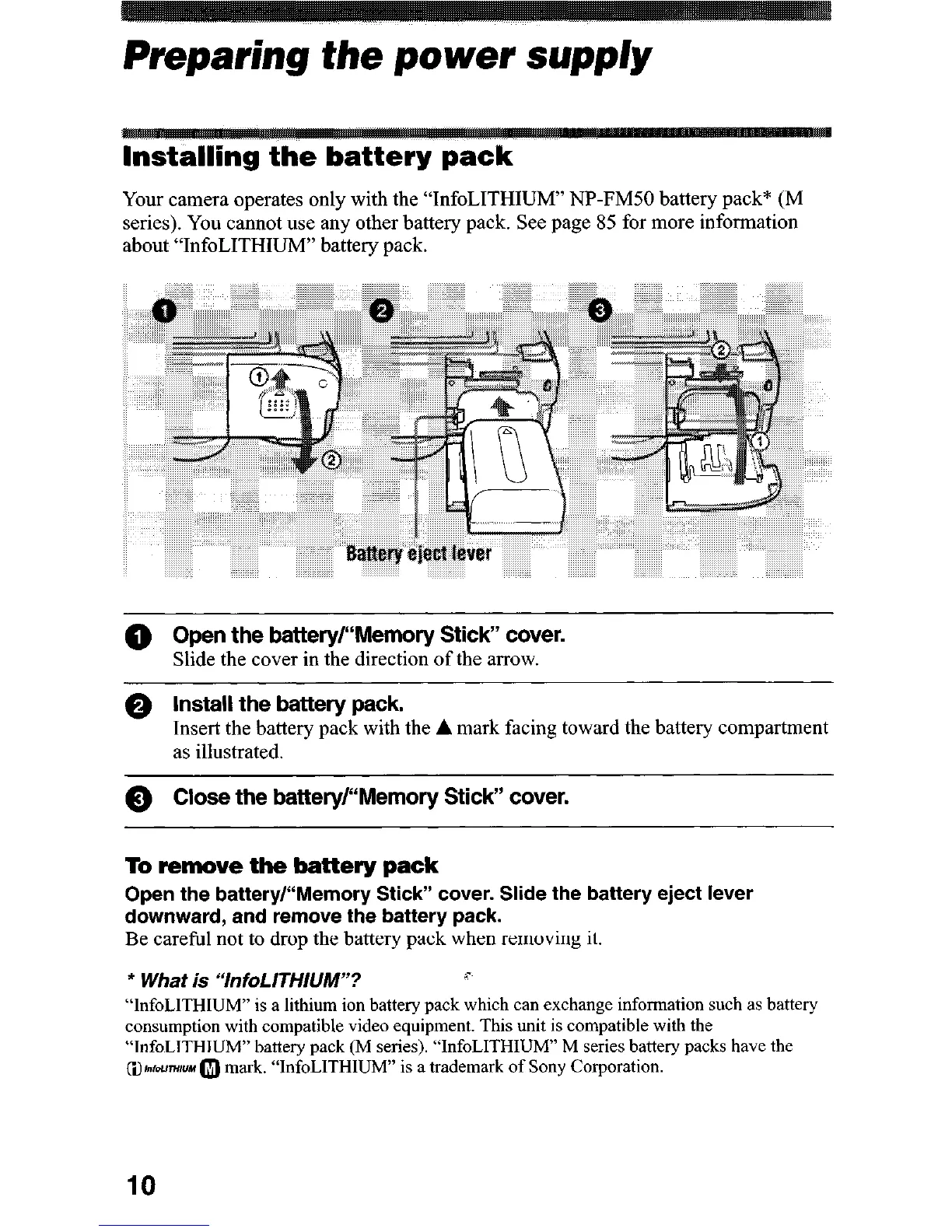
@ Open the battery/“Memory Stick” cover.
Slide the cover in the direction of the arrow.
Q Install the battery pack.
Insert the battery pack with the A mark facing toward the battery compartment
as illustrated.
0 Close the battery/“Memory Stick” cover.
To remove the battery pack
Open the battery/“Memory Stick” cover. Slide the battery eject lever
downward, and remove the battery pack.
Be careful not to drop the battery pack when removing it.
* What is “InfoLITHllJM”?
c
“InfoLlTHIUM” is a lithium ion battery pack which can exchange information such as battery
consumption with compatible video equipment. This unit is compatible with the
“InfoLITHIUM” battery pack (M series). “InfoLITHIUM” M series battery packs have the
QI~IDU~HUM 0 mark. “InfoLITHIUM” is a trademark of Sony Corporation.
10











 To Next Page