Identifying the parts
See the pages in parentheses for details of operation.
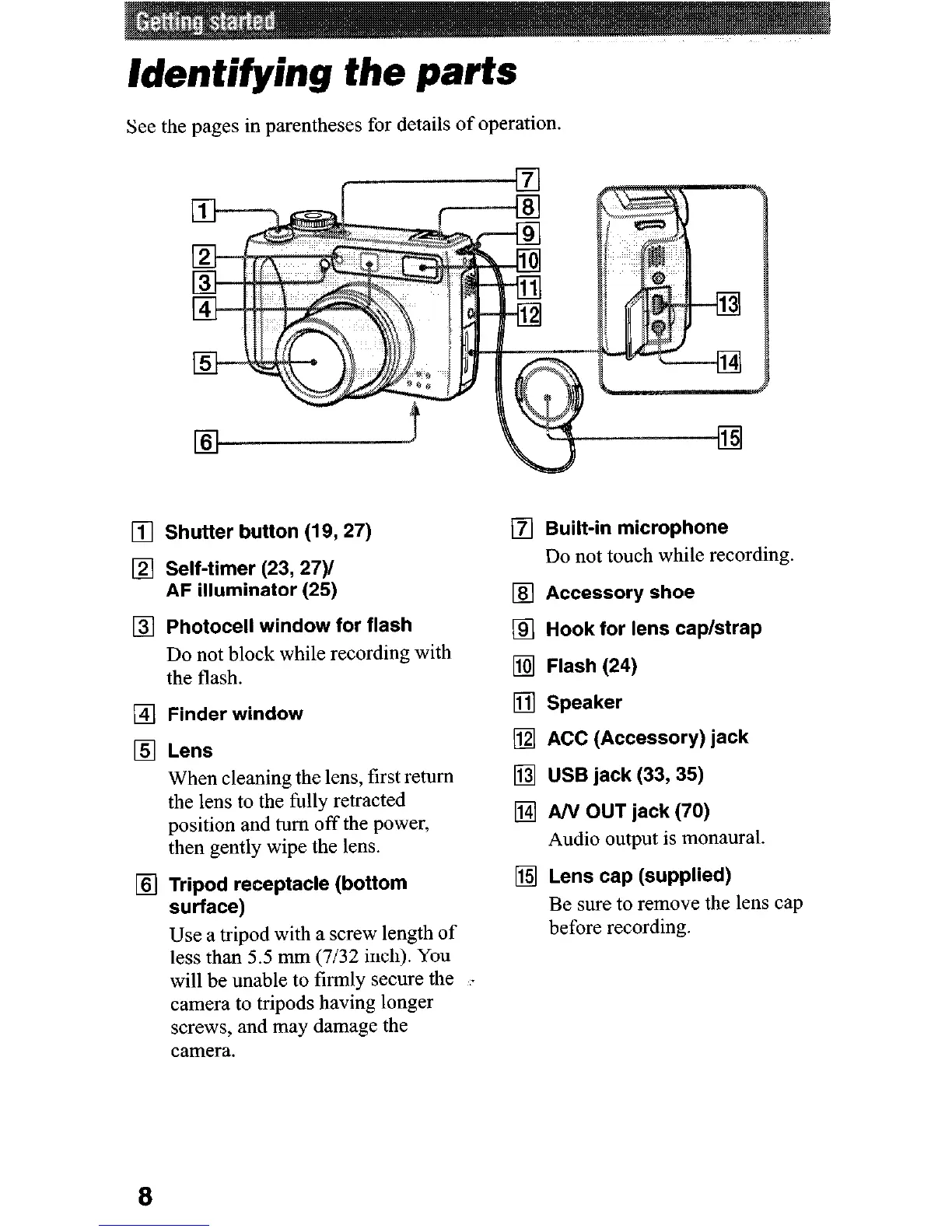
q Shutter button (19,27)
Self-timer (23, 27)/
AF illuminator (25)
Photocell window for flash
Do not block while recording with
the flash.
Finder window
Lens
When cleaning the lens, first return
the lens to the fully retracted
position and turn off the power,
then gently wipe the lens.
Tripod receptacle (bottom
surface)
Use a tripod with a screw length of
less than 5.5 mm (7132 inch). YOU
will be unable to firmly secure the . .
camera to tripods having longer
screws, and may damage the
camera.
q Built-in microphone
Do not touch while recording.
q Accessory shoe
q Hook for lens cap/strap
q Flash (24)
q Speaker
q ACC (Accessory) jack
q USB jack (33,35)
q AN OUT jack (70)
Audio output is monaural.
q Lens cap (supplied)
Be sure to remove the lens cap
before recording.
8











 To Next Page