EasyManua.ls Logo

Sony EV-C100 - Chapter 3: Basic Operations; Playback Functions

Sony EV-C100
28 pages
Print Icon
To Next Page IconTo Next Page
To Previous Page IconTo Previous Page
Loading...
COUNTER
RESET
@
STOP
DUAL
MODE
SHUTTLE
ring
IEE
CON
>
mil
he
Note
The
picture
may
be
distoried
a
moment
at
the
cut-out
point
(recording
‘end
point),
22
|
Advanced
Operations
During
Playback
You
can
re-record
onto
an
unwanted
portion
of
a
pre-recorded
cassette
using
the
DUAL
MODE
SHUTTLE
ring
on
the
VCR.
1
Press
W
PAUSE
at
the
end
of
the
unwanted
scene
during
playback.
The
VCR
enters
playback
pause
mode.
2
Press
COUNTER
RESET
on
the
VCR
to
set
the
linear
counter
to
“OHOOMO0S"
3
Turn
the
DUAL
MODE
SHUTTLE
ring
counterclockwise
until
the
beginning
of
the
unwanted
scene
appears
on
the
screen.
When
you
release
the
ring,
the
VCR
enters
playback
pause
mode
Use
<
DIRECTION
>
on
the
Remote
Commander
to
rewind
or
advance
the
picture
frame
by
frame
when
searching
for
more
specific
points.
4
Press
@
REC.
The
VCR
enters
recording
pause mode.
5
Select
a
new
program
for
re-recording.
6
Press
th
PAUSE
again
to
release
the
pause
when
the
scene
to
be
recorded
begins
to
appear
on
the
screen.
Recording
begins.
7
Press
@
STOP
when
the
linear
counter
shows
“OHOOMOOS”.
Chapter
5
Editing
Overview
of
the
Editing
Functions
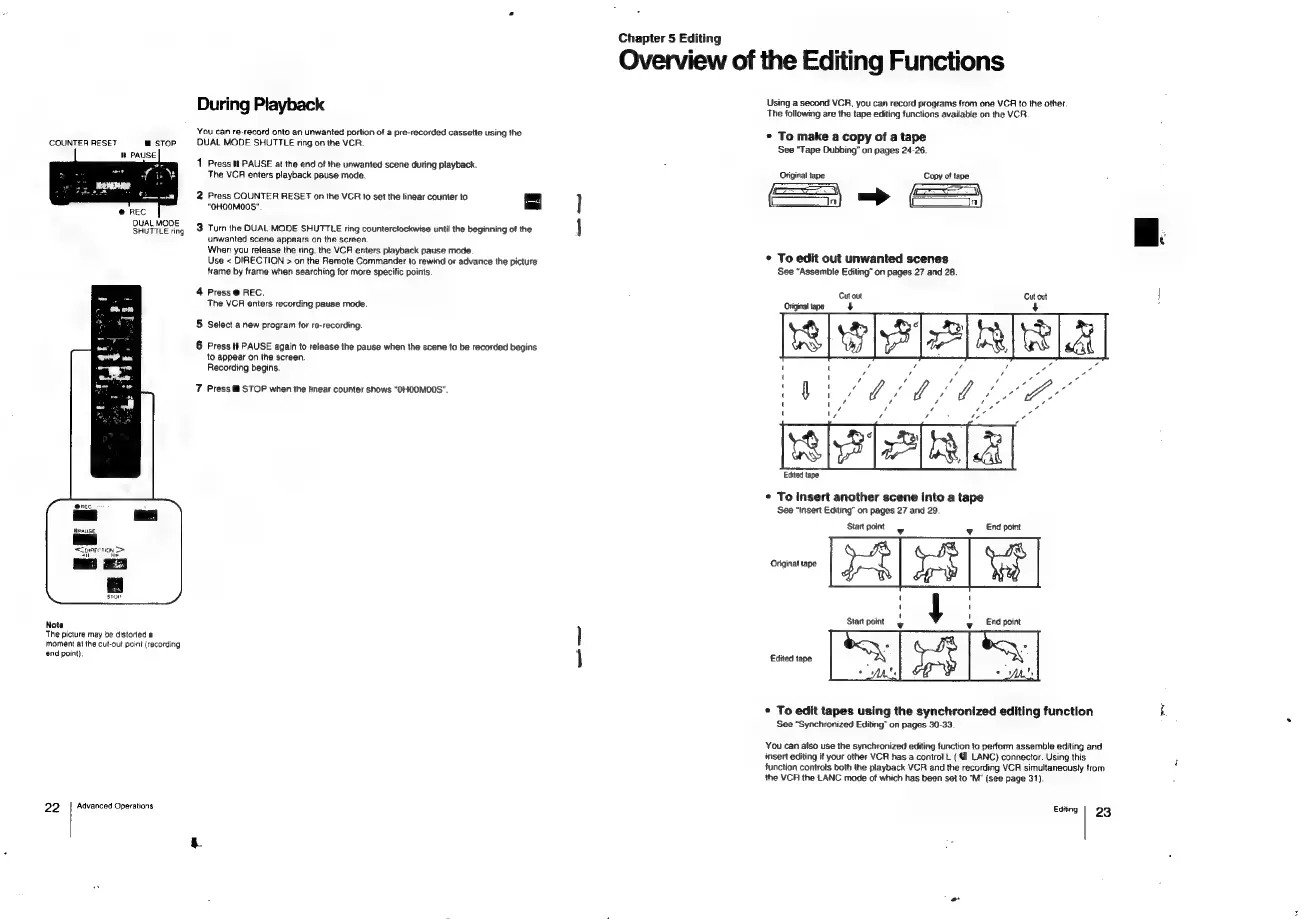
Using
a
second
VCR,
you
can
record
programs
from
one
VCR
to
the
other.
The
following
are
the
tape
editing
functions
available
on
the
VCR.
*
To
make
a
copy
of
a
tape
See
“Tape
Dubbing”
on
pages
24-26.
Original
tape
Copy
of
tape
—Ss
*
To
edit
out
unwanted
scenes
See
“Assemble
Editing”
on
pages
27
and
28.
Cut
out
Cutout
!
Original
tape}
4
:
~
\
Edited
tape
*
To
insert
another
scene
into
a
tape
See
“Insert
Editing”
on
pages
27
and
29.
Start
point
.
wy
End
point
Original
tape
J
Start
point
y
_EAd
point
Edited
tape
*
To
edit
tapes
using
the
synchronized
editing
function
if
See
“Synchronized
Editing”
on
pages
30-33.
You
can
also
use
the
synchronized
editing
function
to
perform
assemble
editing
and
insert
editing
if
your
other
VCR
has
a
control
L
( @
LANC)
connector.
Using
this
function
controls
both
the
playback
VCR
and
the
recording
VCR
simultaneously
from
the
VCR
the
LANC
mode
of
which
has
been
set
to
“M"
(see
page
31).
Editing
23

Related product manuals