EasyManua.ls Logo

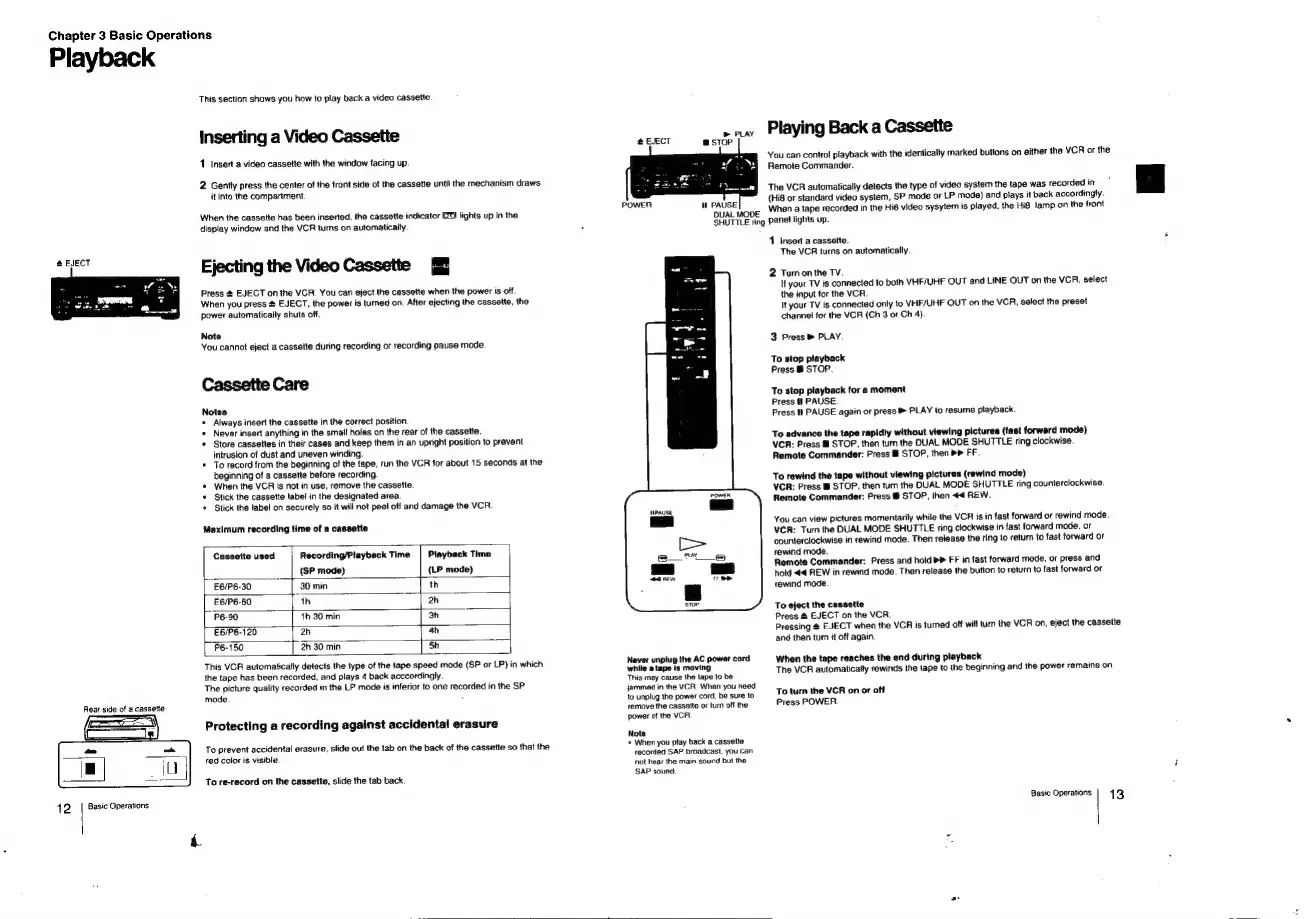
Sony EV-C100 - Chapter 3 Basic Operations; Inserting a Video Cassette; Ejecting the Video Cassette; Cassette Care

Sony EV-C100
28 pages
Print Icon
To Next Page IconTo Next Page
To Previous Page IconTo Previous Page
Loading...
Chapter
3
Basic
Operations
Playback
12
Rear
side
of
a
cassette
Basic
Operations
This
saction
shows
you
how
to
play
back
a
video
cassette
Inserting
a
Video
Cassette
1
Insert
a
video
cassette
with
the
window
facing
up.
2
Gently
press
the
center
of
the
front
side
of
the
cassette
until
the
mechanism
draws
it
into
the
compartment
When
the
cassette
has
been
inserted,
the
cassette
indicator
display
window
and
the
VCR
turns
on
automatically.
lights
up
in
the
Ejecting
the
Video
Cassette
Press
4
EJECT
on
the
VCR.
You
can
eject
the
cassette
when
the
power
is
off.
When
you
press
#
EJECT,
the
power
is
turned
on.
After
ejecting
the
cassette,
the
power
automatically
shuts
off.
Note
You
cannot
eject
a
cassette
during
recording
or
recording
pause
mode.
Cassette
Care
Notes
*
Always
insert
the
cassette
in
the
correct
position
*
Never
insert
anything
in
the
smail
holes
on
the
rear
of
the
cassette.
*
Store
cassettes
in
their
cases
and
keep
them
in
an
upright
position
to
prevent
intrusion
of
dust
and
uneven
winding.
*
To
record
from
the
beginning
of
the
tape,
run
the
VCR
for
about
15
seconds
at
the
beginning
of
a
cassette
before
recording
«
When
the
VCR
is
not
in
use,
remove
the
cassette.
*
Stick
the
cassette
label
in
the
designated
area.
*
Stick
the
label
on
securely
so
it
will
not
peel
off
and
damage
the
VCR
Maximum
recording
time
of
a
cassette
Cassette
used
Recording/Playback
Time
Piayback
Time
(SP
mode)
(LP
mode)
[E6630
|
30min
1h
E6/P6-60
lth
oe
lpehe
|
P6-90
Th
30
min
3h
E6/P6-120
2h
|
4h
P6-150
3h
30
min
3h
This
VCR
automatically
detects
the
type
of
the
tape
speed
mode
(SP
or
LP)
in
which
the
tape
has
been
recorded,
and
plays
it
back
acccordingly.
The
picture
quality
recorded
in
the
LP
mode
is
inferior
to
one
recorded
in
the
SP
mode
:
Protecting
a
recording
against
accidental
erasure
To
prevent
accidental
erasure,
slide
out
the tab
on
the
back
of
the
cassette
so
that
the
red
color
is
visible.
To
re-record
on
the
cassette,
slide
the tab
back.
@
EJECT
QUAL
MODE
SHUTTLE
ring
Never
unplug
the
AC
power
cord
while
»
tape
is
moving
This
may
cause
the
tape
to
be
jammed
in
the
VCR.
When
you
need
to
unplug
the
power
cord,
be
sure
to
remove
the
cassette
or
turn
off
the
power
of
the
VCR.
Note
*
When
you
play
back
a
cassette
recorded
SAP
broadcast,
you
can
not
hear
the
main
sound
but
the
SAP
sound.
Playing
Back
a
Cassette
You
can
control
playback
with
the
identically
marked
buttons
on
either
the
VCR
or
the
Remote
Commander.
The
VCR
automatically
detects
the
type
of
video
system
the
tape
was
recordedin
'
w@
(Hi8
or
standard
video
system,
SP
mode
or
LP
mode)
and
plays
it
back
accordingly.
When
a
tape
recorded
in
the
Hi8
video
sysytem
is
played,
the
Hig
tamp
on
the
front
panel
lights
up.
1
Insert
a
cassette.
The
VCR
turns
on
automatically.
2
Turn
on
the
TV.
If
your
TV
is
connected
to
both
VHF/UHF
OUT
and
LINE
OUT
on
the
VCR,
select
the
input
for
the
VCR.
It
your
TV
is
connected
only
to
VHF/UHF
OUT
on
the
VCR,
select
the
preset
channet
for
the
VCR
(Ch
3
or
Ch
4).
3
Press
®
PLAY.
To
stop
playback
Press
@
STOP.
To
stop
playback
for
a
moment
Press
tt
PAUSE.
Press
It
PAUSE
again
or
press
®
PLAY
to
resume
playback.
To
advance
the
tape
rapidly
without
viewing
pictures
(fast
forward
mode)
VCR:
Press
@
STOP,
then
tum
the
DUAL
MODE
SHUTTLE
ring
clockwise.
Remote
Commander:
Press
@
STOP,
then
bP
FF.
To
rewind
the
tape
without
viewing
pictures
(rewind
mode)
VCR:
Press
@
STOP,
then
tum
the
DUAL
MODE
SHUTTLE
ring
counterclockwise.
Remote
Commander:
Press
B
STOP,
then
44
REW.
You
can
view
pictures
momentarily
while
the
VCR
is
in
fast
forward
or
rewind
mode.
VCR:
Turn
the
DUAL
MODE
SHUTTLE
ring
clockwise
in
fast
forward
mode,
or
counterclockwise
in
rewind
mode.
Then
release
the
ring
to
return
to
fast
forward
or
rewind
mode.
Remote
Commander:
Press
and
hold
®»
FF
in
fast
forward
mode,
or
press
and
hold
<4
REW
in
rewind
mode.
Then
release
the
button
to
return
to
fast
forward
or
rewind
mode.
To
eject
the
cassette
Press
&
EJECT
on
the
VCR.
Pressing
@
EJECT
when
the
VCR
is
tumed
off
will
turn
the
VCR
on,
eject
the
casselte
and
then
turn
it
off
again.
When
the
tape
reaches
the
end
during
playback
The
VCR
automatically
rewinds
the
tape
to
the
beginning
and
the
power
remains
on.
To
turn
the
VCR
on
or
off
Press
POWER.
Basic
Operations
13

Related product manuals