EasyManua.ls Logo

Sony EV-C100 - Chapter 2: Preparation & Setup; Hookups and Getting Started

Sony EV-C100
28 pages
Print Icon
To Next Page IconTo Next Page
To Previous Page IconTo Previous Page
Loading...
Chapter
2
Preparation
Hookups
and
Getting
Started
Before
you
can use
your
VCR
for
the
first
time,
you
need
to
connect
it
to
your
TV
and
set
it
up
to
play
back
video
programs
for
viewing.
This
section
explains
how
to
hook
up, set up,
and
operate
your
VCR
so
that
you
can
start
enjoying
it
right
away.
There
are,
however,
many
types
of
TVs
available
and
many
different
ways
in
which
your
TV
can
be
hooked
up.
As
a
result,
this
manual
describes
several
ways
your
VCR
can
be
connected
Use
the
following
table
to
select
the
correct
hookup
for
your
TV
When
See
Your
TV
has
audio/video
(A/V)
inputs
Your
TV
doesn't
have
audio/video
(A/V)
inputs
Hookup
2
Antenna
Hookup
(page
8)
You
have
a
cable
TV
Hookup
3
Cable
Hookup
(page
10)
After
you've
completed
the
connections,
follow
the
instructions
for
setup.
(During
setup,
if
you
need
more
details
of
the
procedures
described,
page
numbers
are
provided
where
you
can
find
complete,
step-by-step
instructions.
}
After
you've
completed
the
setup,
you're
ready
to
use
your
VCA.
Follow
the
instructions
provided
in
“To
Watch
TV” and
“To
Watch
the
VCR."
tor
your
specific
hookup.
(Again,
if
you
need
step-by-step
instructions,
page
numbers
are
provided
where
you
can
find
these
instructions.)
Before
making
connections,
check
the
following
points:
*
Turn
oft
the
power
to
the
VCR
and
TV.
«
Do
not
connect
the
AC
power
cord
until
all
of
the
connections
are
completed.
Caution
Connections
between
the
VHF/UHF
OUT
connector
on
the
VCR
and
the
antenna
terminals
of
a
TV
receiver
should
be
made
only
as
shown
in
the
instructions.
Failure
to
do
so
may
result
in
operation
that
violates
the
regulations
of
the
Federal
Communications
Commission
regarding
the
use
and
operation
of
RF
devices.
Never
connect
the
output
of
the
recorder
to
an
antenna
or
make
simultaneous
(parallel)
antenna
and
recorder
connections
at
the
antenna
terminals
of
your
receiver.
NOTE
TO
CATV
SYSTEM
INSTALLER
IN
THE
U.S.A.
This
reminder
is
provided
to
call
the
cable
TV
system
instaiier's
attention
to
Article
820-40
of
the
NEC
that
provides
guidelines
for
proper
grounding
and,
in
particular,
specifies
that
the
cable
ground
shall
be
connected
to
the
grounding
system
of
the
>
Jen
wall
culled
building,
as
close
to
the
point
of
cable
entry
as
practical
*
Make
connections
firmly,
Loose
connections
may
Caution
cause
picture
distortion.
Do
not
place
the
VCR
near
a
TV.
The
playback
*
Sf
your
TV
doesn't
match
any
of
the
examples
provided,
picture
may
become
distorted
consult
your
nearest
Sony
dealer
or
qualified
fechnician
6
Preparation
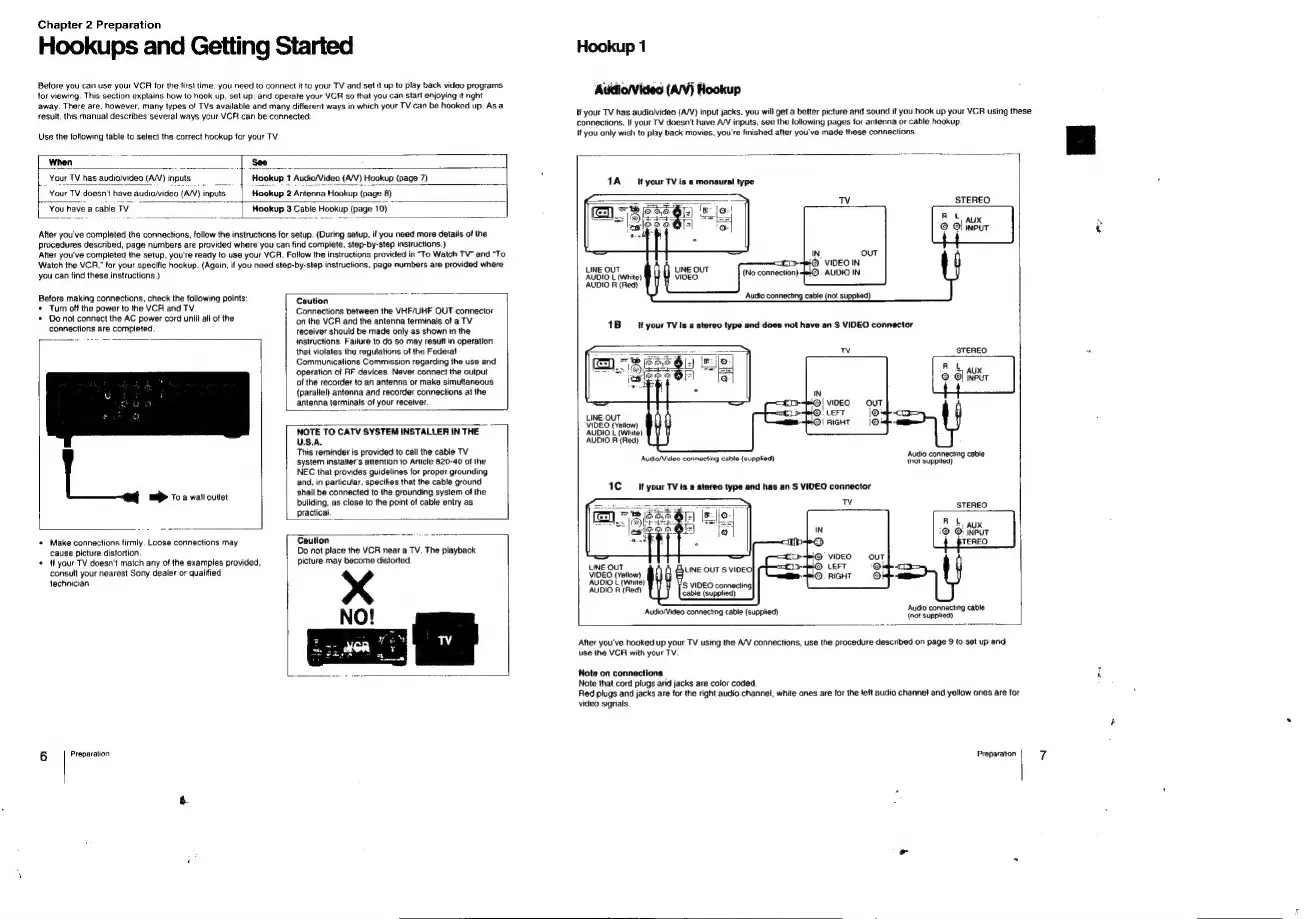
Hookup
1
storviews
(Ari
If
your
TV
has
audio/video
(A/V)
input
jacks.
you
will
get
a
better
picture
and
sound
it
you
hook
up
your
VCR
using
these
connections.
If
your
TV
doesn't
have
A/V
inputs,
see
the
following
pages
for
antenna
or
cable
hookup.
If
you
only
wish
to
play
back
movies,
you're
finished
after
you've
made
these
connections
erie
|
1A
_
If
your
TV
is
a
monaural
type
STEREO
Rt
AUX
©
Ol
input
>O
VIDEO
IN
UNE
OUT
(No
connection).
AUDIO
IN
AUDIO
L
(White)
AUDIO
R
{Red}
1B
if
your
TV
is
a
stereo
type
and
does
not
have
an
S
VIDEO
connector
STEREO
RL
~)
AUX
©
©
ineut
AUDIO
R
(Red)
Audio
connecting
cable
Audio/Video
connecting
cable
(supplied)
(not
supplied)
1C
your
TV
ts
a
stereo
type
and
has
an
S
VIDEO
connector
STEREO
RL
7:
AUX
1@
©:
INPUT
UNE
OUT
VIDEO
(Yellow)
AUDIO
{
(White)
AUDIO
F
(Red)
Audio/Video
connecting
cable
(supplied)
(not
suapheay
cable
After
you've
hooked
up
your
TV
using
the
A/V
connections,
use
the
procedure
described
on
page
9
to
set
up
and
use
the
VCR
with
your
TV.
Note
on
connections
Note
that
cord
plugs
and
jacks
are
color
coded.
Ried
plugs
and
jacks
are
for
the
right
audio
channel,
white
ones
are
for
the
left
audio
channel
and
yellow
ones
are
for
video
signals.
Preparation
7

Related product manuals