EasyManua.ls Logo

Sony EV-C100 - Hookup 2

Sony EV-C100
28 pages
Print Icon
To Next Page IconTo Next Page
To Previous Page IconTo Previous Page
Loading...
Hookup
2
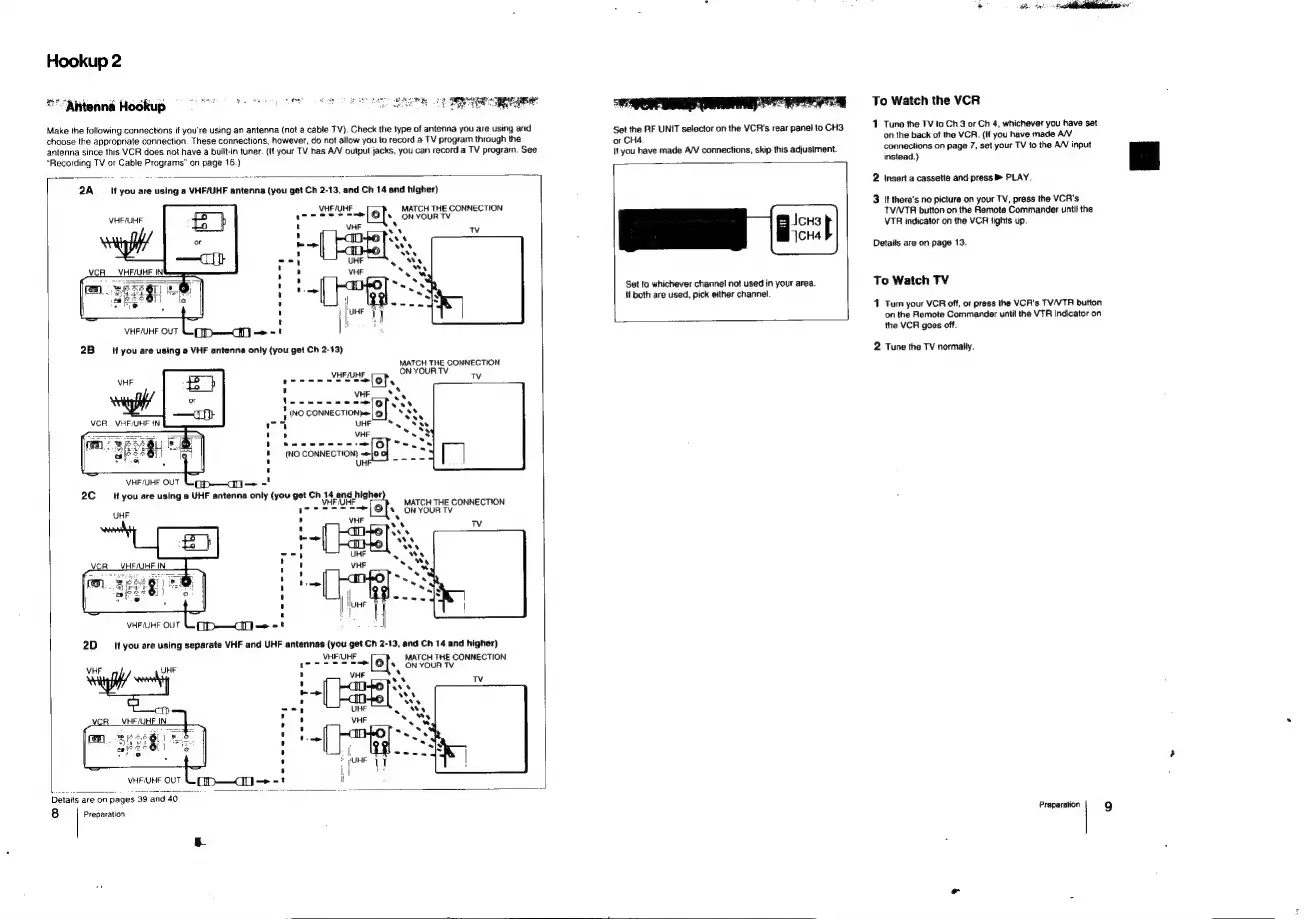
*""Antenna
Hookup
Make
the
following
connections
if
you're
using
an
antenna
(not
a
cable
TV).
Check
the
type
of
antenna
you
are
using
and
choose
the
appropriate
connection.
These
connections,
however,
do
not
allow
you
to
record
a
TV
program
through
the
antenna
since
this
VCR
does
not
have
a
built-in
tuner.
(If
your
TV
has
A/V
output
jacks,
you
can
record
a
TV
program.
See
"Recording
TV
or
Cable
Programs”
on
page
16.)
~
VHEMUHF
eee
7
2B
sf
you
are
using
a
VHF
antenna
only
(you
get
Ch
2-13)
VHF/UHF
OUT
VHF/UHF
OUT
VHF
a a
7
2A
If
you
are
using
a
VHF/UHF
antenna
(you
get
Ch
2-13,
and
Ch
14
and
higher)
[ots
ON
YOUR
TV
[
KBeTs
avs
eRe
MATCH
THE
CONNECTION
MATCH
THE
CONNECTION
ON
YOUR
TV
VHF/UHF,
oe
fof
<
Tv
VHF
Sy
wee
ne
elope,
!
1
(NO
CONNECTION
o|*
Shy
“A
UHF
OSS
,
VHF
Poss
ns
ro)
ir
nes
(NO
CONNECTION)
==}
=
|
UHI
one
VHF/UHF
QUT
2C
you
are
using
@
UHF
antenna
only
(you
get
Ch
14
and
higher)
:
.
ype
ee
ke
MATCH
THE
CONNECTION
UH
1
SE
s|
oN
Your
Tv
VHF
Re
a
2D
if
you
are
using
separate
VHF
and
UHF
antennas
(you
get
Ch
2-13,
and
Ch
14
and
higher)
Tv
VHF/UHF
MATCH
THE
CONNECTION
Pe
Lag
rd
VHF
UH
'
lofts,
ON
YOUR
TV
VHE
ws
ase
ats
ats
cm
UHF
AN
VHE/UHE
IN
VHF
Par
:
.
Details
are
on
pages
39
and
40.
8
Preparation
Set
the
RF
UNIT
selector
on
the
VCR's
rear
panel
to
CH3
or
CH4.
If
you
have
made
A/V
connections,
skip
this
adjustment.
Bei
|
Set
to
whichever
channel
not
used
in
your
area.
lf
both
are
used,
pick
either
channel.
To
Watch
the
VCR
1
Tune
the
TV
ta
Ch
3
or
Ch
4,
whichever
you
have
set
on
the
back
of
the
VCR.
(If
you
have
made
A/V
connections
on
page
7,
set
your
TV
to
the
A/V
input
instead.)
2
Insert
a
cassette
and
press
PLAY.
3
It
there's
no
picture
on
your
TV,
press
the
VCR's
TV/VTA button
on
the
Remote
Commander
until
the
VTR
indicator
on
the
VCR
fights
up.
Details
are
on
page
13.
To
Watch
TV
1
Turn
your
VCR
off,
or
press
the
VCR's
TV/VTR
button
on
the
Remote
Commander
until
the
VTR
indicator
on
the
VCR
goes
off.
2
Tune
the
TV
normally.
Preparation
9

Related product manuals